
Social media can feel overwhelming for small businesses. But with a clear checklist, you can simplify the process and stay consistent. Here’s the key takeaway: Plan ahead, focus on your audience, and track your results. This checklist will help you:
- Define your goals using the SMART framework (e.g., increase Instagram followers by 50 per week in 3 months).
- Research your audience beyond demographics – look at interests, values, and behavior.
- Keep your profiles updated with accurate info, consistent branding, and relevant keywords.
- Use a content calendar to organize posts and save time with batch scheduling.
- Create high-quality visuals tailored for each platform using tools like PixelPanda.
- Engage with your followers by responding to comments and creating interactive content.
- Monitor your metrics – track reach, engagement, conversions, and ROI to refine your strategy.
Social media success comes from consistent effort and learning what works for your audience. Start small, stay organized, and let your data guide you.
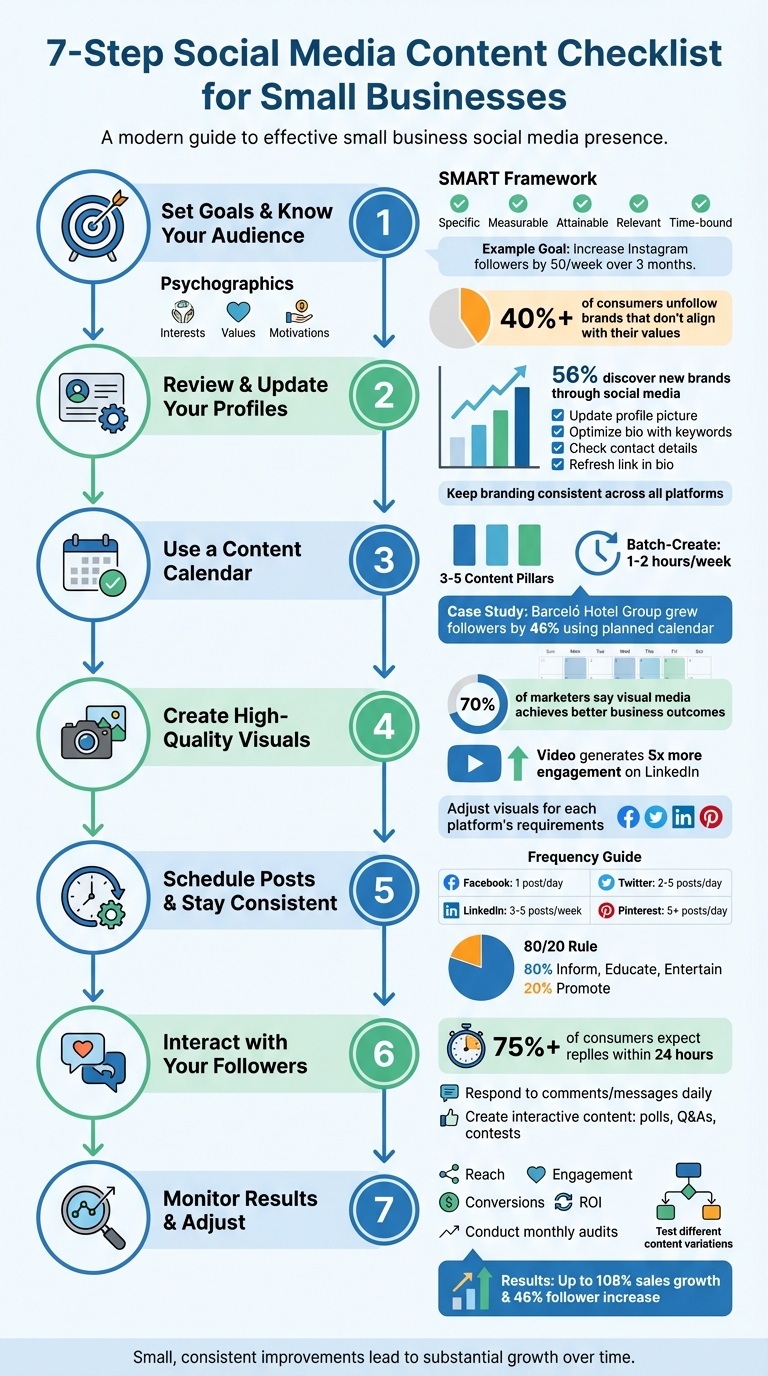
7-Step Social Media Content Checklist for Small Businesses
The Ultimate Social Media Posting Checklist
sbb-itb-76ad1b7
1. Set Your Goals and Know Your Audience
Before diving into social media, take a moment to define your goals and understand your audience. Clear objectives ensure your efforts align with your business priorities – whether that’s reaching new customers, boosting brand visibility, or enhancing customer satisfaction.
Define Measurable Goals
Focus on two or three key goals that align with your current business needs. These might include increasing brand awareness, driving traffic to your website, generating leads, growing revenue through sales or signups, fostering a sense of community, improving engagement, or enhancing customer service experiences. To make these goals actionable, use the SMART framework: Specific, Measurable, Attainable, Relevant, and Time-bound. For instance, instead of saying, "I want more followers", aim for something like, "Increase Instagram followers by 50 per week over the next three months."
Skip vanity metrics like likes or retweets and focus on numbers that demonstrate actual impact, such as leads, referrals, or conversion rates. Take Jugnoo, for example – a ride-hailing service in India. By using Facebook Analytics, they discovered that 90% of their referring users were aged 18 to 34, with 65% on Android devices. Using this insight, they fine-tuned their ad targeting and reduced their referral costs by 40%. Once your goals are set, dive into audience research to ensure your messaging hits the mark.
Research Your Target Audience
Go beyond surface-level demographics and dig into psychographics – things like interests, values, and motivations. This deeper understanding can help you anticipate purchasing decisions. Develop detailed customer personas to guide your strategy. For example, you might create a profile like "Nia, a 24-year-old teacher who values sustainability and shops on Instagram during her commute" to tailor your content to her preferences.
Social listening is another powerful tool. Monitor conversations about your brand, competitors, and industry keywords to uncover pain points and opportunities. Comments on your posts – or even your competitors’ – can reveal challenges your audience faces.
Social media consultant Jade Beason suggests: "Identify your audience’s pain points to craft effective content".
Analytics tools can also provide valuable insights, showing you where your audience is located, what languages they speak, and when they’re most active online. Timing your posts to match their activity boosts engagement. Keep in mind that more than 40% of consumers will unfollow brands that don’t align with their values. Understanding what matters to your audience isn’t just helpful – it’s essential for building genuine connections.
2. Review and Update Your Social Media Profiles
Your social media profiles are often the first place potential customers interact with your business. In fact, 56% of people discover new brands or products through social media. That’s why keeping these profiles polished and up-to-date is crucial. A quick monthly check can help you spot outdated details and maintain a professional, reliable presence across all platforms.
Update Profile Information
Start with your profile picture – use a clear, professional logo that represents your brand. Then, take a fresh look at your bio. It should clearly explain what your business does and include relevant keywords. For example: "Handcrafted leather goods for everyday carry – made in Portland, OR since 2019".
Double-check your contact details. Make sure email addresses, phone numbers, and business hours are accurate on every platform. The link in your bio is another key detail – ensure it points to the most relevant page, whether it’s your homepage, a current promotion, or your latest blog post. Don’t forget to update cover photos and headers to reflect ongoing campaigns or seasonal events. If possible, get your accounts verified to protect your brand from impostor profiles.
Keep Your Branding Consistent
Consistency is a trust-builder. Create a brand kit that includes your logo, color palette, and fonts, and use it across all platforms. While each social network might serve a different purpose, your visual style and tone should feel cohesive and recognizable.
"Everything is better when you can speak directly to your target audience in language they use and understand, maybe even saying things they’ve thought before or spoken to friends about." – Hailley Griffis, Head of Communications & Content, Buffer
Pay attention to image sizes for each platform to avoid blurry or awkwardly cropped visuals. Use keywords wisely in your bios to boost searchability. Ultimately, your profiles should make it easy for potential customers to understand your business and connect with you.
3. Use a Content Calendar
A content calendar helps you stay consistent and ensures your posts are aligned with your goals. By planning ahead, you can tie each post to specific business objectives – whether it’s increasing brand awareness or driving leads – instead of posting randomly.
Build Your Content Calendar
Start by defining 3–5 content pillars, like customer success stories, helpful tips, or promotions. Use a color-coded system to keep things balanced and organized. For each entry, include key details: the platform, publication date and time, post copy, relevant links, and any visuals you’ll need.
Here’s a real-world example: From 2024 to 2025, Barceló Hotel Group revamped its social media strategy across more than 250 accounts. By switching from sporadic posting to a well-planned calendar, they grew their follower base by an impressive 46%.
Batch-creating and scheduling your posts for the week can take just 1–2 hours. This method not only saves time by minimizing distractions but also gives you a clear overview of your month. You’ll easily spot content gaps and have everything – visuals, captions, and all – ready before deadlines hit.
Add Seasonal and Trending Content
Incorporate posts tied to holidays, events, or company milestones. Leave some flexibility in your schedule so you can quickly adapt to trends as they emerge.
Stay updated by monitoring TikTok and Instagram Reels daily for trending content. Keep tabs on industry-specific hashtags to spot conversations worth joining.
"If you fail to plan, you plan to fail."
- Kirsti Lang, Senior Content Writer, Buffer
Set up alerts for brand mentions and industry keywords to catch trends as they happen. When something timely pops up, tweak your calendar to join the buzz while it’s still relevant.
With your content calendar in place, the next step is to focus on creating eye-catching visuals that bring your posts to life.
4. Create High-Quality Visuals with PixelPanda
Once your content calendar is ready, it’s time to shift your focus to creating eye-catching visuals. Strong visuals can make or break a post’s success. In fact, 70% of marketers agree that visual media helps achieve better business outcomes, and video content generates five times more engagement on LinkedIn.
Generate AI-Powered Visuals
PixelPanda offers AI tools that make it easy to create professional-grade visuals, from product photos to UGC-style videos and avatar-based photo packs – all without the need for a photographer or designer. For example, you can generate product images with custom backgrounds that match your brand’s aesthetic. The background removal feature is particularly handy, letting you eliminate distractions and highlight your products in the best possible light.
When it comes to video content, PixelPanda’s UGC-style video creation tool helps you craft ads that feel genuine and relatable – perfect for platforms like TikTok. Interestingly, 68% of TikTok users say they remember brands better when videos include songs they enjoy. PixelPanda also allows you to customize visuals with diverse body types, ethnicities, and even multi-language voiceovers in up to 35 languages, ensuring your content resonates across different markets. Once your visuals are ready, it’s important to tailor them for specific social media platforms.
Adjust Visuals for Each Platform
A one-size-fits-all approach won’t work when it comes to social media. What grabs attention on Instagram might fall flat on LinkedIn or TikTok. To maximize engagement, adapt your PixelPanda visuals to each platform’s unique style and audience preferences.
For Instagram, carousel posts featuring multiple product angles are a smart choice. The algorithm often shows different images to users who didn’t engage with the first one. On Facebook, design event banners with clear, compelling calls-to-action. For TikTok, focus on short, authentic videos that feel more natural than overly polished ads.
Don’t overlook technical details like aspect ratios and dimensions to avoid cropping or distortion. Adding text overlays with key headlines or information can help your visuals stand out, while alt-text descriptions make your content accessible to visually impaired users and cater to those watching videos without sound. These small adjustments can make a big difference in how your audience interacts with your content.
5. Schedule Posts and Stay Consistent
Creating visually appealing content is only half the battle – you also need to ensure it shows up consistently in your audience’s feeds. Using scheduling tools can help you plan and automate your posts, keeping your social media accounts active even when you’re occupied with other business tasks. Platforms like Hootsuite and Zoho Social allow for bulk scheduling, making it easier to stay on top of your posting game.
Automate with Scheduling Tools
One of the smartest strategies is to batch-create your content. Dedicate time each week – say, Friday afternoons – to craft and schedule your posts. This ensures your content goes live at optimal times, even if you’re busy or traveling . Modern scheduling tools now use AI-driven heat maps to identify when your audience is most active, rather than relying on generic timing recommendations. For example, if your Instagram followers are most engaged at 8 PM on weekdays, these tools can automatically schedule posts to go live at that time.
Different platforms thrive on different posting frequencies. Facebook tends to perform well with about one post per day, while Twitter demands two to five posts daily. LinkedIn is more low-key, requiring just three to five posts per week, whereas Pinterest benefits from five or more daily posts to keep your content circulating . Tools like PixelPanda can help streamline this process, allowing you to manage all these schedules from one place. Once your posts are automated, you can focus on diversifying your content to keep your audience engaged.
Vary Your Content Types
Consistency doesn’t mean repeating the same type of content over and over. To keep your audience interested, mix things up. A good approach is the 80/20 rule: dedicate 80% of your posts to informing, educating, or entertaining your audience, and reserve the remaining 20% for promoting your products or services. Rotate between product showcases, behind-the-scenes glimpses, customer testimonials, industry tips, and interactive features like polls.
Don’t be afraid to recycle content that performed well in the past. For instance, if a post highlighting your product’s unique features got great engagement a few months ago, you could reshare it with updated visuals or a new caption. You can also introduce theme days – like “Product Tips Tuesday” or “Customer Spotlight Friday” – to simplify your planning and give your audience something to look forward to. This variety not only keeps your feed fresh but also helps fill your schedule without requiring extra effort.
6. Interact with Your Followers
Engaging with your audience on social media is about more than just posting content – it’s about building a relationship. And that starts with responding to your followers. In fact, over 75% of consumers expect brands to reply to them on social media within 24 hours.
Mitra Mehvar, Social Media Manager at Buffer, explains it perfectly: "Ignoring customers on social media is similar to ignoring the phone ringing when they call your help centers."
Reply to Comments and Messages
Make it a habit to check your notifications daily so you can respond quickly. Set up alerts not just for your exact brand name but also for common misspellings or variations. Sometimes, people mention your products without tagging you – jumping into those conversations can make a big impact.
When it comes to negative feedback, handle it with professionalism. Acknowledge the issue publicly, but then move the discussion to private messages to resolve it. A great example of this approach is the Barceló Hotel Group, which streamlined its social media strategy across more than 250 accounts. This effort led to a 46% increase in new followers. The key? Be prompt, clear, and genuine in your responses.
Create Interactive Content
One way to keep your followers engaged is by creating content that invites interaction. Ask questions, run emoji-based polls, or host Q&A sessions where you address common questions about your products or industry.
You can also try contests or giveaways to encourage immediate participation and reward your loyal audience. If someone shares a photo featuring your product, repost it on your feed – but don’t forget to tag and credit the original poster. After putting these strategies into action, take time to review your results and fine-tune your approach for even better engagement.
7. Monitor Results and Adjust Your Approach
Once you’ve established a rhythm with consistent posting and engagement, it’s time to evaluate how well your efforts are paying off. Metrics are your feedback loop – they tell you what’s working and what needs tweaking.
Review Your Metrics
Focus on metrics that align with your specific goals. For example, if your priority is driving website traffic, click-through rates matter more than Instagram likes. On the other hand, if your goal is to boost brand awareness, keeping an eye on impressions and reach will help you understand how many people are seeing your content.
Consider tracking these five core metrics: reach, engagement, conversions, customer care, and ROI. Trying to measure everything can be overwhelming, so stick to the numbers that directly tie back to your business objectives.
Instagram has made tracking a bit simpler by introducing "Views" as the primary metric across all content formats. This replaces the previously confusing mix of "plays" and "impressions", making it easier to compare Reels, Stories, and feed posts.
To spot patterns, conduct monthly audits and log key figures in a spreadsheet. Track follower growth, website referral traffic, and the posts that perform best in terms of impressions and engagement. This "highlight reel" of top-performing content can guide your future strategy, allowing you to replicate what already works.
Armed with this data, you can start experimenting to refine and improve your content strategy.
Test Different Content Variations
Testing is an essential part of fine-tuning your approach. Experiment with different captions, visuals, or formats to see what resonates most with your audience. For instance, tools like PixelPanda can help you create alternate visuals to compare engagement levels.
While captions around 150 characters often drive more clicks, your audience might respond differently. Test shorter or longer captions and analyze the results to see what works best. If you notice that video content consistently outperforms images, consider shifting your focus to short-form video.
Conclusion
This checklist covers everything you need, from setting clear goals to connecting with your audience effectively. By following a structured approach, social media management becomes far less daunting. Breaking tasks into daily, weekly, and monthly actions ensures nothing slips through the cracks, while maintaining the consistency needed to grow a loyal community.
Small businesses that have embraced these strategies have seen impressive results – some reporting sales growth of up to 108% and follower increases by 46%. Tools like PixelPanda make visual content creation easier, enabling you to design professional-quality images and videos without requiring advanced design skills or costly equipment.
Your social media strategy should be adaptable, evolving alongside your business. Regular reviews allow you to identify what’s working and adjust as platform algorithms change. This ongoing refinement ensures that every post serves a purpose, aligning with your broader business goals instead of just adding to the noise.
It’s also worth noting that over 75% of consumers expect businesses to respond to inquiries within 24 hours. So, don’t just focus on broadcasting messages – make time for meaningful engagement. As Adrian Speyer from the Community Leaders Institute wisely says:
"If you start with the mindset of nurturing or assisting your audience with ways to find one another and connect, you will see the value it brings".
Use the checklist from this guide as your starting point, track your progress, and refine your approach based on your audience’s preferences. Small, consistent improvements lead to substantial growth over time. Let your data shape each update, ensuring your strategy stays aligned with your business goals.
FAQs
How can small businesses use the SMART framework to set effective social media goals?
Small businesses can establish clear, actionable social media goals using the SMART framework: Specific, Measurable, Achievable, Relevant, and Time-bound. Instead of vague objectives like "grow Instagram followers", aim for something concrete, such as "increase Instagram followers by 15%." Make the goal measurable by tracking metrics like follower growth, engagement rates, or website clicks. Ensure it’s realistic by basing targets on past performance and available resources. Align the goal with your business priorities – if your focus is driving in-store visits, connect it to an outcome like "redeem 30 Facebook coupons per month." Lastly, set a deadline, such as "by December 31, 2026", to stay focused and measure progress effectively.
Here’s how to get started:
- Define your metric: Choose what you’ll measure, like followers, clicks, or sales.
- Set a realistic target: For instance, "gain 1,200 new followers."
- Evaluate feasibility: Consider past results and the tools you have.
- Link the goal to a business outcome: For example, "boost online revenue by $5,000."
- Establish a timeline: Set a clear deadline, like "by the end of Q3 2026."
By outlining these steps, you can monitor progress, celebrate achievements, and refine your strategy as needed. This approach turns social media into a reliable driver for business growth.
What are some practical tips for creating engaging social media content for small businesses?
Creating engaging social media content starts with thoughtful preparation. Begin by using a content calendar to map out what you’ll post and when. This not only keeps you organized but ensures your content aligns with your goals. To save time and keep your branding consistent, batch-create visuals using tools like Canva. Additionally, scheduling posts ahead of time with platforms like Hootsuite can help you maintain a steady posting schedule without the daily scramble.
Variety is essential to keep your audience interested. Incorporate different formats such as photos, short videos, infographics, carousel posts, and Stories. This keeps your feed dynamic and caters to diverse audience preferences. Encourage interaction by asking open-ended questions, running polls or quizzes, or promoting user-generated content through photo contests or hashtag challenges.
To increase your reach, make use of relevant hashtags and stay active by responding quickly to comments and messages. This two-way interaction builds a sense of community. High-quality visuals, clear calls to action, and a genuine, relatable presence can turn casual scrollers into loyal and engaged followers.
How can I evaluate if my social media strategy is working?
To gauge how effective your social media strategy is, keep an eye on key performance indicators (KPIs) that match your objectives. These could include metrics like reach, impressions, engagement rates (such as likes, comments, and shares), follower growth, click-through rates, and conversion rates.
Measure these numbers against your SMART goals – those that are Specific, Measurable, Achievable, Relevant, and Time-bound. Analytics tools can help you calculate your social media ROI and pinpoint areas that need improvement. By consistently reviewing these metrics, you’ll be able to fine-tune your strategy and build stronger connections with your audience.