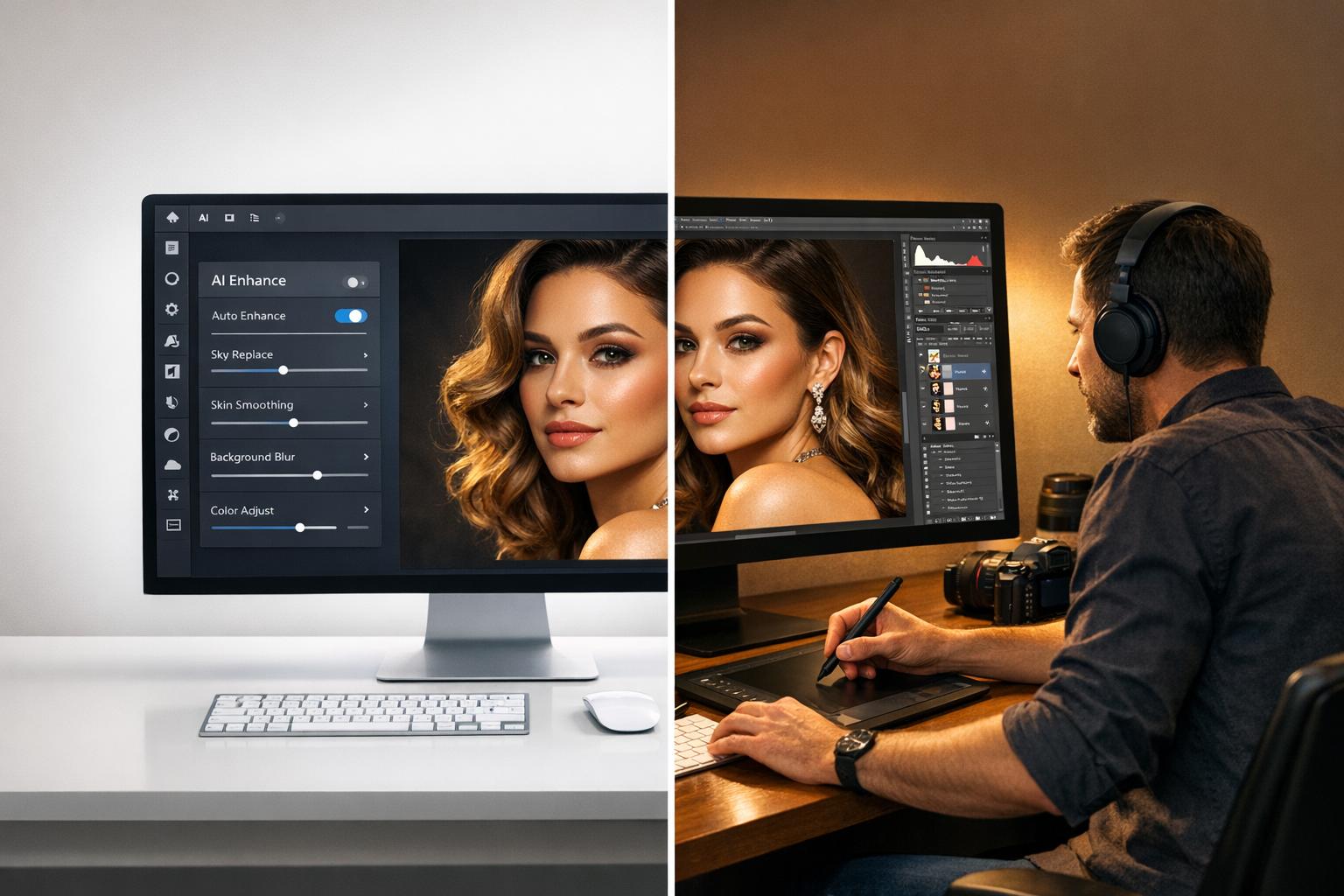
AI photo editing saves time and cuts costs, while manual editing ensures precision for high-end projects. Here’s the breakdown:
- Speed: AI completes tasks in seconds, ideal for large batches (e.g., 1,000 images in an hour). Manual editing takes longer but allows detailed adjustments.
- Cost: AI tools for photo editing reduce costs by up to 90%, with subscriptions as low as $8.33/month. Manual editing involves higher labor and equipment expenses.
- Quality: AI delivers consistent results for repetitive tasks like background removal. Manual editing excels in areas requiring artistic judgment, such as luxury branding or intricate textures.
- Best Use Cases: AI works well for e-commerce catalogs and marketplace compliance. Manual editing is better for premium campaigns, hero shots, and products with complex details.
Quick Comparison
| Feature | AI Editing | Manual Editing |
|---|---|---|
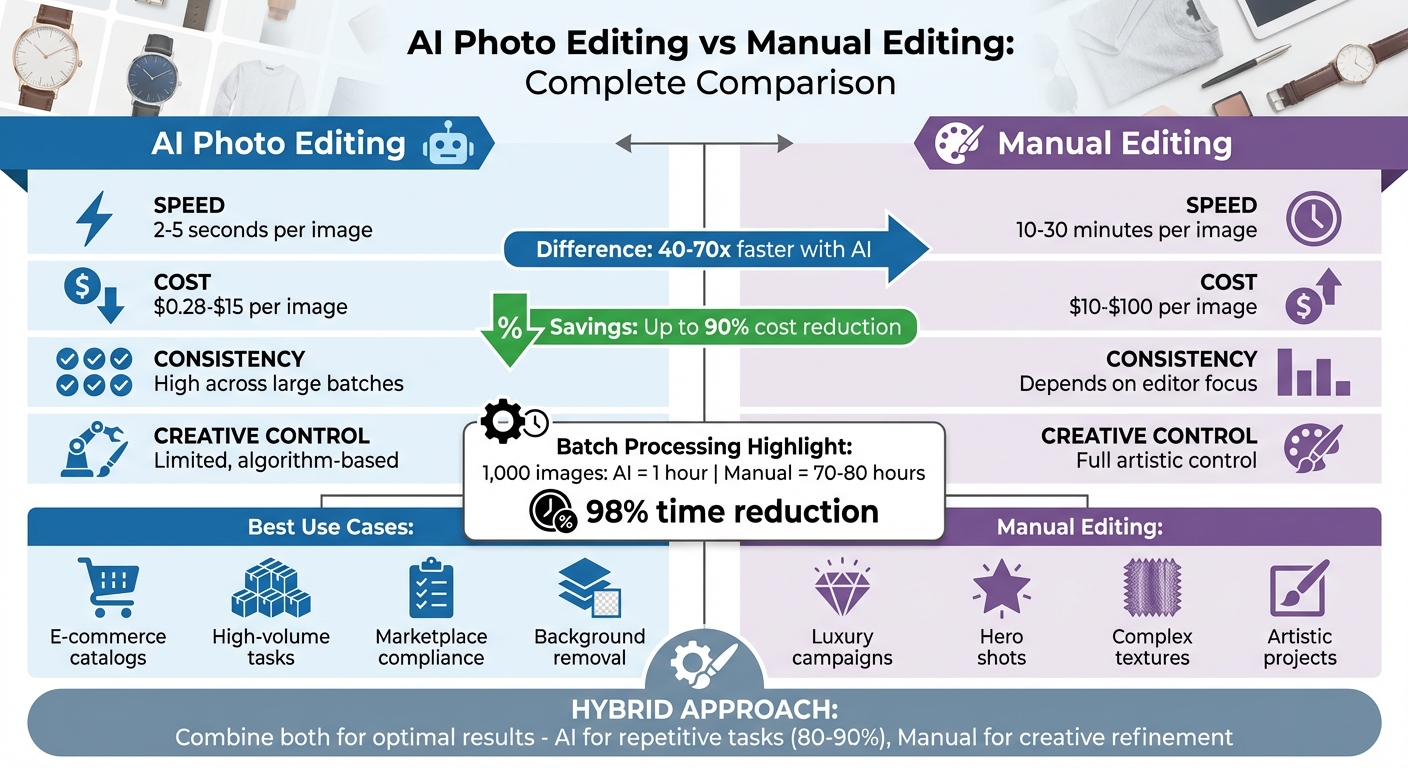
| Speed | 2–5 seconds per image | 10–30 minutes per image |
| Cost | $0.28–$15 per image | $10–$100 per image |
| Consistency | High across large batches | Depends on editor’s focus |
| Creative Control | Limited, relies on algorithms | Full, allows for detailed choices |
| Best For | High-volume, repetitive tasks | Luxury, intricate, or artistic work |
Takeaway: Combine both methods for efficiency and quality – let AI handle repetitive tasks, and use manual editing for refining key visuals.
AI vs Manual Photo Editing: Speed, Cost and Quality Comparison
AI Photo Editing vs. Manual Edits – Which is better? (Real Workflow test)
sbb-itb-76ad1b7
Speed and Efficiency Comparison
When it comes to speed, AI-powered editing tools are in a league of their own. Take background removal as an example: AI tools can handle this task in just 2–5 seconds per image. Compare that to manual methods, which typically require 10–30 minutes per image – a staggering 40–70 times faster. For e-commerce businesses juggling hundreds or thousands of photos, this time savings is monumental, especially when processing large batches.
The efficiency gap widens even further with batch operations. Cropping and resizing 1,000 images manually might take 70–80 hours of work. With AI automation, that same job can be completed in about an hour – cutting the time needed by roughly 98%. Portrait photographer Ernesto put AI retouching to the test against his manual workflow. He noted, "Both portraits looked good, but the AI version took a fraction of the time". For him, manually retouching 40 portraits took over 5 hours, while AI finished the same batch in under 7 minutes.
Task Completion Time Breakdown
| Task | Manual Method | AI Method | Efficiency Difference |
|---|---|---|---|
| Background Removal | 10–30 minutes/image | 2–5 seconds/image | 40–70x faster |
| Portrait Retouching | 10–20 minutes/image | 5–10 seconds/image | ~120x faster |
| Batch Processing (1,000 images) | 70–80 hours | ~1 hour | 98% time reduction |
| Cropping & Resizing | 5–8 minutes/image | Seconds (automated) | Up to 70x faster |
Another factor to consider is the learning curve. Traditional software like Photoshop can demand over 100 hours of training to reach a professional level. In contrast, AI editing tools are designed for ease of use, allowing users to produce results within minutes of starting, making it easier than ever to improve image quality online.
Automation and Batch Processing
AI doesn’t just accelerate individual tasks – it transforms entire workflows. Batch processing with AI applies preset edits across multiple images instantly, eliminating repetitive manual steps. Once you set parameters like white backgrounds, dimensions, or color corrections, the system applies them automatically to your entire catalog.
This feature is especially critical for industries like fast fashion, where brands launch anywhere from 1,000 to 4,500 new products monthly. With 4–7 images required per SKU, teams face tight deadlines. Some AI tools can process over 100,000 images daily with a 95% success rate. PixelPanda, for example, uses an API-based system that delivers processing times under 5 seconds per image. What used to take 2–3 days of manual effort can now be done in about an hour, freeing your team to focus on creative strategies rather than repetitive tasks.
Quality and Precision Analysis
When it comes to maintaining your brand’s impeccable visual standards, quality is just as important as speed. Both AI and manual editing have their own strengths, and knowing when to use each can help you optimize your workflow.
AI Editing Advantages
AI image editing isn’t just about speed – it also delivers consistent, high-quality results. When you’re handling thousands of product images, AI ensures uniformity across the board, eliminating the risk of fatigue or human error.
One area where AI shines is edge detection. Advanced AI tools can handle intricate details like hair, fur, and textured surfaces with remarkable precision, completing tasks in seconds that would take a human editor anywhere from 10 to 30 minutes. For instance, PixelPanda’s background removal tool can create clean cutouts in under five seconds per image.
AI also excels at routine tasks. Whether it’s removing blemishes or reducing shine, AI delivers consistent results in a fraction of the time – what might take 15 to 45 minutes manually is done in mere seconds.
Manual Editing Advantages
On the other hand, manual editing brings a level of artistic judgment that AI simply can’t replicate. Take portrait photographer Ernesto, for example, who explained his deliberate choices in retouching:
"I’m leaving the under-eye line because it makes it look human. If I remove everything, it looks fake."
This kind of decision-making preserves authenticity and requires a human touch.
For high-end retouching, manual editing remains unmatched. Complex tasks like creating ghost mannequins (the "floating garment" effect), intricate body sculpting, and precise makeup enhancements demand human expertise. These tasks require creative control and pixel-perfect adjustments, which AI struggles to deliver. For luxury e-commerce, magazine covers, and editorial campaigns, manual editing is still the gold standard.
AI can also falter in areas requiring extreme precision. For example, AI masks sometimes "bleed" into unintended areas, affecting teeth, hair, or beards when only skin tones need adjustment. In fields like medical, legal, or scientific photography, where accuracy is critical, manual tools provide the reliability AI can’t guarantee.
Feature Comparison Table
| Feature | AI Capability | Manual Capability | E-commerce/Content Example |
|---|---|---|---|
| Background Removal | 2–5 seconds; excellent edge detection for hair/fur | 10–30 minutes; requires detailed masking | High-volume product catalogs |
| Skin Retouching | Instant; consistent blemish and shine removal across batches | 15–45 minutes; allows for subtle, natural-looking results | Premium beauty ads |
| Consistency | Uniform results across all images in a batch | Depends on editor’s focus; prone to fatigue and errors | Social media content feeds |
| Creative Control | Limited; relies on preset algorithms or prompts | Maximum; every detail can be fine-tuned for artistic vision | Magazine covers and hero imagery |
| Ghost Mannequin | Limited; struggles with replicating garment shapes without a model | High; achieves "floating garment" effects through compositing | Apparel photography for web stores |
Interestingly, a 2025 photography report revealed that 99% of clients were satisfied with AI-assisted results, with only 1% raising concerns about authenticity. For most commercial projects, AI meets professional standards – but knowing when to switch to manual editing can elevate your workflow from good to exceptional.
Next, we’ll dive into the cost and resource considerations to help refine your approach further.
Cost and Resource Requirements
Traditional photography comes with a hefty price tag, often ranging between $2,045 and $2,980 just for equipment. This includes camera bodies ($1,300–$1,600), lighting ($245–$380), and accessories ($500–$1,000). On top of that, ongoing costs like hiring photographers ($500–$3,000 per day), models ($300–$2,000), and studio rentals ($200–$1,000 per session) can quickly add up. A professional fashion shoot alone can cost anywhere from $2,000 to $15,000.
In comparison, AI-powered photography slashes these expenses dramatically. Instead of large upfront investments, AI operates on predictable monthly subscriptions ranging from $8.33 to $299, bringing per-image costs down from $55–$160+ to as little as $0.28–$15. Companies using AI tools report savings of 70% to 90%, with fashion brands seeing an average cost reduction of 87%. For small businesses, the impact is even more striking – 76% report cutting visual content production costs by over 80% after adopting AI tools.
Cost Breakdown
The hidden costs of traditional photography make the gap even wider. Expenses like shipping product samples to studios, coordinating schedules, and dealing with reshoots (which happen 15–20% of the time on average) add significant overhead. Manual retouching, another costly element, ranges from $10 to $100 per image, with revisions costing an additional $50 to $150 each. In contrast, AI tools often include unlimited revisions in their subscription plans. Platforms like PixelPanda can handle tasks like background removal in seconds, a process that might take manual editors 10–30 minutes.
Let’s look at a five-year comparison for a small business processing 100 images per month:
- Free AI tools: $0
- Adobe plans: Around $1,200
- Manual labor: Over $10,000
When you combine these savings with the time efficiencies AI offers, it’s clear why AI is becoming the go-to solution for high-volume e-commerce operations.
Scalability for E-Commerce
AI also shines when it comes to scalability. With traditional photography, costs rise proportionally with the number of products – double the catalog, and you’ll likely double the budget. AI platforms break this pattern by allowing businesses to create hundreds of image variations at nearly the same cost as a small batch. High-volume retailers can process entire catalogs in just one hour, compared to the two to three days required for traditional methods.
Here’s a real-world example: In December 2025, Sarah Chen, founder of a sustainable fashion startup, used AI to create five lifestyle variations for 45 products. A traditional shoot was estimated to cost $35,000–$40,000, but with AI, she completed the project for under $500 in just two days. The result? A 23% increase in conversion rates.
"I knew my product photos weren’t doing justice to the brand… But a lifestyle shoot for 45 products would have cost me USD 35,000-40,000 that I simply didn’t have."
- Sarah Chen, Founder, Sustainable Fashion Brand
For growing e-commerce brands managing thousands of SKUs or launching seasonal campaigns, AI eliminates the logistical headaches of studio scheduling and equipment rentals. Traditional workflows require a full team – photographers, stylists, models, and retouchers – while AI empowers a single designer or marketer to produce professional-quality results. This not only cuts costs but also provides the flexibility to scale content production without hiring more staff or booking lengthy studio sessions.
Combining AI and Manual Editing
Blending AI with manual editing strikes a balance between efficiency and quality. By allowing AI to handle the bulk of repetitive tasks, while leaving creative refinements to human editors, this hybrid approach maximizes both speed and precision. For instance, AI can take care of 80–90% of routine work, freeing up manual editors to focus on the finer details that demand a human touch.
AI for Speed, Manual for Details
AI thrives on repetitive tasks such as batch background removal, exposure adjustments, and surface cleanup. For example, it can process 1,000 images in less than 5 minutes, applying consistent edits like white balance adjustments, background removal, cropping, and cleaning up imperfections – all automatically. Once AI completes these tasks, manual editors step in to handle subjective decisions. This includes selecting the perfect "hero" shot that aligns with the brand’s identity, ensuring colors match specific palettes, and preserving natural textures to avoid an overly polished appearance.
"AI replaces repetition and NOT craft. The constant masking, the zooming in and out… that’s the work photographers are happiest to offload." – Aftershoot
For more complex projects, such as high-end e-commerce composites, a typical workflow might involve manually aligning product assets in Photoshop to ensure precise placement and perspective. AI tools like Generative Fill can then take over, harmonizing lighting, blending shadows, and creating seamless backgrounds. This combination ensures that the final product achieves pixel-perfect accuracy while saving time on labor-intensive tasks.
Use Case: E-Commerce Product Photography
A great example of this hybrid model in action is GoodBuy Gear, a secondhand marketplace that standardized over 42,000 product images using AI-driven workflows. They automated tasks like background removal API integration and image standardization across their catalog, which led to a 23% increase in conversion rates compared to their previous inconsistent imagery. However, manual quality checks were still performed on high-value items to ensure brand consistency and catch any AI-related errors.
Here’s how their workflow looked: AI batch-processed images for background removal and marketplace-compliant cropping within minutes. Manual editors then refined premium listings to maintain brand standards. This approach slashed per-image costs from $2.00 to $0.25, an 80% savings, all while preserving the quality customers expect. For fast fashion brands that release anywhere from 1,000 to 4,500 new products each month, this hybrid workflow is essential to meet tight deadlines without compromising on visual appeal.
This combination of AI and manual editing not only boosts efficiency but also ensures high-quality results, making it easier to determine the best use cases for each method.
When to Use Each Method
Deciding between AI and manual editing often comes down to the specifics of your project – how many images you’re working with, your deadlines, and the level of detail required. Here’s a closer look at when each method shines.
Best Scenarios for AI Editing
AI is a game-changer when it comes to handling large volumes of images quickly and consistently. If you’re processing anywhere from 500 to over 3,000 images a month, AI can cut timelines from days to just hours, achieving efficiency gains of 70–98% in the process. For instance, in 2025, the e-commerce platform Selency integrated Photoroom’s API to streamline its image processing. Within just 24–48 hours, they saw an 89% drop in costs compared to their previous manual workflow.
AI is also perfect for marketplace compliance. Retailers on platforms like Amazon or eBay use AI to generate white backgrounds and standardized dimensions automatically, ensuring their listings meet platform guidelines seamlessly. Similarly, it’s ideal for social media and time-sensitive campaigns, where themed or seasonal backgrounds – like holiday or outdoor settings – can be created without the need for time-consuming photoshoots.
Tools like PixelPanda are particularly effective at converting plain white-background product shots into engaging lifestyle images. When it comes to standardized retouching across high volumes, AI delivers unmatched consistency, a challenge for even the most skilled human editors. In fact, a 2025 photography report found that 99% of clients were satisfied with AI-assisted results, citing speed and quality as top priorities over concerns about authenticity.
But not every project is suited for AI. Some require the human touch to achieve the desired artistic finesse.
Best Scenarios for Manual Editing
Manual editing is the go-to choice for high-end, detail-oriented projects where every pixel matters. Think magazine covers, premium brand campaigns, and hero portraits – these demand the precision and creative input that only human editors can provide. As Victoria’s Secret Fashion Director Priscilla Polley puts it:
"Styling tells the story of the company. Without it, you just have products. It’s the part that actually makes the brand resonate with people".
Certain tasks, like creating ghost mannequins, liquifying, or body sculpting, require the expertise and judgment of a skilled editor. Manual editing is also essential for correcting manufacturing flaws, such as misplaced logos, incorrect hardware colors, or garments sent in the wrong size or length.
Products with reflective or highly detailed surfaces – like intricate fabrics, polished metals, or gemstones – benefit significantly from manual editing. Luxury brands, for instance, rely on manual retouching for 68% of texture-heavy items because AI often struggles with the nuances of reflections and fine details. Skilled editors can manage light, shadows, and reflections to ensure these products look flawless. Manual editing also ensures color consistency across materials like silk, wool, and cotton, which is crucial for reducing the 22% of e-commerce returns caused by products appearing differently in person than they do online.
Conclusion
Select the approach that aligns best with your goals. AI can cut background removal time from minutes to mere seconds, offering a huge boost in efficiency – perfect for high-volume catalogs, marketplace compliance, or businesses processing over 500 images a month on a tight budget. On the flip side, manual editing shines when working with luxury products, intricate textures, or creative campaigns that demand pixel-perfect precision and artistic judgment.
Many successful workflows combine both methods for the best results. This hybrid approach reflects the comparisons outlined earlier. AI takes care of repetitive tasks like background removal, basic color adjustments, and batch processing, while manual editing adds the finishing touches to hero shots and flagship products.
"AI replaces repetition and NOT craft"
Cost is another key factor. Some AI tools can process images for as little as $0.02 each, while manual editing involves a higher labor cost. By strategically blending both methods, you can maintain the human touch where it truly matters.
For those looking to streamline e-commerce workflows without compromising quality, PixelPanda offers tools to automate background removal, craft professional product photos, and create lifestyle images that drive conversions – all while freeing your team to focus on creative decisions that set your brand apart.
FAQs
When should businesses choose AI photo editing over manual editing?
The decision between using AI photo editing or manual editing boils down to your project’s specific needs, including factors like volume, complexity, deadlines, and budget.
- AI editing shines when speed and uniformity are critical. It’s an excellent choice for handling large batches of images, such as e-commerce product photos or fast-moving campaigns. Tasks like background removal, color corrections, or lighting adjustments can be completed quickly and consistently at scale.
- Manual editing, on the other hand, is the go-to for projects that demand creativity, precision, or a tailored approach. If you’re working on visuals that need artistic flair, a distinct style, or intricate adjustments, manual retouching offers the level of control needed to bring your vision to life.
When making your choice, think about the number of images you need to process, how tight your deadlines are, the complexity of the edits, your budget, and whether your brand requires a signature aesthetic. Matching your needs to the strengths of each method can help streamline your process and deliver the results you’re aiming for.
How can AI photo editing save costs for small businesses?
AI-powered photo editing is a game-changer for small businesses, helping them save money by automating tasks that once required skilled professionals or pricey photoshoots. Tasks like background removal, color adjustments, and image touch-ups can now be completed in moments, cutting down the need for freelance retouchers or dedicated in-house staff.
These tools also speed up workflows by processing large volumes of images in just seconds, slashing the time and effort typically required. On top of that, they eliminate expenses like studio rentals, hiring models, or scheduling lengthy photoshoots. What used to cost hundreds of dollars per image can now be achieved in minutes with a budget-friendly monthly subscription.
For small businesses, this means more than just cost savings – it offers predictable, flat-rate pricing for photo editing while still delivering the professional quality essential for thriving in e-commerce.
When is manual photo editing better than AI-powered tools?
Manual photo editing shines when precision, creative control, and subtle adjustments are needed. For instance, human editors excel at tackling complex details like strands of hair, translucent fabrics, or intricate product textures – areas where AI tools often fall short.
This approach is also perfect for projects that demand a distinct, artistic touch, such as luxury branding or editorial photography. Experienced editors can carefully adjust tone, color, and style to align with a specific aesthetic, steering clear of the overly processed look that AI can sometimes produce. Manual editing becomes crucial for high-stakes retouching, like maintaining natural skin textures or crafting seamless composites, where even the smallest details make a huge difference. These capabilities make manual editing a go-to choice for delivering top-tier quality and personalized visual content.