AI tools are transforming product photography by turning low-quality images into polished visuals without the need for expensive photoshoots or professional equipment. Poor lighting, blurry resolution, and cluttered backgrounds can hurt your sales, but AI can fix these issues quickly and affordably. Here’s what you need to know:
- Blurry Photos: AI upscalers can sharpen and enhance resolution, making details like textures and stitching clear.
- Bad Lighting: AI adjusts shadows and colors for balanced, true-to-life visuals.
- Cluttered Backgrounds: Tools remove distractions and replace backgrounds with clean, professional settings using AI background remover tools.
For as little as $39/month, platforms like PixelPanda can process thousands of images in minutes, saving time and cutting costs by up to 90%. Businesses have seen sales jump by 20%-64% using high-quality AI-processed photos. Whether you’re managing a small catalog or thousands of products, AI makes it easy to improve your visuals and boost customer trust.
How to Create Stunning Product Images for Your Ecommerce Store Using AI
Product Photo Problems AI Can Fix
Blurry images, poor lighting, and cluttered backgrounds can make products look less appealing, potentially costing sales in the competitive world of e-commerce. Let’s break down these common issues and how they impact customer trust.
Low Resolution and Pixelation
Blurry, pixelated images can instantly make shoppers second-guess a purchase. If customers can’t clearly see details – like the stitching on a handbag or the texture of a fabric – they may question the product’s quality. This often happens when photos are taken quickly on smartphones or provided by suppliers without proper settings. The result? A lack of trust in your product that can lead to abandoned shopping carts.
Poor Lighting and Color Accuracy
Bad lighting and inaccurate colors can completely misrepresent a product. Imagine ordering a red dress that arrives looking orange because of poor photo lighting. Uneven lighting, harsh shadows, or washed-out colors not only confuse buyers but can also hurt your brand’s reputation. When customers receive items that don’t match their expectations, it often leads to negative reviews and more returns.
Distracting Backgrounds and Clutter
Messy or unprofessional backgrounds pull attention away from your product. Whether it’s a cluttered room or décor that doesn’t match your brand, these distractions can make your listing appear less credible. Clean, consistent backgrounds keep the focus on your product and are often required by marketplaces, which typically prefer plain white backdrops. Ignoring these guidelines can delay your listing approval and reduce its visibility.
AI Tools for Fixing Product Photos
Modern AI tools for photo editing have revolutionized the way we handle product photography, automating tasks that once required professional editing skills. These tools analyze your images and apply precise corrections, saving both time and resources. Let’s break down how they tackle key areas of photo enhancement.
Image Upscaling and Resolution Improvement
AI upscalers go beyond simply stretching pixels like older software – they predict and generate new ones based on learned patterns. For example, when you upload a blurry supplier photo, the algorithm identifies textures, edges, and details that should exist and reconstructs the image at a higher resolution.
"An AI image upscaler predicts the extra pixels needed to enlarge an image. Instead of just stretching, it uses learned patterns to rebuild edges, textures, and sometimes remove noise and compression artifacts." – Claid.ai
These tools can upscale images by 2x, 4x, or even up to 16x. For instance, an image as small as 64×64 pixels can be enhanced to a 4-megapixel output. During this process, the AI removes JPEG compression artifacts and grain, delivering cleaner and sharper results. Some tools even offer specialized models, such as "Face Recovery" for portraits or "Text & Shapes" for crisp product labels [20,21].
If you’re working with large catalogs, batch processing is your best friend. It allows you to apply the same upscaling settings across hundreds of images, ensuring consistency. However, keep in mind that AI performs best on clear, well-lit originals. Images that are heavily blurred or damaged may lead to artifacts or "hallucinations", where the AI invents non-existent details [21,6].
Next up, let’s explore how AI handles lighting and color adjustments for polished product images.
Color Correction and Lighting Fixes
AI-powered lighting tools identify shadows and highlights in your photos, smoothing them out to create a balanced, professional look. These algorithms automatically correct uneven lighting and color shifts, ensuring your products appear vibrant and true to life across your gallery.
In 2025, the secondhand marketplace GoodBuy Gear used Photoroom to standardize over 42,000 product images, which resulted in a 23% boost in conversion rates.
"AI-powered lighting correction bridges the gap by detecting shadows and highlights and smoothing them out, helping every image feel evenly lit and visually coherent." – Photoroom
Advanced tools also use Convolutional Neural Networks (CNNs) to eliminate "chroma noise" (colored specks in shadows) and "luminance noise" (graininess), which can distort colors in low-light photos. Some platforms even let you adjust the mood of your shots using text prompts like "bright natural light" or "warm amber lighting". For larger projects, batch editors can handle brightness, clarity, and color balance adjustments across hundreds of images, ensuring your brand’s visual consistency.
Background Removal and Replacement
AI background removal tools make isolating your product from its surroundings a one-click process. These tools meet marketplace standards – such as Amazon’s white background requirement – without the need for manual masking.
Once the background is removed, generative AI can create custom backdrops based on text prompts. For instance, typing "minimalist kitchen counter" or "vintage record store" generates a professional setting without requiring a physical photoshoot. The system even adjusts the product’s lighting to match the new background, adding realistic shadows to prevent the image from looking flat.
For businesses managing extensive product catalogs, batch processing applies uniform background styles, framing, and padding across all images. Additionally, AI inpainting tools can remove unwanted elements like props, wires, or dust while preserving the overall integrity of the image. This eliminates the need for costly reshoots, which can range from $15 to $300 per product.
sbb-itb-76ad1b7
Why PixelPanda Works for E-Commerce Photo Enhancement

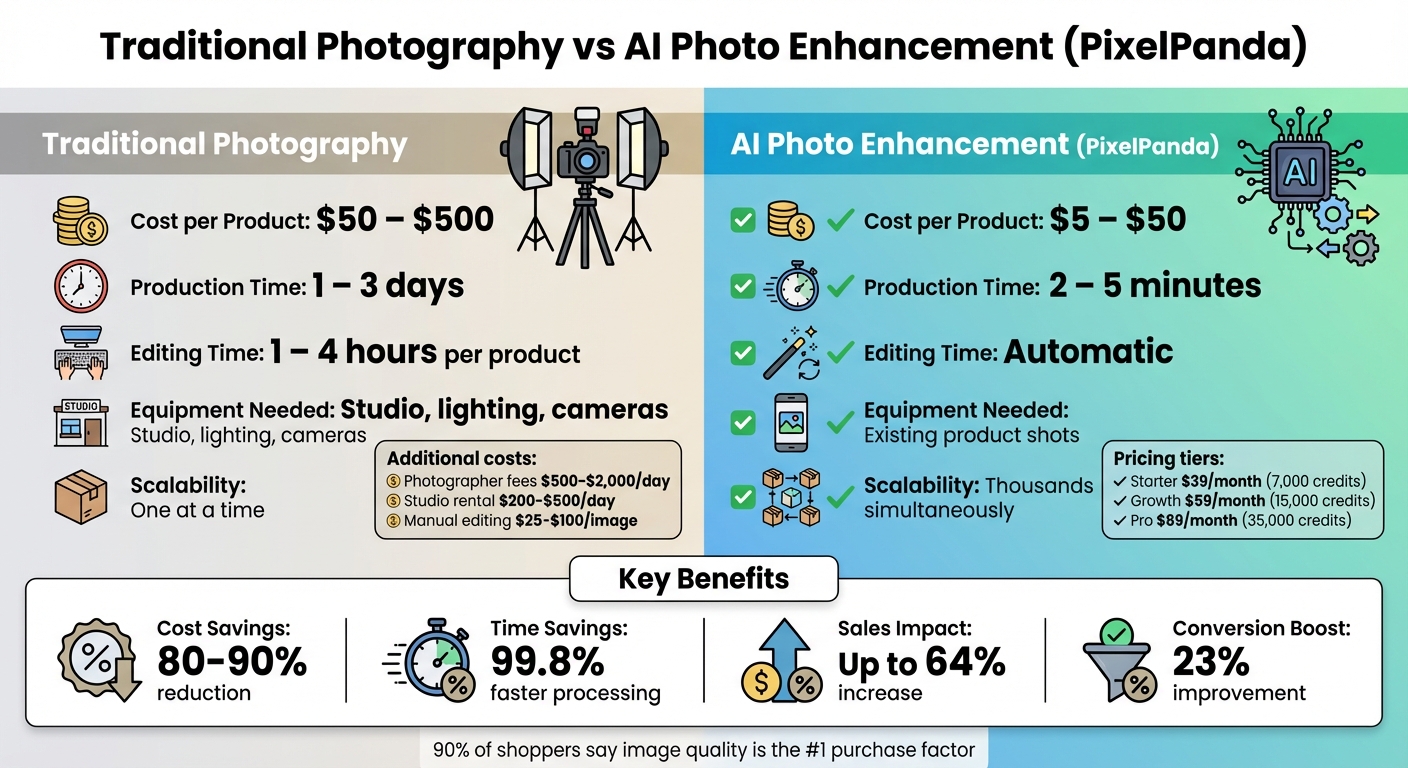
Traditional Product Photography vs AI Photo Enhancement: Cost and Time Comparison
PixelPanda streamlines the process of enhancing product photos – handling background removal, lighting adjustments, and resizing – all in just minutes. What used to take days can now be completed almost instantly. This is a game-changer for businesses managing large inventories, enabling them to get products online faster than ever. Let’s dive into the features and top AI tools for photo editing that make PixelPanda stand out.
AI Automation for Batch Processing
When it comes to saving time, PixelPanda’s batch processing capabilities are a standout feature. Instead of painstakingly editing each image individually, you can apply uniform adjustments – like brand-specific padding, centering, color corrections, and shadow placement – across your entire product catalog in one go.
For example, in 2025, Decathlon used AI automation to process a staggering 35,000 images across eight countries. What could have taken two years manually was completed in just three months, reducing editing time by 99.8% and saving an estimated $165,000 in costs. Similarly, Valuence Japan processes 24,000 photos each month, cutting 600 hours of manual labor and saving $80,000 annually.
"We wanted a long-term partnership that would grow with our business… It’s the easiest and smoothest API integration we’ve ever built."
- Clara Albornoz, Co-founder, List Perfectly
Customizable AI Models for Brand Consistency
PixelPanda allows businesses to maintain a cohesive brand identity by embedding elements like HEX codes, logos, and background styles directly into their image adjustments. Custom templates ensure consistent lighting, framing, and padding across entire product categories, eliminating the inconsistencies that often come with manual editing.
This attention to detail pays off. Brands using AI-enhanced photography have reported up to a 73% boost in click-through rates and a 23% increase in conversions. Moreover, 90% of online shoppers say that high-quality images are the most critical factor in their purchasing decisions. Consistent lighting and uniform shadows not only build trust but also present a polished, professional product catalog. And all of this comes with a significant reduction in costs.
Affordable Pricing vs. Traditional Photography
Traditional product photography can be expensive. Professional photographers charge between $500 and $2,000 per day, studio rentals range from $200 to $500 daily, and manual editing costs anywhere from $25 to $100 per image. For a catalog of just 100 products, the expenses can skyrocket before you’ve even published a single photo.
PixelPanda flips the script with its budget-friendly pricing. The Starter plan offers 7,000 credits for $39 per month, while the Growth plan provides 15,000 credits for $59 per month. For businesses with larger needs, the Pro plan delivers 35,000 credits for $89 per month. This pricing structure slashes costs by 80% to 90% compared to traditional methods.
| Factor | Traditional Photography | PixelPanda |
|---|---|---|
| Cost per Product | $50 – $500 | $5 – $50 |
| Production Time | 1 – 3 days | 2 – 5 minutes |
| Editing Time | 1 – 4 hours per product | Automatic |
| Equipment Needed | Studio, lighting, cameras | Existing product shots |
| Scalability | One at a time | Thousands simultaneously |
"It effectively resolved the problem my business had been struggling with for many years… It allows me to create stunning model shots without the cost of hiring professionals."
- Roberta Lacey, Founder of Lacey & Bohème
How to Add AI Photo Enhancement to Your Workflow
Adding AI photo enhancement to your workflow is easier than you might think. You don’t need a major system overhaul – just a few steps to seamlessly integrate tools like PixelPanda and start seeing results.
Getting Started with PixelPanda: Step-by-Step
First, connect PixelPanda to your e-commerce platform, whether you’re using Shopify, DAM, or PIM. This allows you to bulk import your product catalog effortlessly.
Next, set up your brand parameters. Define your preferred background styles, lighting settings, aspect ratios, and padding. These settings will act as your custom templates, ensuring a polished, uniform appearance across all your images. You can even create multiple presets to match specific marketplace requirements – like a clean white background for one platform or a lifestyle-themed look for another.
Once your presets are ready, upload a batch of 100–250 images. PixelPanda will automatically apply your template, handling tasks like background removal, upscaling, and resizing. After processing, review a sample batch to ensure product colors, textures, and details are accurate.
When everything looks good, push the enhanced images directly to your product pages, marketplace listings, or internal systems. This automated process is much faster than traditional manual editing and delivers consistent results.
Using Automation to Save Time
For larger catalogs with over 500 SKUs, automation can make an even bigger difference. PixelPanda’s API lets technical teams link the tool directly to your DAM or PIM system, automating the entire image workflow. Non-technical users can still process smaller batches of up to 250 images with ease.
Once you’ve set your HEX codes, shadow preferences, and padding presets, you can apply them across thousands of images instantly. This eliminates the inconsistencies that come with manual editing and ensures all your product photos meet marketplace standards.
Consider the results: In 2025, the secondhand marketplace GoodBuy Gear standardized over 42,000 product images using AI automation. The result? A 23% increase in conversion rates. Similarly, Selency, an e-commerce brand managing a catalog of over 700,000 items, sped up product listings by 200 times while slashing image processing costs by 89%.
Once automation is in place, the next step is evaluating how these enhancements impact your business.
Tracking Results: Visual Quality and Sales Impact
After streamlining your image workflow, it’s time to measure the results. Start by looking at both visual quality and business metrics. Keep an eye on conversion rates, click-through rates, and dwell time to assess how enhanced images are performing [5,23].
A/B testing is a great way to see what works best. For example, you can test different background colors or lighting styles to find out which changes drive more engagement and sales [1,23]. Also, track return rates – accurate, high-quality images often lead to fewer returns.
On the operational side, calculate how much time and money you’re saving. Compare AI processing costs – which can be as low as a few cents per image – with traditional photography, which can cost anywhere from $50 to $500 per product [1,7]. Businesses using AI automation have reported saving up to 50,000 hours annually.
Finally, remember the power of great visuals. Over 85% of shoppers say product photos are the most important factor in their buying decisions. High-quality images can boost sales by as much as 64% compared to lower-quality visuals. By tracking these metrics, you’ll see how AI photo enhancement directly contributes to your bottom line.
Conclusion
AI-powered tools like PixelPanda turn blurry, low-quality, or cluttered product photos into polished, professional-grade visuals – no expensive equipment or studio time needed. This technology can upscale low-resolution images by up to 10x, remove distracting backgrounds, and fix lighting issues effortlessly.
With nearly 90% of shoppers prioritizing image quality, having superior visuals can boost sales by as much as 64%. Case studies reveal that standardized, high-quality images can increase conversions by over 20%. Plus, AI automation slashes costs significantly, offering 90%–95% savings compared to traditional photography, which can cost anywhere from $50 to $500 per product.
For small businesses, the benefits go beyond just saving money. AI tools allow you to process hundreds – or even thousands – of images at once, ensuring consistent branding across your entire catalog. This consistency not only strengthens your brand identity but also builds trust with your customers. High-quality images also help reduce return rates by 20%–25%, as customers get a clearer idea of what to expect.
Switching from manual editing to AI-powered image editing saves time and scales effortlessly. AI workflows ensure consistent results across large product catalogs, whether you’re managing 50 SKUs or 50,000. Even a single smartphone photo can be transformed into multiple variations for different platforms or campaigns – no reshoots required.
Start with your lowest-performing images and watch as better visuals lead to improved engagement, higher conversions, and fewer returns. With tools like PixelPanda, professional product photography is no longer out of reach. It’s time to elevate your product presentation.
FAQs
How can AI enhance low-quality product images for e-commerce?
When it comes to improving low-quality product images, AI steps in with super-resolution algorithms that upscale photos while adding missing details and sharpening edges. What starts as a blurry, pixelated image is transformed into a sharp, high-definition visual – perfect for showcasing products in online stores.
But that’s not all. AI tools can also fine-tune lighting, tweak colors, and even remove distracting backgrounds. The result? Polished, professional-looking product photos that grab attention. These improvements don’t just make your images more appealing – they also build customer trust and can lead to higher conversion rates for your e-commerce business.
Can AI improve color accuracy in product photos?
AI-driven tools can fine-tune color accuracy by automatically tweaking hues and tones to align with a reference image or predefined standards. This is particularly useful for maintaining consistent, vibrant colors in product photos, which is crucial for showcasing items effectively.
That said, while AI does a great job improving color representation, it isn’t flawless. Factors like lighting variations or the quality of the original image can sometimes affect results. Still, for e-commerce businesses aiming to level up their visuals, these tools offer a dependable and time-saving solution.
How does using AI for product photo enhancement save money?
AI-driven tools offer a game-changing solution for cutting down the hefty costs tied to traditional product photography. Think about it: hiring professional photographers, renting studio space, and paying for post-production edits can easily rack up hundreds – if not thousands – of dollars per product. By using AI, you can create or refine high-quality images right in-house, skipping many of these pricey steps.
But the benefits go beyond just saving money. AI also speeds up the editing process, slashing labor hours and eliminating the need for expensive reshoots. This quicker workflow means you can roll out products or campaigns faster, giving your sales a head start while keeping expenses under control. For e-commerce businesses, it’s an efficient way to elevate product visuals without compromising on quality.