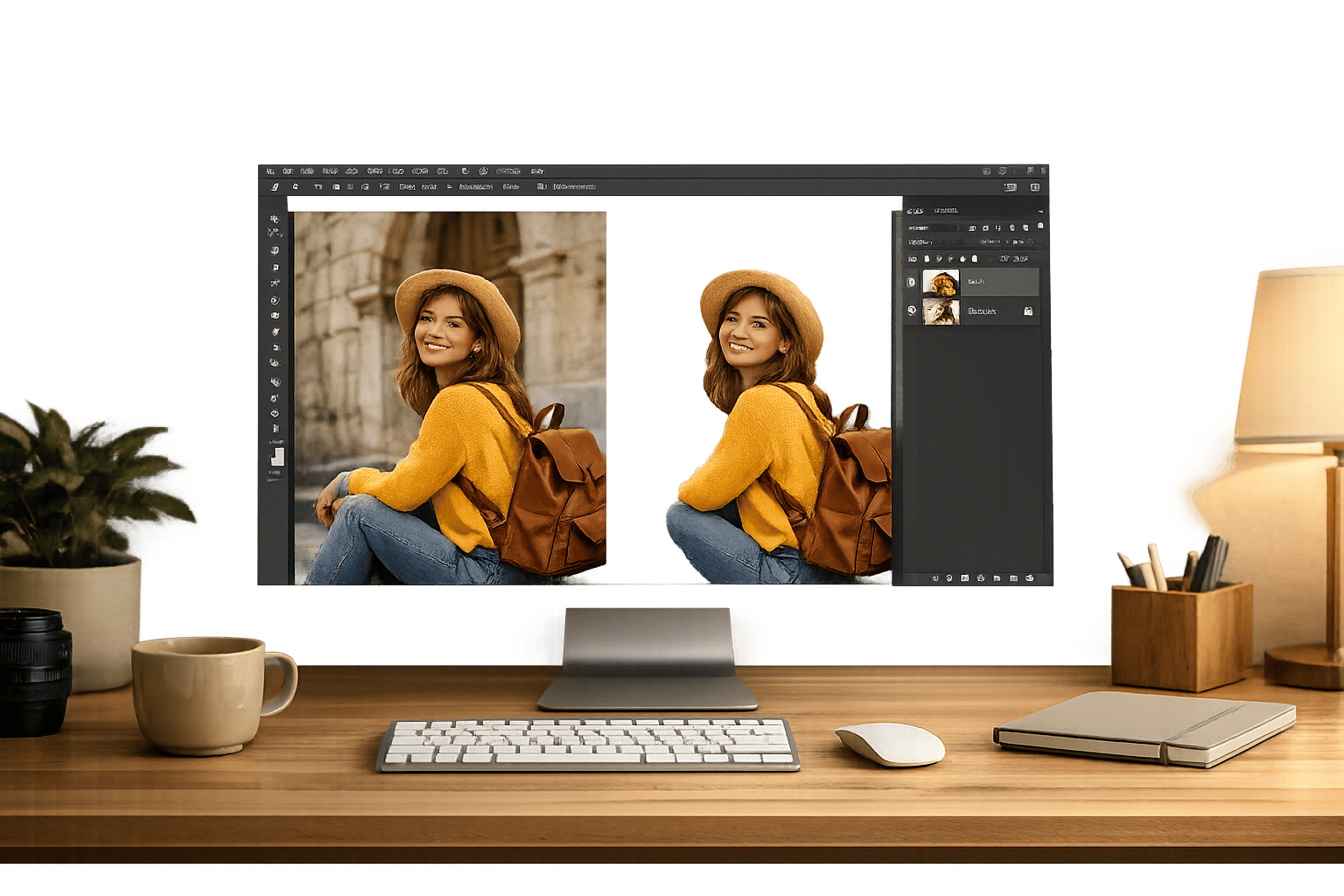
Removing image backgrounds doesn’t have to be complex or time-consuming. With tools like PixelPanda, you can achieve professional results in just three steps:
- Upload your image: Drag and drop or select files (up to 40MB) for processing. Batch processing is available for handling multiple images at once.
- AI background removal: The tool automatically isolates the subject, preserving details like hair or fur.
- Edit and download: Refine edges if needed, then download as PNG (transparent) or JPG (solid background).
PixelPanda is a practical solution for e-commerce sellers and content creators, offering features like high-resolution outputs, batch processing, and AI-generated backgrounds. Plans start at $39/month, making it an efficient choice for businesses of all sizes. Save time and effort while maintaining sharp, polished visuals.
BEST Ai Bulk Background Remover Ever?! (FREE)
How PixelPanda Removes Backgrounds

PixelPanda takes the hassle out of background removal by fully automating the process. Using AI trained on millions of real-world images, the platform quickly identifies and isolates your subject – whether it’s a product, person, car, or even an animal – from the background. The entire process takes just 3 seconds, saving you from the time-consuming task of manual tracing. This efficiency is a game-changer for modern e-commerce, where polished images are a necessity.
PixelPanda’s Background Removal Features
With just one click, PixelPanda’s AI pinpoints the subject in your image and removes the background. Its advanced edge detection excels at handling intricate details like hair, fur, and feathers, delivering clean and precise cutouts.
"I’m surprised how accurate and smooth the cut-out edges are. I always wanted a super fast background remover." – Andrea Mangano, Product Designer
PixelPanda supports high-resolution outputs of up to 25 megapixels, ensuring your images remain sharp and professional whether they’re used online or in print. For areas that require extra attention, such as low-contrast edges, the platform includes refinement tools that let you make manual adjustments while the AI handles the heavy lifting.
For those managing large volumes of images, PixelPanda offers batch processing, allowing you to upload and edit up to 1,000 images at once. This feature is perfect for maintaining consistent quality across product catalogs. Developers can also take advantage of API integration to seamlessly incorporate PixelPanda’s background removal into their workflows. These tools make it easier to elevate both e-commerce listings and creative projects.
Benefits for E-commerce and Content Creators
PixelPanda solves a major problem for e-commerce sellers by enabling them to process entire catalogs in minutes. This ensures compliance with the clean, white background standards required by leading marketplaces. Research shows that high-quality AI-enhanced imagery can boost sales by 96% and improve sell-through rates by 56%.
Content creators also gain from PixelPanda’s flexibility. Transparent PNGs integrate effortlessly into various platforms and designs, giving creators more freedom to experiment. Businesses using PixelPanda report cutting photo editing costs by up to 93%, freeing up resources for other creative endeavors. Whether you’re a seller or a creator, PixelPanda offers a fast and efficient way to achieve professional results.
How to Remove Backgrounds with PixelPanda
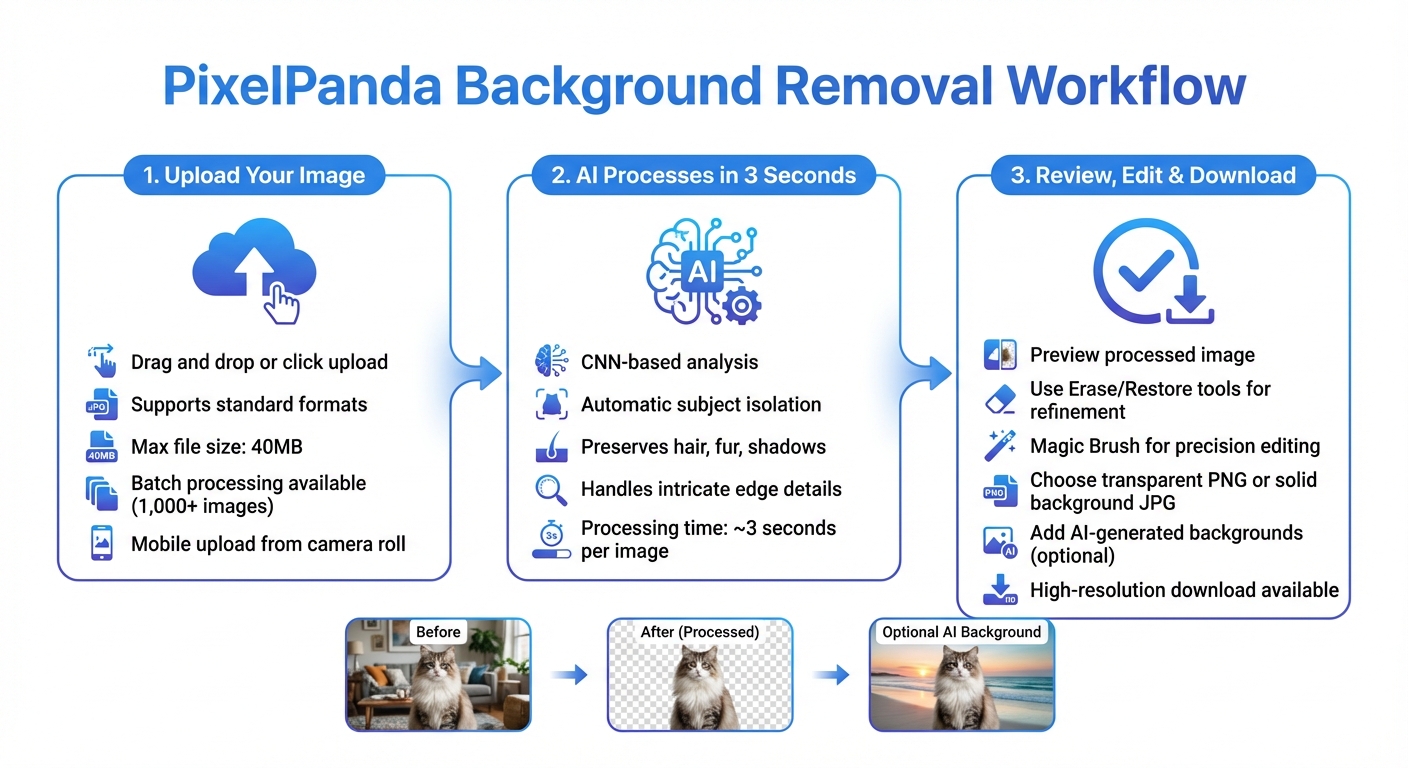
How to Remove Image Backgrounds with PixelPanda in 3 Steps
PixelPanda makes it easy to turn your photos into professional cutouts, even if you’re not a tech wizard. With its advanced tools, you can upload, process, and download your images in just three simple steps. Here’s how you can get started:
Step 1: Upload Your Image
First, log in to your PixelPanda account and head to the background removal tool. You can either drag and drop your image into the upload area or click the "Upload" button to browse your files. PixelPanda supports standard image formats, with a maximum file size of 40MB. If you’re on a mobile device, you can upload directly from your camera roll.
To get the best results, use high-resolution images where the subject has clear, defined edges and minimal overlapping elements. The better the quality of your image, the easier it is for the AI to separate the subject from the background. If you have multiple images, PixelPanda’s batch processing feature allows you to handle them all at once.
Step 2: Let the AI Do the Work
Once your image is uploaded, the AI takes over. It uses CNN-based analysis to separate your subject from the background, carefully preserving details like hair strands, fur, shadows, and other intricate edges.
"The visual quality of a clipping mostly comes from the quality of the edges." – Aurélien Houdbert, Data Scientist at Vestiaire Collective (September 2023)
This advanced processing ensures that even complex details are handled with precision.
Step 3: Review, Edit, and Download
After the AI finishes processing, you’ll get a preview of your image. If you notice any areas that need adjustment, use the Erase and Restore tools to fine-tune the edges. For even more precision, try the Magic Brush feature – it allows you to brush over areas while the AI refines the edges automatically.
Before downloading, decide whether you’d like to keep the background transparent or replace it with a solid color, gradient, or even an AI-generated backdrop. To maintain transparency, save your image as a PNG file. If you save it as a JPG, it will automatically add a solid white background. For marketing materials or large-scale prints, opt for the high-resolution download to ensure your image looks sharp and professional. And just like that, your edited image is ready to shine!
sbb-itb-76ad1b7
Additional Features for Better Visuals
PixelPanda doesn’t just stop at quick background removal – it also brings tools that give you more creative control while streamlining your workflow.
Batch Processing and High-Resolution Outputs
Editing a large number of photos one by one can be a huge time sink. That’s where PixelPanda’s batch processing comes in. It lets you process over 1,000 images at once, removing backgrounds from all of them in one go. Each image is processed in just about 3 seconds, and the results are packed into a single ZIP file for easy downloading. This is a huge time-saver, especially for tasks like seasonal product launches or updating large catalogs.
Need your images to meet platform standards like Amazon or Google Shopping? This feature automatically applies clean, white backgrounds to your photos. And if you’re working with smaller images, PixelPanda’s AI Image Upscaler has you covered. It can enlarge photos by 2x, 4x, 6x, or even 8x using the best AI image upscaler tools without losing quality, making them perfect for print materials or high-resolution digital use.
But PixelPanda doesn’t stop at efficiency – it also helps you create visuals that stand out.
Adding AI-Generated Backgrounds
After removing the background, why not take it a step further? With PixelPanda’s AI Background Generator, you can replace the empty space with a custom scene. All you need is a simple text prompt – something like "marble table with soft sunlight" or "wooden table with flowers in warm tones" – and the tool creates a photorealistic background that matches your product’s lighting and angles.
This feature is perfect for creating lifestyle images without the hassle of booking a studio or setting up props. You can even tweak your visuals for seasonal promotions or holidays, with the AI automatically adjusting shadows and perspectives to ensure everything looks natural. Save your final images as PNG files to keep transparency or as JPGs for immediate use.
PixelPanda combines speed, precision, and creativity to make your visuals not just functional, but striking.
PixelPanda Pricing and Plans
PixelPanda uses a credit-based subscription model, giving users monthly credits for tasks like background removal, batch processing, AI-created backgrounds, and image upscaling tools. Here’s a breakdown of how the plans are designed to suit different business needs.
Plans for Different Users
- Starter Plan: Priced at $39/month (billed annually), this plan provides 7,000 credits. That’s enough for 7,000 images or 350 videos, making it a great choice for small e-commerce businesses or individual creators.
- Growth Plan: At $59/month, this plan includes 15,000 credits, which can be used for 15,000 images or 750 videos. It’s tailored for businesses that are expanding their operations.
- Pro Plan: For $89/month, users get 35,000 credits, covering 35,000 images or 1,750 videos. This plan also unlocks additional features like batch processing, AI background generation, and multi-language support.
Flexible Pricing for Small Businesses
PixelPanda’s pricing model is designed to be budget-friendly while offering professional-grade tools. Whether you’re a solo entrepreneur or managing a larger business, you can enjoy predictable monthly costs without worrying about high per-image fees. Start with the Starter plan and easily upgrade as your needs grow. Plus, every plan includes commercial usage rights, so you can confidently use your edited images for product listings, ads, social media, and even print materials.
Conclusion
PixelPanda takes the hassle out of image editing, making background removal quick and effortless. With its AI-powered tools, you can process images in just seconds while maintaining intricate details. Whether you’re running a small e-commerce business or scaling up your content production, PixelPanda is equipped to handle large projects with ease.
The platform offers credit-based pricing starting at $39/month, which includes commercial usage rights, AI-generated backgrounds, and video processing – providing a complete toolkit for creating stunning visuals. This makes it a game-changer for e-commerce marketers and content creators aiming to produce high-quality imagery consistently.
Accessible via web browsers, iOS, and Android, PixelPanda allows you to edit anytime, whether you’re on your desktop or mobile device.
Looking to streamline your visual content creation? Try PixelPanda today and discover how its AI-powered background removal can save you valuable time while delivering studio-grade results.
FAQs
How does PixelPanda’s AI handle intricate details like hair or fur when removing backgrounds?
PixelPanda’s AI is crafted to tackle the tricky details in images, like individual strands of hair or delicate fur, with impressive precision. Thanks to its advanced algorithms, it can meticulously detect and separate even the most intricate edges from their backgrounds, delivering a clean and polished finish.
Whether you’re editing portraits, pet photos, or intricate product shots, PixelPanda’s technology ensures those fine details stay intact, giving your images a refined and natural appearance. It’s fast, efficient, and perfect for producing high-quality visuals without the hassle.
Can I remove backgrounds with PixelPanda on my mobile device?
PixelPanda works smoothly on mobile devices, offering a hassle-free way to remove image backgrounds. Whether you’re using a smartphone or tablet, the interface remains just as user-friendly as it is on a desktop.
This means you can edit your images wherever you are, making it a convenient option for quick, on-the-go adjustments.
What are the advantages of using AI-generated backgrounds with PixelPanda?
Using AI-generated backgrounds with PixelPanda means you can work faster, more precisely, and with more creative options. The platform’s automated tools remove backgrounds from images in just seconds, delivering clean, transparent PNG files that are ready for you to customize. This saves you from the hassle of tedious manual edits, letting you focus on producing polished visuals in no time.
PixelPanda also brings consistency and versatility to your projects. By isolating the subject, you can effortlessly add custom backgrounds – whether it’s a brand-specific color, a themed graphic, or a lifestyle setting. This makes it easy to align your visuals with your brand identity while keeping a professional, cohesive look for e-commerce listings, marketing materials, or social media content.