Picture this: you snap the perfect product photo, but the lighting is off, or the background is a cluttered mess. Instead of sinking hours into a labyrinth of editing tools, you click a button, and poof—the image is flawless. That’s the promise of AI photo enhancement software, and honestly, it often feels like magic.
These tools aren't just fancy filters; they're more like having a whole team of seasoned photo editors on standby, ready to work at lightning speed.
So, What Exactly Is AI Photo Enhancement Software?
Let's break it down with an analogy. Traditional photo editors like Photoshop are incredible, but they're like a professional woodshop. You have all the chisels, saws, and sanders you could ever want, but you need the skill and time to master them. In the right hands, you can create a masterpiece. For everyone else, it’s a bit of a struggle.
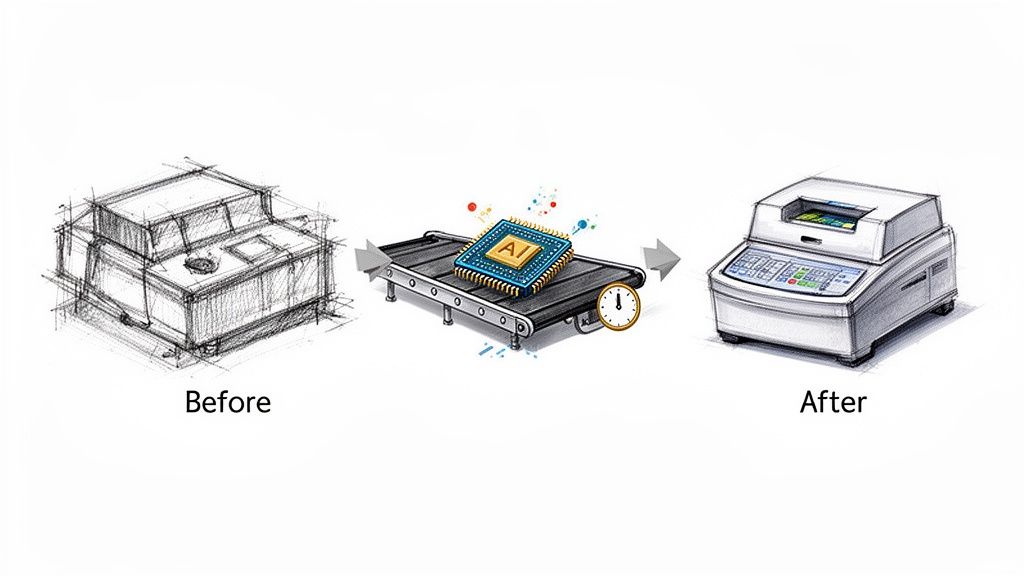
AI photo enhancers, on the other hand, are like a state-of-the-art automated manufacturing line. You feed in the raw material (your image), and it handles the complex jobs—like color correction, background removal, and sharpening—all on its own. It's smart enough to understand what it's looking at, identifying faces, objects, and backgrounds to make just the right tweaks.
It's More Than Just a Little Touch-Up
We're not talking about just cranking up the brightness or saturation here. This is about a fundamental transformation powered by sophisticated deep learning models. These AIs have been trained on millions of before-and-after images, learning the subtle patterns that separate an amateur snapshot from a professional-grade photo.
Some of the standout features include:
- Intelligent Upscaling: Instead of just stretching pixels and creating a blurry mess, it generates brand-new, believable pixel data to boost an image's resolution.
- Context-Aware Removal: It can magically erase an unwanted object or photobomber, then intelligently rebuild the background so you’d never know they were there.
- Automated Retouching: It enhances portraits by smoothing skin and sharpening eyes, but with a light touch that keeps things looking natural, not plastic.
This isn't just a niche tool; it's a booming industry. The global AI image enhancement market, currently valued at a cool USD 2.6 billion, is expected to skyrocket to USD 50.7 billion by 2034. That explosive growth is driven by everyone from e-commerce giants to media companies who live and die by the quality of their visuals. You can find more details on this growth over at market.us.
At its core, AI photo enhancement software is a great equalizer. It hands the power of a professional photo studio to everyone—marketers, developers, small business owners—without the brutal learning curve or sky-high costs of traditional editing.
Platforms like PixelPanda are leading the charge, offering powerful solutions that turn tedious, multi-step editing nightmares into a simple click. Whether you're trying to polish thousands of user-submitted photos or prep product shots for your online store, this kind of software is quickly becoming an essential tool for getting things done.
A Look Inside the AI-Powered Editing Toolbox
To really get what AI photo enhancement software is all about, you have to pop the hood and see what’s running the show. This isn't just a grab-bag of filters; it's a collection of highly specialized tools, each one trained to handle a specific and often tricky visual problem. Think of it less like a simple photo app and more like a Swiss Army knife for your images.
At its core, the software follows a workflow that’s a lot like what a seasoned human editor would do, just at a mind-boggling scale. This graphic breaks down how the AI thinks about every image it sees.

This simple process—analyze, repair, and perfect—is the bedrock for every cool feature. It’s how a messy, low-quality picture gets turned into a pristine, professional asset.
Let’s take a closer look at the key players in this toolkit.
Core Features of AI Photo Enhancement Software
Modern AI platforms offer a range of powerful capabilities, each designed to solve common and not-so-common image problems automatically. Here’s a quick breakdown of the heavy hitters and what they're actually good for.
| Feature | What It Does | Best For |
|---|---|---|
| AI Upscaling | Intelligently generates new pixels to increase image resolution without causing blurriness or artifacts. | Rescuing low-res photos, preparing web images for print, and sharpening grainy shots. |
| Background Removal | Automatically detects and isolates the main subject, creating a clean cutout with a transparent background. | E-commerce product shots, profile pictures, and creating composite marketing images. |
| Face Enhancement | Subtly improves facial features by sharpening eyes, smoothing skin, and correcting lighting naturally. | Professional headshots, user-generated content moderation, and portrait photography. |
| Inpainting | Fills in missing or removed parts of an image by analyzing the surrounding context. It’s a magic eraser. | Removing unwanted objects, text, watermarks, or fixing damaged parts of a photo. |
| Style Transfer | Applies the artistic aesthetic of one image (like a painting) to the content of another. | Creating unique social media content, artistic visuals, and branded marketing assets. |
| API/SDK Access | Allows developers to integrate all these AI features directly into their own apps, websites, or workflows. | High-volume image processing, automating content pipelines, and building new products. |
These features work together to provide a comprehensive solution for just about any image-related challenge you can throw at them.
Beyond Just Stretching Pixels with AI Upscaling
One of the most jaw-dropping features is easily AI upscaling. Old-school software just stretched the pixels you already had, which is why blowing up a small image always resulted in a blurry, blocky disaster. But AI doesn't just stretch—it recreates.
Having been trained on millions of high-res and low-res image pairs, the AI actually learns what things like hair, fabric textures, and fine lines are supposed to look like up close. So when you feed it a small photo, it intelligently adds brand new pixels that make sense in context. That’s the secret to turning a tiny thumbnail into something you can actually print.
The magic isn’t just making the image bigger; it’s in adding back believable detail. The AI isn’t guessing, it’s making incredibly educated inferences to produce sharpness that feels real, not digitally faked.
The Art of a Perfect Cutout
For years, cutting an object out of its background was a slow, painful task, especially if you were dealing with wispy hair or a fuzzy sweater. AI has completely flipped the script. Today’s algorithms can lock onto a subject down to the pixel, delivering a perfect cutout in seconds flat.
These models are smart enough to understand complex edges and see-through elements, so they keep all those delicate little details that make a cutout look convincing instead of like a bad Photoshop job. For an e-commerce brand with thousands of product photos, that kind of automated precision saves an insane amount of manual labor.
If you want to see how well these models handle the tricky stuff, you can throw your own images at our interactive tools and judge for yourself over at our demos page.
Smart Fixes and Creative Twists
The toolkit doesn’t stop at the basics. A few other standout features unlock a ton of value for both practical clean-up and creative projects.
- Intelligent Inpainting: This is your "magic eraser" on steroids. When you highlight an unwanted object or a pesky watermark, the AI looks at everything around it and fills in the blank so seamlessly it’s like the object was never even there.
- Face Enhancement: This is not your typical smoothing filter that makes people look like plastic dolls. AI face enhancement tools are far more subtle, capable of sharpening eyes, evening out skin tones, and balancing light in a way that just looks professional and authentic.
- Style Transfer: Ready to get a little weird? Style transfer lets you apply the vibe of one image—say, a Van Gogh painting—to a totally different photo. It’s a fantastic way to generate one-of-a-kind visuals for a marketing campaign or just for fun.
When you start connecting the dots, you see how these tools can be combined for amazing results. For example, in real estate, AI tools for virtual staging lean on these same inpainting and enhancement techniques to digitally furnish empty rooms and help buyers see a home’s true potential.
The Developer’s Secret Weapon: APIs and SDKs
For all the developers and tech teams out there, the most important part of this toolkit isn't a slick user interface—it's the Application Programming Interface (API) and Software Development Kits (SDKs). These are what let you plug all this AI horsepower directly into your own apps, websites, and automated systems.
Instead of dragging and dropping images one by one, an API allows your system to send thousands of images for processing automatically. This opens the door to automation on a scale no human team could ever match, powering everything from an app that enhances profile pictures on the fly to a system that processes an entire e-commerce catalog overnight.
Putting AI Photo Enhancement to Work
Alright, let's move past the theory. Where does the rubber really meet the road? The magic of AI photo enhancement software isn't just about making pictures prettier; it’s about solving brutally expensive and time-sucking problems for businesses. This is about completely overhauling how we create and use visual content.
This stuff is quickly shifting from a "cool toy" to an essential business tool. The numbers don't lie. The market for AI in product photography is on an absolute tear, predicted to explode from USD 450 million to a mind-boggling USD 5 billion by 2035. Better yet, a whopping 87% of retailers already using AI image tools are seeing a direct bump in their annual revenue. This isn't a gamble; it's a proven investment.
So, let's dig into how smart companies are already using these tools to get ahead.
Supercharging Ecommerce and Retail
In any online store, your product photo is your star salesperson. It’s what stops the scroll, builds that flicker of trust, and ultimately convinces someone to click "buy." In fact, businesses that nail their AI-powered imagery can see conversion rates leap by as much as 3X.
Think about an online fashion brand with a catalog of 5,000 different items. In the old days, manually cutting out backgrounds, tweaking colors, and making every shot look consistent would take a team of editors weeks of tedious work. With an AI photo enhancement API, that entire nightmare workflow gets automated.
- Batch Background Removal: Suddenly, thousands of images get processed overnight. You wake up to perfect, clean cutouts ready for Amazon, Shopify, or anywhere else.
- Automated Color Correction: The AI makes sure that the "cerulean blue" sweater looks like cerulean blue in every single photo, which drastically cuts down on returns from customers saying, "it didn't look like this online."
- Consistent Sizing and Framing: Every product is automatically centered and cropped to spec. The result? A slick, professional storefront that screams credibility.
This isn’t just about saving time. It’s about launching products faster, slashing operational costs, and giving your customers a far better shopping experience.
Revolutionizing Marketing and Advertising
Marketing teams are under constant, relentless pressure to feed the beast—more ads, more social posts, more email campaigns. AI photo enhancement acts like a force multiplier, giving them creative superpowers.
Let’s say you just did a big photoshoot for a new energy drink. A marketer can take that one perfect "hero shot" and use AI tools to spin up dozens of variations in minutes, not days.
By automating the grunt work of editing, AI lets creative teams get back to what they do best: thinking about big-picture strategy and high-impact ideas instead of being buried in pixels. It flips the script from manual labor to creative direction.
They can instantly test new backgrounds for different campaign themes, use inpainting to zap a distracting shadow out of existence, or apply a dozen different artistic styles to see what pops on TikTok. It even opens the door to creating completely AI generated social media posts to fill out your content calendar and keep your audience engaged.
Empowering Developers and App Builders
For developers, AI photo enhancement isn't a fancy app with buttons and sliders. It's a powerful, rock-solid API they can build right into their own products. This unlocks a whole universe of possibilities for creating smarter, more automated applications.
Take a social networking app, for instance. When a new user uploads their first profile picture, an integrated AI API can spring into action behind the scenes.
- It can instantly enhance the image quality, brightening up a poorly lit photo and adding a touch of sharpness.
- It can wipe out a messy background, putting the focus squarely on the user's face.
- It can even moderate the content, flagging inappropriate images before they ever go live.
All of this happens in milliseconds, without the user even knowing it. It delivers a seamless, polished experience and saves the company from hiring a massive content moderation team. It’s the perfect example of AI handling the mundane tasks at an incredible scale, freeing up developers to focus on building the features that really matter.
How to Choose the Right AI Photo Enhancement Software
Stepping into the world of AI photo enhancement software can feel a bit like walking into a massive, futuristic arcade. Flashing lights, bold claims, and a dozen different machines all promise to level up your images. With so many options, how do you see past the marketing hype and pick the tool that’s actually right for your mission?
Don't just go with the first flashy demo you see. Choosing the right software requires a bit of detective work. You need a practical way to evaluate each contender like a pro, focusing on what really matters for your specific workflow—whether you're a developer building an app or a marketer trying to scale ad creative.
Think of it like test-driving a car. You wouldn't buy one without checking under the hood, seeing how it handles sharp turns, and making sure it has the cargo space you need. The same logic applies here.
Start with the Final Image Quality
This is the most obvious, yet most important, starting point. Does the software actually produce great-looking images? Marketing materials will always show you the perfect "best-case scenario" results, but you need to stress-test the AI with your own real-world, often imperfect, photos.
A great way to do this is by creating a "torture test" folder of images. Don't just upload pristine studio shots; throw it some curveballs.
- Complex Edges: Use photos with wispy hair, fuzzy sweaters, or chain-link fences to see how well the background remover handles those fine details.
- Transparent and Reflective Objects: See how the AI handles tricky items like glassware, mesh fabrics, or jewelry. Does it preserve the transparency or create weird, solid artifacts?
- Low-Light and Grainy Shots: Test the upscaler and denoiser with an old, grainy photo. Does it create a clean, sharp image, or just a smeared, artificial-looking mess?
The goal isn't just to see if the AI works, but to find its breaking point. A top-tier tool will handle these edge cases with grace, while a lesser one will quickly show its weaknesses.
Peek Under the Hood at Performance Metrics
For developers and businesses processing images at scale, a pretty picture isn't enough. The underlying performance of the API is what separates a hobbyist tool from a professional-grade platform. You need to look at the numbers that impact your workflow and, ultimately, your budget.
Here’s a quick checklist of the technical stuff you need to evaluate:
- Throughput: How many images can the system process at once? If you need to enhance an entire product catalog overnight, you need a system built for high-volume, concurrent processing.
- Latency: How fast does it return a finished image? For user-facing applications, like an app that enhances a profile picture on upload, speed is everything. A delay of a few seconds can be the difference between a happy user and an abandoned cart.
- Export Formats: Does the tool support the formats you need? For web use, you'll likely need transparent PNGs or optimized WebPs. Make sure the software exports clean files without artifacts.
Don't Forget the Business Essentials
Finally, you need to zoom out and look at the bigger picture. The best technology in the world is useless if the pricing model doesn't fit your budget or if the privacy policy puts your data at risk.
Your evaluation should always include these crucial business considerations:
- Pricing and Scalability: Look for a transparent, predictable pricing model. Does it scale fairly as your usage grows? Avoid platforms with confusing credit systems or steep overage fees that could lead to nasty surprise bills.
- Privacy and Compliance: Where is your data being processed and stored? Ensure the provider has a clear privacy policy and is compliant with regulations like GDPR if you handle customer data. Your images are valuable assets; make sure they're being handled securely.
- Documentation and Support: For developers, this is non-negotiable. Is the API documentation clear, complete, and easy to follow? Is there an active support channel to help you if you get stuck? Good documentation saves countless hours of frustration.
To help you put all this into practice, here's a handy checklist you can use when comparing different tools.
Evaluation Checklist for AI Photo Enhancement Software
This table is a practical guide to help you compare different AI photo enhancement solutions based on key technical and business criteria.
| Evaluation Criteria | What to Look For | Why It Matters |
|---|---|---|
| Image Quality | Test with your own "hard" images (hair, fur, low light). Compare results side-by-side. | Marketing demos are cherry-picked. Real-world performance on your actual images is the only thing that counts. |
| Throughput & Latency | Can it handle high-volume batch processing? How fast is the API response for a single image? | High throughput is crucial for large catalogs. Low latency is essential for real-time, user-facing applications. |
| Feature Set | Does it offer all the features you need (upscaling, background removal, inpainting, etc.)? | A single, integrated solution is often more efficient and cost-effective than juggling multiple specialized tools. |
| API & Documentation | Is the documentation clear, with code examples? Are there SDKs for your preferred programming language? | Good documentation and SDKs drastically reduce integration time and headaches for your development team. |
| Pricing Model | Is the pricing transparent and predictable? How does it scale with your volume? Are there hidden fees? | You need a cost model that aligns with your business growth and prevents unexpected budget overruns. |
| Privacy & Compliance | Does the provider comply with GDPR/CCPA? Where is data stored? Is it used for model training? | Protecting your user data and intellectual property is non-negotiable. Ensure the provider meets your security standards. |
| Support & Reliability | What are the support options (email, chat, dedicated manager)? What is the documented uptime or SLA? | When things go wrong (and they sometimes do), you need responsive support and a reliable platform to minimize downtime. |
By running each potential AI photo enhancement software through this three-part gauntlet—quality, performance, and business viability—you move from being a hopeful shopper to an empowered evaluator. Use those free trials to run meaningful tests and make a confident decision based on hard evidence, not just slick marketing.
Putting AI Editing Power to Work in Your Own Apps
Alright, let's get down to the really fun part. We've talked about what this AI magic can do, but now it's time to wire that power directly into your own software and workflows. Moving from a point-and-click editor to an API might sound like a huge leap, but it’s how you unlock automation at a scale that would make your jaw drop.
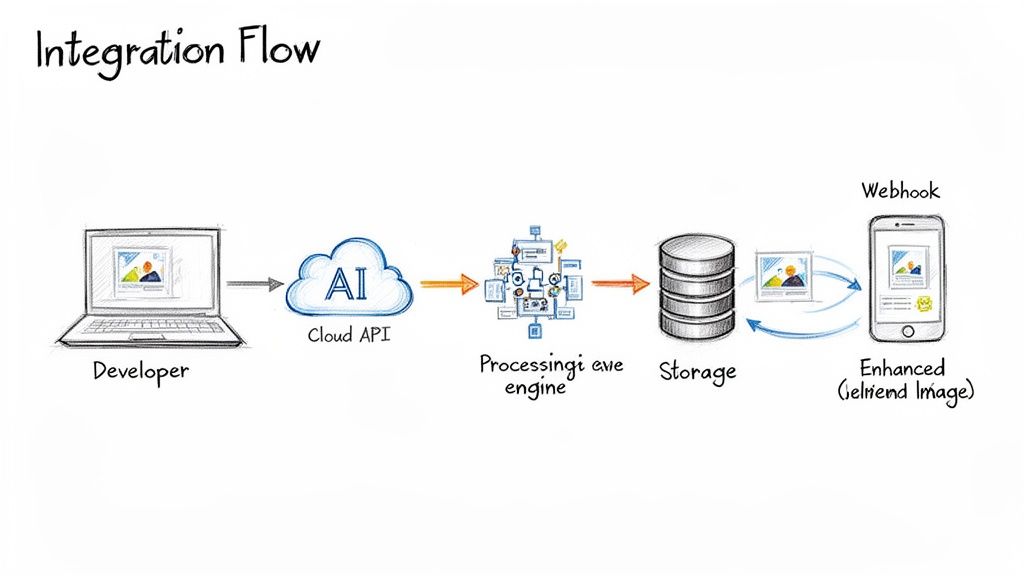
Think of an API—or Application Programming Interface—as a direct line to the AI's brain. Instead of you manually clicking "remove background," your application sends a quick, coded message that says, "Hey, remove the background from this product shot." The AI gets it, does the work, and sends back a perfectly edited image in seconds. It’s like having a tireless photo editor on call, 24/7.
The demand for this kind of automation is exploding. The AI Image Editor Market is already valued at a staggering USD 88.7 billion, and it's not just a consumer trend. Big businesses are the main drivers here, accounting for about 42% of the spending. Why? Because when you have a catalog of 100,000 products, you can't afford to edit each image by hand. You can dig into the numbers in this report on the AI market.
Getting Your Hands Dirty: Your First API Call
Diving in is way easier than it sounds. You don’t need a Ph.D. in machine learning to get this up and running. It's usually a simple three-step process that takes just a couple of minutes.
- Get Your Key: Once you sign up for a trial, you'll be given a unique API key. Think of it as your secret handshake to prove it's you.
- Pick Your Weapon: You can use a tool like Postman to poke around and send test requests without writing a single line of code. Or, if you're ready, you can jump right in with a few lines of Python or JavaScript.
- Make the Call: You send your image file to the API endpoint along with a simple command, like
"operation": "upscale". The server works its magic and zips the finished image right back to you.
That’s it. This simple back-and-forth is the building block for some seriously powerful automation.
What Makes an API a Joy to Work With?
Let's be real: not all APIs are created equal. Some feel like you're trying to assemble IKEA furniture with instructions written in ancient Sumerian. A truly developer-friendly API, on the other hand, gives you everything you need to build fast and stay sane.
Crystal-clear documentation is table stakes. It’s the map that shows you exactly how everything works without any guesswork.
On top of that, good SDKs (Software Development Kits) for languages like Python, JavaScript, or Ruby are a godsend. They package up all the complicated bits into simple functions, letting you add powerful AI features to your app with just a few lines of your own code. We've put a ton of effort into this on our PixelPanda developers page if you want to see what that looks like.
A great API feels less like a tool and more like a smart colleague. When you mess something up, it doesn't just throw a cryptic error—it gives you a helpful hint so you can fix it and move on.
Going from One Image to One Million
Okay, so you've successfully processed your first image. Awesome. Now, how do you handle thousands—or even millions—without everything catching fire? This is where you need to think about building for scale.
- Juggling Rate Limits: To keep their servers from melting, APIs limit how many requests you can make per minute. A pro knows how to work within these limits, maybe by adding a short pause or spreading requests out, to build a stable and reliable system.
- Processing in Parallel: Why wait for one image to finish before sending the next? To really crank up the speed, you'll want to send a bunch of images for processing at the same time. A well-built API is designed to handle this kind of controlled chaos beautifully.
- Don't Wait by the Phone (Use Webhooks): For big jobs like upscaling a high-res video still, you don't want your app just sitting there, waiting. That's where webhooks come in. You send the job, and the API pings your server back when it's done. Your app is free to do other things in the meantime. It’s the ultimate "I'll call you back" for developers.
Ready to Ditch the Drudgery? Start Automating Your Image Editing.
So, we've pulled back the curtain on AI photo enhancement software. You've seen what it can do, how it works, and how to plug it into your daily grind. It’s pretty obvious this isn't just another shiny tech toy—it’s the solution to some of the most stubborn headaches in creating great visuals.
Think about it. The days of fighting with inconsistent photos, burning hours on mind-numbing manual edits, and watching production timelines crawl are numbered. These aren't just small frustrations; they're the roadblocks that tank your budget, stall your marketing campaigns, and keep your products from getting to market.
Stop Pushing Pixels and Start Building What's Next
Every minute you or your team spends manually cutting out a background or tweaking the color on a hundred product shots is a minute you're not spending on strategy, creative brainstorming, or actually growing the business. The future of visual content isn't about endless, repetitive tasks. It’s about automation, scale, and flat-out speed.
We built PixelPanda to crush this exact problem. Our goal is to give you studio-quality edits, automatically, every single time. We sweat the small stuff—like perfectly preserving wispy hair and fine fur details—so you don't have to.
Let’s be real: your time is your most valuable asset. Stop wasting it on tasks a machine can nail in a fraction of a second.
Our developer-friendly API was designed to slide right into your existing apps and workflows without a major IT project. This is how you start moving faster, producing consistently stunning images, and scaling up your entire operation without having to hire an army of editors.
But don't just take our word for it. The proof is in the pixels. We highly recommend playing around with our interactive demos to see for yourself how the AI handles even the trickiest images.
When you're ready to see what this can do for your workflow, sign up for a free trial. No credit card, no commitment, no strings attached. Just an opportunity to finally stop editing and start creating. Take the leap today and see what a little automation can do for you.
Got Questions? We've Got Answers
Diving into the world of AI photo enhancement can feel a bit like learning a new language. You've got questions, and that's a good thing. Whether you're a developer weighing API options or a marketer chasing that perfect campaign image, let's clear up some of the common head-scratchers.
So, Is This AI Stuff Really Better Than a Human Editor?
For raw speed and consistency across thousands of images? Absolutely, it's not even a contest. An AI can blaze through an entire product catalog, applying the exact same standards to every shot, in the time it takes a human editor to get through their morning coffee. It’s a game-changer for high-volume work where brand consistency is king.
That said, if you’re commissioning a one-of-a-kind, museum-quality art print, a seasoned human artist still brings a unique creative touch. But let's be real—for over 95% of business use cases, from e-commerce listings to social media ads, AI offers a knockout combination of quality, speed, and affordability. It handles the tedious stuff so you can focus on the creative.
How Much of a Headache Is It to Integrate an AI Photo API?
You'd be surprised. If you pick a platform built with developers in mind, you'll find it's refreshingly simple. Most modern services are built on REST APIs, which is basically the lingua franca for web developers.
The goal is to get you up and running, not stuck in documentation purgatory. With solid guides, handy SDKs, and copy-paste code examples, a developer can go from getting an API key to seeing their first enhanced image in just a few minutes.
It usually boils down to three simple steps:
- Grab your unique API key from your account dashboard.
- Fire off an image file to the service's endpoint.
- Tell it what to do, like
remove_backgroundorupscale.
The platform does all the complex processing on its end and zips the finished image right back to you. Easy peasy.
What Kinds of Photos Does This AI Work Best On?
Today’s top-tier AI models are incredibly flexible. They’ve been trained on millions upon millions of images, so they're pros at handling standard business visuals like product shots, corporate headshots, and even messy user-generated content.
Of course, starting with a decent photo never hurts. But the real magic of AI photo enhancement software is its power to salvage less-than-perfect images. These tools are built to tackle real-world problems—fixing wonky lighting, erasing a photobomber, or blowing up a tiny, pixelated image into something usable.
The only way to know for sure is to put it to the test. Don't be shy—feed it your problem children. Give it photos with wispy hair, intricate lace, or funky shadows and see how it holds up. That’s how you’ll know if the quality is truly ready for primetime.
Ready to hang up your manual editing gloves and see what a smart AI can do for your workflow? PixelPanda gives you a developer-first API and a powerful set of tools to put your visual content creation on autopilot. Start your free trial today and see the difference for yourself.