
When Google's crawler, Googlebot, stumbles upon a 404 error on your site, it’s not just a "page not found" message. It’s a dead end. For a human visitor, it’s an annoyance. But for Google, it’s a wasted trip that burns through your valuable crawl budget on a URL that leads absolutely nowhere.
What a 404 Error Is Really Telling Google
Think of that quirky broken robot page as a big, flashing warning sign. When a user—or more critically, Googlebot—hits a 404, it’s a clear signal that the content they were looking for has simply vanished. This isn't some minor technical blip; it has real, tangible consequences for your site's health and SEO performance.
A sudden spike in 404s can signal to users that your site is neglected, often causing them to bounce right back to the search results. For Google, the problem is even bigger. Its spiders waste precious crawl budget trying to fetch pages that don't exist, which can seriously delay the discovery and indexing of your actual, important content. It's like sending a delivery driver to an address that was bulldozed last year—a complete waste of time and resources.
So, Where Do These Pesky 404s Come From?
These errors pop up for all sorts of reasons, but they usually trace back to a few common culprits. Getting a handle on these is the first real step toward stopping them.
- Simple Typos: One wrong letter in an internal link or a marketing campaign URL can send a flood of traffic to a dead end. We've all done it.
- Deleted Pages: Content gets axed during a site cleanup or a content audit, but nobody puts a redirect in its place. Oops.
- Botched Site Migrations: Moving to a new domain or CMS is notorious for leaving a trail of broken links if the redirect mapping isn't perfect.
- URL Structure Changes: Decided to update your permalinks (like going from
site.com/p=123tosite.com/blog/new-post)? If you forget to redirect the old URLs, you've just created a 404 minefield.
A 404 error is Google's signal that it followed a path to nowhere. Each one represents a missed opportunity to deliver value and a small dent in your site's perceived reliability.
The Sneaky "Soft 404" vs. a Real 404
Just when you thought you had it figured out, there’s a sneakier, more confusing variant: the soft 404. This is what happens when a URL for a non-existent page returns a "success" (200 OK) status code to the browser instead of the proper 404. The page itself might say "Sorry, not found!", but the server is telling Google, "Everything is A-OK here!"
This mixed message is a nightmare for crawlers. They see a technically valid page that has zero real content, leading to indexing problems and more wasted crawl budget.
Here’s a fun fact to put it all in perspective: these errors are so widespread that Google’s own 404 page is an absolute traffic monster. It ranks as the 33rd most visited webpage on the planet, which just goes to show the staggering scale of broken links across the web. You can discover more insights about Google's web dominance, even with its error pages.
Being proactive about fixing your own 404s isn't just good housekeeping; it's a fundamental part of modern SEO. For more on how we handle data, you can learn about our commitment to privacy.
Your Toolkit for Hunting Down Broken Links
You can't fix what you can't find. To become a proper 404 detective, you need to know where to look. And your first stop should always be the one place where Google literally hands you a list of every broken link its crawlers have stumbled upon.
Your most powerful weapon in this fight is, without a doubt, Google Search Console. It’s free, it’s coming straight from the source, and it’s the unfiltered truth about how Google sees your website. Think of it as your command center for spotting any 404 error Google has logged.
Your Starting Point: Google Search Console
Pop open Search Console and head over to the 'Pages' report. Tucked away under the "Not indexed" tab, you'll find a reason neatly labeled "Not found (404)." This isn't just a random number; clicking on it reveals an interactive list of every single URL Google tried to crawl but came up empty.
Here’s a glimpse of what that indexing report looks like in the wild.
This report shows you the exact URLs returning a 404 status. It’s an immediate, actionable list of problems that need your attention, pronto.
From there, you can export this list straight into a spreadsheet. That simple click transforms abstract data into a concrete hit list, giving you the foundation for your entire cleanup operation. Honestly, it's the most direct way to see your site through Google’s eyes.
Going Deeper with Web Crawlers
While Search Console tells you what Google finds, a dedicated web crawler shows you what’s broken inside your own walls. Tools like Screaming Frog or Ahrefs' Site Audit act like your own personal Googlebot, meticulously crawling every page, link, and image on your domain.
These crawlers are absolute gold for digging up issues that Search Console might not flag, such as:
- Broken internal links: A link from one of your blog posts to another page on your site that now leads to a dead end.
- Faulty redirect chains: A tangled mess of redirects that ultimately drops the user on a 404 page.
- Broken image sources: Missing product photos or blog post images that just kill the user experience.
Running a site crawl gives you a complete health report of your site's internal linking structure. It lets you pinpoint the exact source of a broken link and fix it on the spot, rather than just patching up the destination. This proactive approach is just solid technical SEO. For more advanced implementations, check out our guide on how to build with our developer-friendly tools.
For the Truly Dedicated: Server Log Analysis
Ready to go full Sherlock Holmes? Your server logs hold the raw, unfiltered truth. Every single request made to your server is recorded here—every hit on a non-existent URL, complete with the user agent (was it a real person or a bot?) and the referrer (where did they come from?).
Server log analysis is like dusting for fingerprints at a crime scene. It shows you everything—not just what Googlebot found, but what every user and bot has experienced. It’s the ultimate source of truth for 404 detection.
Diving into server logs is definitely more technical, but the insights you can pull are unmatched. You might discover some rogue bot is hammering old, deleted URLs, eating up your server resources. Or maybe you'll find that a popular external site is sending a ton of traffic to one of your broken pages—a perfect candidate for a 301 redirect.
By combining these three tools—Search Console, crawlers, and server logs—you get a complete, 360-degree view of every broken pathway on your website.
Choosing the Right Fix for Every Type of 404
Alright, you’ve got your hit list of broken URLs. Now comes the fun part—playing digital surgeon. But here’s the thing: this isn’t a one-size-fits-all kind of operation. Slapping the wrong fix on a 404 can cause more SEO headaches than just leaving it alone.
Your mission is to send crystal-clear signals to everyone involved, from the frustrated user clicking a dead link to the Googlebot trying to make sense of your site structure. A typo in an internal link requires a totally different approach than a product page you intentionally nuked last season.
Let's walk through the decision-making process for handling any 404 error Google flags in your reports.
The Go-To Solution: The 301 Redirect
Think of a 301 redirect as the digital equivalent of a permanent change-of-address form you file at the post office. It's your most trusted and frequently used tool for a reason.
You pull out the 301 when a page’s content is still alive and well, just living under a new roof (a new URL). It seamlessly whisks users away to the new location and, most importantly, passes the vast majority of the old page's SEO juice—its authority, its rankings—along with it.
You'll want to use a 301 redirect when:
- You’ve updated a URL slug (e.g.,
/blog/post-1becomes/blog/awesome-post-1). - You've combined several weaker articles into one powerhouse piece of content.
- You notice another website is sending you great traffic, but they misspelled the URL in their link.
A classic example: your best-selling "Blue Suede Shoes" page at /products/blue-shoes is now at the more descriptive /products/blue-suede-footwear. A 301 from the old URL to the new one ensures you don't lose an ounce of that hard-earned link equity.
When to Tell Google It’s Gone for Good
Sometimes, a page is just… gone. And it’s not coming back. Maybe it was for a flash sale from three years ago or a blog post on a topic that’s now completely irrelevant to your business. In these cases, letting Googlebot hit that 404 page over and over is a waste of everyone's time.
Enter the 410 Gone status code.
A 410 is like putting a "Business Closed Permanently" sign on the door. It’s far more definitive than a 404, telling Google, "Hey, we deleted this on purpose. Don't bother checking back for it, ever." This often gets Google to de-index the URL faster and stop wasting its precious crawl budget on a dead end.
Just be sure before you use it, as this is a permanent solution. It's the perfect tool for content you've intentionally vaporized with no plans for a replacement.
Here’s a quick visual of how you might start your investigation, beginning with the tools that give you the broadest view and narrowing down from there.
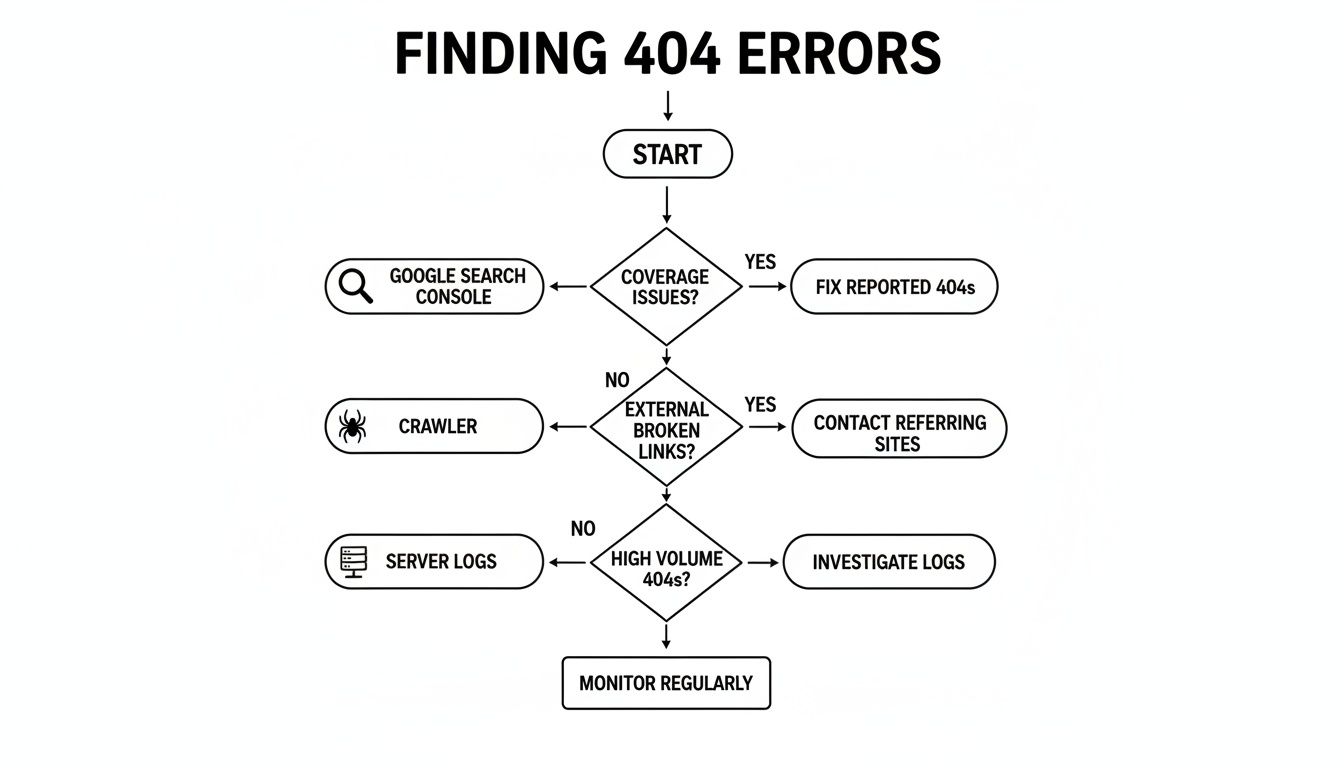
This process helps you triage effectively, tackling the most visible errors first before digging into the nitty-gritty details hidden in your server logs.
The Easiest Fix of All: Just Restore the Page
We’ve all been there. Someone on the team accidentally unpublished a critical landing page, or a key resource got trashed during a content audit. Human error is part of the game, and sometimes the simplest solution is staring you right in the face.
Before you start messing with redirect plugins or .htaccess files, just ask yourself one simple question: "Was this page actually supposed to be deleted?"
If the answer is a sheepish "no," then your job is easy. Just restore the page from your CMS trash or a recent backup. Boom. The 404 vanishes, the URL works again, and you can get back to your coffee. It’s the cleanest possible fix for those inevitable "oops" moments.
To make this even simpler, here's a quick cheat sheet to help you make the right call in the heat of the moment.
404 Error Remediation Cheat Sheet
| Scenario | Best Solution | Why It Works |
|---|---|---|
| Accidental Deletion | Restore the page | The page was never meant to be gone. This is the simplest, cleanest fix. |
| URL Has Changed | 301 Redirect | The content moved. This passes users and SEO value to the new location. |
| Content Was Merged | 301 Redirect | Redirect old, less comprehensive pages to the new, consolidated "super" page. |
| Page Is Gone Forever | 410 Gone | Tells search engines to stop crawling this URL, saving crawl budget. |
| Typo in an Internal Link | Update the link | Fix the source of the problem directly. No redirect is needed. |
| Minor Typos in External Links | 301 Redirect | You can't fix their site, but you can capture that link equity by redirecting their typo. |
Ultimately, choosing the right solution comes down to understanding the intent behind the missing page. Was it an accident, a strategic move, or an oversight? Once you know the "why," the "how" becomes much clearer.
How AI Search Changes the Game for Broken Links
Well, the age of AI search is officially here, and it’s got a surprisingly tight connection to every single 404 error Google stumbles upon on your site. When a tool like Google’s AI Overviews or ChatGPT cites your website, it's doing more than just sending a link; it's stamping your content with a seal of approval.
This new dynamic raises the stakes—a lot. A broken link that shows up in an AI-generated answer isn't just a frustrating dead end for a user anymore. It's a direct blow to your credibility, telling these powerful new models that you can't be trusted.
Think about it. If an AI points a user to your site for a specific answer and they smack into a "Page Not Found" wall, you've got a double-whammy of a problem. First, you've annoyed a potential customer. Second, the AI model itself might just learn that your domain isn't a reliable source, which could tank your visibility in future AI-powered results.
The Credibility Gap of AI Citations
This isn't just some far-off theory, either. We're already seeing data that shows a real difference in how well different platforms are handling link rot.
A recent analysis dug into over 145,000 URLs cited by ChatGPT and found that a startling 1.22% of them led to 404 Not Found errors. That means you’re twice as likely to hit a dead end from a ChatGPT citation than from Google's ecosystem. For comparison, Google's AI Overviews came in with a much cleaner error rate of just 0.56%. It’s a clear sign of how seriously Google is taking link reliability in this new world. If you want to dive deeper, you can check out the full research on AI and broken links at seranking.com.
When an AI cites your broken page, it's not just sending a user to a dead end. It's broadcasting your site's unreliability at scale, potentially damaging your brand's reputation with both humans and algorithms.
All this means that keeping your site squeaky clean of 404s has graduated from "good SEO housekeeping" to "essential future-proofing." It's about making sure your website is ready for a world where algorithms, not just people, are the ones judging your authority.
Why Every Single Link Matters More Now
In this new reality, every URL on your site is a potential citation—a tiny piece of data that AI models gobble up to build their knowledge. A single broken link can create a ripple effect, slowly chipping away at the trust these systems have in your entire domain.
Let’s break down the impact:
- For Users: Hitting a dead end from an AI recommendation is instantly frustrating and makes your brand look sloppy.
- For AI Models: It’s a loud-and-clear signal that your content is outdated or poorly managed, making you a less attractive source for future answers.
- For Your SEO: It's a completely wasted opportunity for referral traffic and a negative mark on your site's overall health report card.
Fixing a 404 error Google flags is no longer just about clawing back some link equity. It’s about cementing your position as a trusted voice for the next generation of search. For those building integrations, you can explore our own commitment to reliability by checking out the specifications in our OpenAPI documentation.
How to Stop Playing Whack-A-Mole with 404s

Fixing 404s after Google flags them is a reactive, never-ending game. The real win? Building a fortress against broken links so they never show up in the first place.
Instead of waiting for that dreaded email from Search Console, you need to get ahead of the problem. This means being meticulous before anything goes live and having a solid game plan for retiring old content. It's time to shift from cleanup crew to a savvy site architect.
Get Your Pre-Launch Checklist in Order
Pushing a new page, feature, or a whole site redesign live without a pre-launch checklist is just asking for trouble. This isn't some nice-to-have document; it's your first and best line of defense against creating a fresh batch of 404s.
Your checklist needs to be simple but brutally effective. The absolute number one item on that list? Test every single link. Seriously. Before you even think about hitting "publish," run a full crawl on your staging environment. This is how you catch broken paths before they ever become a public embarrassment.
This one habit prevents the most common source of self-inflicted 404s: simple human error during development or content migration. A single unchecked box can save you hours of pain later.
A proactive crawl of a staging site is the single most effective way to prevent 404 errors. It turns a potential public mess into a private, easily fixable issue.
Never Just Delete Old Content
Every piece of content has a lifecycle. When a blog post is no longer relevant or a product line gets discontinued, hitting the delete button is an SEO cardinal sin. That single action instantly creates a 404 for any internal links, user bookmarks, or—most critically—valuable backlinks pointing to that URL.
Retiring content requires a graceful handoff. Always, always implement a 301 redirect to the next most logical page. If you're sunsetting a page for "vintage blue sneakers," redirect users and search engines to the main "sneakers" category. This simple step preserves your hard-earned link equity and saves the user from a dead end.
Schedule Regular Site Health Checks
Don't let Google be the one to tell you something's broken. Get into the habit of running a full crawl on your live site on a regular basis. Firing up a tool like Screaming Frog or Ahrefs' Site Audit once a month is a fantastic way to catch problems before they fester.
Think of it as a routine dental checkup for your website. This kind of maintenance helps you spot and fix nagging issues, such as:
- Broken internal links that popped up after a recent content update.
- Redirect chains that have gotten too long or looped back on themselves.
- External links pointing to pages or sites that have since vanished.
By catching these things early, you stay miles ahead of the crawlers and maintain a rock-solid site structure that users and search engines can trust.
Craft a Killer Custom 404 Page
Look, even with the best systems in place, some users are going to hit a 404. They might mistype a URL or follow a bad link from a third-party site you have no control over. This is your chance to turn a moment of frustration into a surprisingly positive brand experience.
A great custom 404 page does more than just state the obvious. It should:
- Show Some Personality: Use your brand's voice. A little self-aware humor can go a long, long way.
- Offer a Search Bar: Empower users to find what they were actually looking for.
- Provide an Escape Hatch: Give them helpful links to your homepage, popular articles, or main product categories.
This simple touch transforms a digital dead end into a helpful new starting point, keeping visitors on your site and preventing them from bouncing away for good.
Your Burning Questions About 404 Errors, Answered
Let's cut through the noise and tackle some of the most common myths and questions that always seem to pop up around the dreaded 404 error. Getting a handle on these will help you manage your site's health with a lot more confidence and sidestep some classic technical SEO face-plants.
Do 404 Errors Actually Hurt My Rankings?
This is the big one, isn't it? The short answer is no, not directly. Google’s own John Mueller has said many times that having some 404s is just a normal part of the internet doing its thing. A few broken links won't make Google slap your entire site with a penalty.
But—and this is a big but—the indirect effects are where the real danger lies. If a page that has a bunch of awesome backlinks suddenly starts 404'ing, all that hard-earned link equity just vanishes into thin air. Poof. And if your users keep hitting dead ends, they’ll bounce, sending signals to Google that your site offers a frustrating experience.
What’s the Difference Between a 404 and a Soft 404?
Think of it this way: a standard 404 (Not Found) is an honest, straightforward message. The server clearly tells both the browser and Googlebot, "Nope, nothing here." Everyone is on the same page, and there's no confusion.
A soft 404, on the other hand, is a master of mixed signals. The server sends a 200 OK success code, basically saying, "Yep, this page is totally here and working!" but the content itself is a sad, empty shell saying something like, "Sorry, this product is out of stock." Google gets this confusing message—a technically valid page with zero actual value—and flags it because it doesn't know what to do with it.
A soft 404 is like a ghost page. The server swears it's there, but for all practical purposes, it’s empty. This just wastes your crawl budget and muddies the waters for search engines.
How Many 404s Are Too Many?
Honestly, there's no magic number. A sprawling e-commerce site with millions of product pages will naturally rack up more 404s from discontinued items than a tiny five-page business site. It's not about the raw number; it’s all about the context and the impact.
So, instead of trying to get to "inbox zero" in your Google Search Console report, you need to get smart about prioritizing. Focus your energy on fixing 404s that:
- Get a meaningful amount of traffic.
- Have valuable, high-authority backlinks pointing to them.
- Are a crucial part of a user's journey, like a step in your checkout process.
Should I Just Redirect All My 404s to the Homepage?
Oh, please don't. While it might seem like a quick fix, this is a lazy solution that creates a genuinely terrible user experience. Just imagine you clicked a link for "blue running shoes" and were unceremoniously dumped on the homepage. It's confusing, unhelpful, and makes people leave.
Google is wise to this trick, too, and often treats this kind of blanket redirect as a soft 404. The golden rule is to always redirect a broken URL to the next most relevant page. If a good alternative doesn't exist, you're far better off letting it serve a proper 404 or, even better, a 410 Gone status code to say it's gone for good.
Ready to stop wrestling with visual content and start scaling? With PixelPanda, you can automate everything from background removal to smart upscaling with a simple API call. Get started for free and see what you can build.