
Imagine trying to build a modern app completely from the ground up. It’s a bit like deciding to cook a five-star meal but insisting on forging your own knives and weaving your own baskets first. You could do it, but why would you?
This is where third-party apps come in. Think of them as the high-end, specialized gadgets for your digital kitchen—the slick espresso machine, the precise sous-vide cooker, the high-speed blender. They let you create amazing things without having to become a master of every single craft.
What Are 3rd Party Apps

Let's break it down. Your own software, website, or mobile app is your home base—it's your "first-party" application. A third-party app is simply any piece of software built by another company that you plug into your platform to add new features or capabilities.
You probably use them dozens of times a day without even noticing. Ever used Google Maps inside a ride-sharing app? Or paid for your morning coffee with Apple Pay through a store's app? Both are perfect examples of seamless integrations powered by 3rd party apps. These tools are built to handle one specific, complex job so you don't have to.
The Power of Plug-and-Play Functionality
Instead of sinking thousands of hours and a mountain of cash into building your own payment gateway or a global mapping service, you can just integrate a solution from a provider who lives and breathes that stuff. This plug-and-play approach is the secret sauce behind modern software development.
Here’s why it works so well:
- Go Faster: Why reinvent the wheel when a perfectly good one is sitting right there? Grabbing a pre-built solution shaves massive amounts of time off your development cycle, helping you launch features and products in a fraction of the time.
- Borrow a Brain: The companies building these tools are the best in the world at what they do, whether that's AI image editing, secure financial transactions, or social media logins. By integrating their app, you get all their expertise without having to hire a new team.
- Make Users Happy: Adding powerful features like one-click sign-ins or beautiful data visualizations gives your users a richer experience. They get more value, and you don't have to shoulder the massive upfront cost of building it all yourself.
For developers, this means you can finally stop worrying about building basic infrastructure and focus on what makes your product special. For the business, it means getting to market faster with a much stronger product.
It's All About the Data
The magic that makes these connections work is data exchange. To really get it, you have to understand the difference between first-party vs. third-party data. Your app collects first-party data directly from your users (like an email signup). A third-party tool might take that data to perform a task or even add its own data to the mix.
Think of it this way: our AI image API is like your personal master chef for visual content. You provide the raw ingredients (your images), and it uses its expertise to turn them into a culinary masterpiece.
How 3rd Party Apps Actually Talk To Each Other
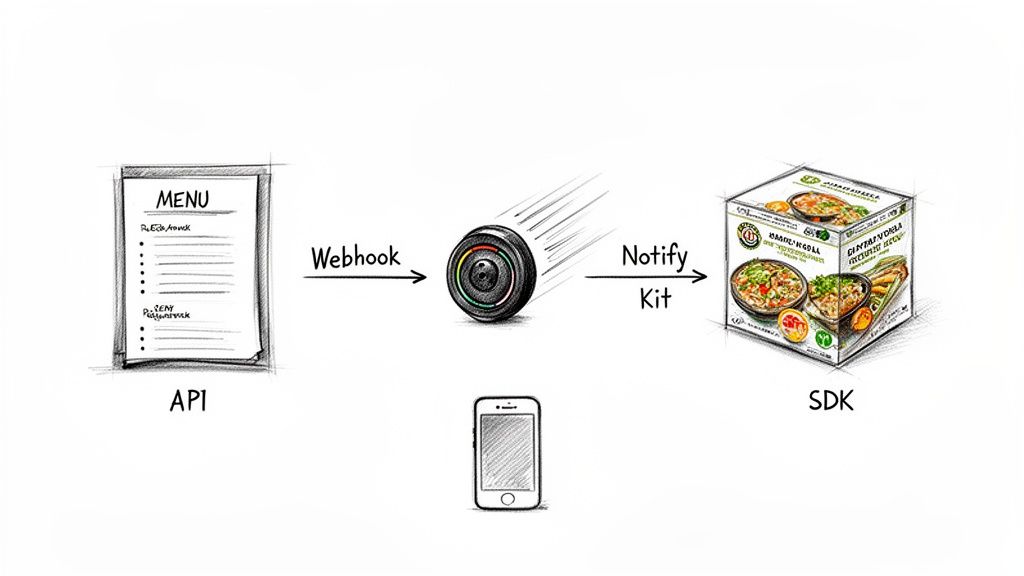
So, how do all these separate pieces of software actually connect? It’s not magic, but it’s just as cool. Think of it like ordering food from a high-tech restaurant. You’ve got a few different ways to place your order and get your meal, and each method has its own purpose.
These "methods" are the languages that 3rd party apps use to communicate. Let's break down the three big ones you’ll run into constantly: APIs, Webhooks, and SDKs.
The API Is Your Menu
The most common way apps talk is through an API, which stands for Application Programming Interface. The best way to think of an API is as a structured menu that one app gives to another. It lists all the available "dishes" (services) and explains exactly how to order them.
When your app needs something, it sends a very specific, well-formed request to the third-party app's API. For instance, your e-commerce platform could send an image to PixelPanda's API with a request like: "Remove the background from this product photo and send me back a transparent PNG."
The API is the waiter that takes your order, makes sure the kitchen understands it, and brings the finished dish back to your table. If you want to see a real menu, developers can dig into detailed API documentation, like the PixelPanda OpenAPI specification, which outlines every single thing you can ask for.
The Webhook Is Your Pager
Okay, but what if you don't want to keep asking the waiter, "Is my order ready yet? How about now?" That would get annoying fast. This is where Webhooks come into play.
Think of a webhook as the pager a restaurant gives you. You place your order, go sit down, and when the food is ready, the pager buzzes automatically. Simple.
Instead of your app constantly polling (checking for updates), a webhook is an automated notification sent from the third-party app back to yours when a specific event happens. For example, after you submit a batch of 1,000 images for processing, the API can trigger a webhook to ping your system the moment the job is done. This is way more efficient.
The SDK Is Your Meal Kit
Finally, we have the SDK, or Software Development Kit. If an API is the restaurant’s menu, an SDK is like a complete meal-kit subscription box. It doesn't just give you instructions; it provides all the pre-measured ingredients, specialized tools, and recipe cards you need to cook a perfect dish right in your own kitchen.
An SDK bundles together all the necessary code, libraries, and documentation a developer needs to build features using a 3rd party service directly within their own application, often for a specific platform like iOS or Android.
A developer could use an SDK to build image processing features directly into their mobile app, for example. This makes the integration feel totally native and seamless to the end-user. It’s the most hands-on approach, giving you the deepest control over the final experience.
Integration Methods At A Glance
To put it all together, here’s a quick cheat sheet comparing these three methods.
| Integration Method | Analogy | Best For | Example Use Case |
|---|---|---|---|
| API | Restaurant Menu | Requesting specific data or actions on-demand. | Asking a weather service for the current temperature in London. |
| Webhook | Pager/Buzzer | Receiving real-time notifications about events. | Getting a ping when a customer's payment has been processed. |
| SDK | Meal Kit | Building deep, native integrations on a specific platform. | Adding a social media login feature directly into your mobile app. |
Each method solves a different problem, but they often work together to create a smooth, powerful connection between applications. Knowing which one to use is half the battle.
Navigating The Security And Privacy Maze
Integrating a 3rd party app is a bit like giving a new houseguest a key. You're inviting them into your digital home, trusting they won't track mud on the carpet or accidentally leave the front door wide open for thieves. And while most guests are perfectly respectable, you wouldn't just hand over keys to a total stranger, would you?
The benefits of these integrations are undeniable, but so are the risks if you drop your guard. The biggest one? Data security. When you connect an app, you're handing over your data—and often, your customers' data—for safekeeping. A single weak link in that app's security can quickly become a gaping backdoor into your entire system.
This is where you run into the classic problem of "permission overreach." It's like calling a plumber to fix a leaky sink and having them ask for the keys to your master bedroom. It just doesn't feel right. Always stick to the Principle of Least Privilege: grant an app only the bare minimum permissions it needs to do its job, and nothing more.
Your Security Vetting Checklist
Before you hand over that digital key, it’s time to do a little background check. You’d vet a housesitter, so why wouldn’t you vet an app that has access to your company’s most sensitive information? A bit of homework now will save you a world of pain later.
Here’s a quick and dirty checklist for vetting any 3rd party apps you’re thinking about using:
- Check for Compliance Certifications: Keep an eye out for well-known standards like SOC 2 or ISO 27001. These aren't just fancy acronyms to slap on a website; they're proof that the company has passed rigorous, independent security audits.
- Actually Read the Privacy Policy: I know, I know—it's boring. But it’s also where the bodies are buried. Does the company spell out exactly what data they collect and how they use it? Or is it a mess of vague legalese? A shady privacy policy is a massive red flag.
- Investigate Their Authentication Methods: How do you log in and grant access? Secure, modern services use protocols like OAuth. This lets you grant specific, limited permissions without ever sharing your main password. If an app asks for your master password, run.
- Look for a Public Security Page: Companies that take security seriously aren't shy about it. They'll often have a dedicated page explaining their security posture, how they handle bug reports, and their general philosophy. Transparency is a great sign.
Think of robust authentication like giving your guest a special key that only opens the living room and expires after their visit, instead of your master key that opens everything forever.
Securing Your Own Connection
Okay, so you've picked a trustworthy partner. Your job isn't done yet. You also have to lock things down on your end. That means protecting your API keys and other credentials like they're the crown jewels.
Whatever you do, don't hardcode sensitive keys directly into your app's source code. That's just asking for them to be leaked. Instead, use environment variables or a proper secrets management tool to keep them locked away safely. Treat your API keys like passwords—because, for all intents and purposes, that's what they are. By being smart about who you partner with and how you connect, you can get all the benefits of 3rd party apps without gambling with your security.
Your Ultimate Checklist for Choosing the Right App
Let's be honest, not all third-party apps are created equal. Picking the right one is less like shopping and more like choosing a co-pilot for a long-haul flight—you need someone reliable, skilled, and easy to talk to when things get bumpy. Think of this checklist as your pre-flight inspection before you invite a new integration into your cockpit.
Jumping into a long-term commitment without a proper test drive is just asking for trouble. A great provider knows this and makes the evaluation process a breeze. A hypothetical image API, for instance, should offer a generous free trial that lets you kick the tires and see if its performance actually lives up to the marketing hype.
The right partner makes it easy to say yes. This is especially true in booming sectors like ecommerce, where third-party tools are the backbone of the business. The market reflects this, with spending on user acquisition for these apps hitting a staggering $78 billion globally. Why? Because the good ones dramatically increase revenue and efficiency. You can dig into more app revenue statistics on ElectroIQ.
The Documentation Deep Dive
Your first stop should always be the documentation. Is it a dusty, forgotten manual sitting on a digital shelf, or is it a vibrant, easy-to-navigate library? Clear, comprehensive, and well-organized documentation is a massive green light. It’s a sign that the company actually cares about the people who will be using their product.
Here are a few tell-tale signs of quality documentation:
- Quickstart Guides: Can you get from zero to a successful API call in under five minutes? You should be able to.
- Code Samples: Are there copy-paste-ready examples in your favorite programming languages?
- Clear Explanations: Does it explain the "why" behind the features, not just the "what"?
Great documentation anticipates your questions and gives you the answers before you even have to ask. It’s the difference between a smooth takeoff and being stuck on the runway with a confusing instruction manual.
Support and Community Strength
When something inevitably breaks at 3 AM, who are you going to call? A responsive developer support team is absolutely non-negotiable. See if they offer real support through channels like Slack, Discord, or a dedicated email that gets answered by a human. A lively community forum is also a huge plus, as it means you can learn from the shared battle scars of other users.
Before you sign on the dotted line, you also need to vet the app's performance and ability to scale. Can it handle your workload today and grow with you over the next few years? Look for clear information on rate limits, uptime guarantees, and case studies from companies operating at a similar scale to yours. To see how a well-structured app definition should look, check out the PixelPanda AI plugin configuration—it’s built for pure clarity.
Transparent and Fair Pricing
Finally, let's talk about the money. The pricing model should be dead simple to understand. If you need a spreadsheet and a calculator to figure out your monthly bill, run the other way.
Avoid providers with confusing tiers, sneaky hidden fees, or models that punish you for growing. A good pricing page clearly lays out what you get at each level and makes it easy to predict your costs. The best partners win when you succeed, not by trapping you in a confusing contract.
A Practical Walkthrough for Integrating 3rd-Party Apps
Alright, enough with the theory. Let's get our hands dirty and actually plug something in. This is where the real fun starts. Integrating a 3rd-party app isn't about memorizing a phonebook-sized manual; it's about understanding a few key ideas that make the whole process smooth and predictable.
Think of it like building a new LEGO set. You don't need to be a master builder, but you do need to follow the instructions, use the right pieces, and make sure everything clicks together securely. Let’s walk through the must-know steps for any successful integration.
Your Secret Handshake: Authentication
First things first, you’ve got to prove you are who you say you are. This is authentication. You wouldn’t just let a stranger walk into your office and start using your computer, and an API won't let your app start making requests without the right credentials.
Most services today use API keys or OAuth tokens. This is your secret handshake—a unique key you send along with every request to identify your app. To see how this works in the wild, check out the PixelPanda developer documentation; it’s a great example of how to get your keys and get started fast.
Don't Break the Speed Limit
Once you're authenticated, you can't just put the pedal to the metal. Every API has rate limits, which are essentially rules that cap how many requests you can make in a certain amount of time. This is a good thing! It stops one user from hogging all the resources and slowing things down for everyone else.
It’s like being at a popular ice cream shop. If one person tries to order 1,000 scoops at once, the whole line grinds to a halt. Rate limits keep the line moving so everyone gets a turn. Always, always check the API docs for these limits and build your code to play by the rules.
This little flowchart nails the key checkpoints for a smooth integration, from the moment you start evaluating an app to getting it running.
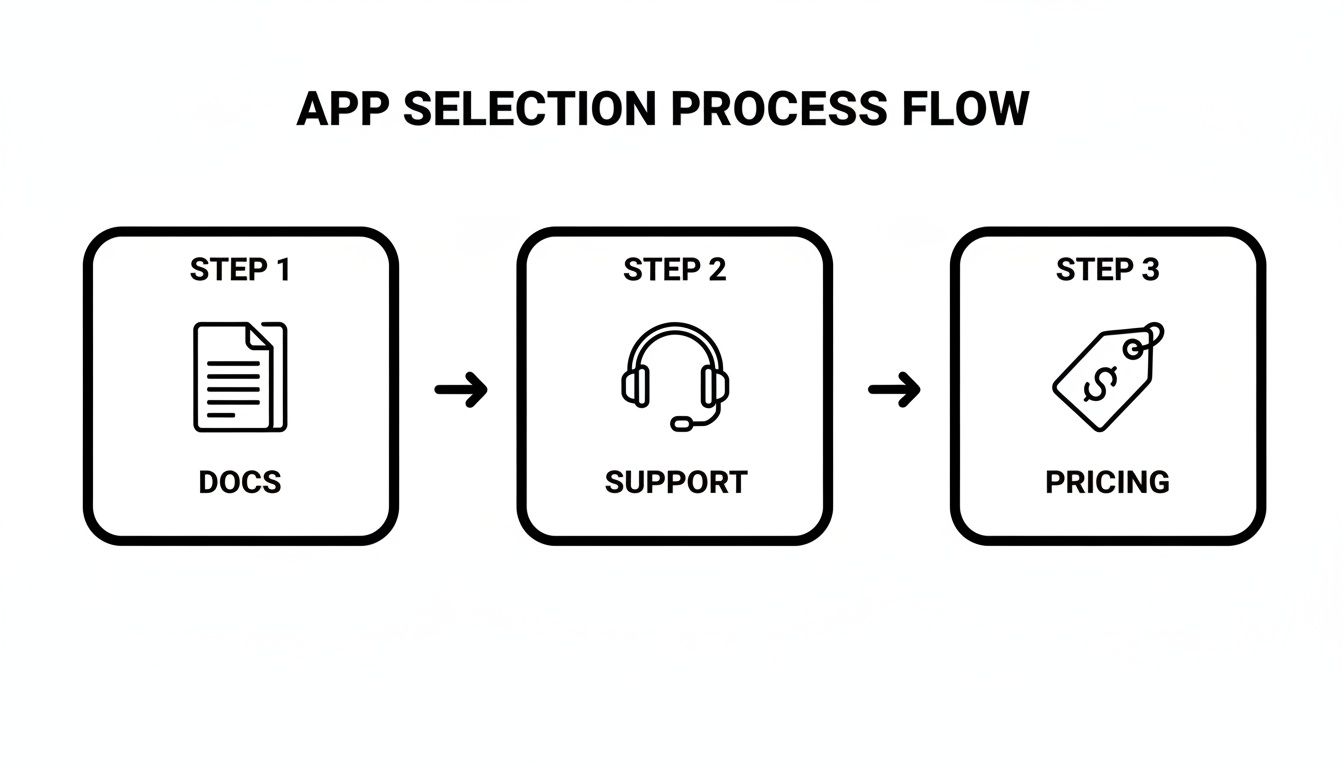
The path from checking docs to support and then pricing shows that a solid integration starts long before you write a single line of code.
Plan for a Rainy Day
So, what happens when things go wrong? Because they will. An image upload might fail, a server could be down for maintenance, or an astronaut could trip over a cable. This is where graceful error handling saves the day. Your code needs a plan B. That might mean retrying the request after a short pause or simply letting the user know something went sideways.
A well-built integration doesn't just work when everything is perfect; it remains stable and predictable even when things aren't.
This kind of planning is mission-critical, especially as the app world keeps growing. Think about the 255 billion app downloads happening worldwide. That’s a staggering number of moving parts, and it highlights just how interconnected modern software has become.
Let's look at a real-world example. Imagine an e-commerce site that uses an API to automatically remove the background from new product photos. A smart workflow would authenticate, process images in batches to stay under the rate limit, and if one photo fails, it would flag it and move on without stopping the entire batch. To see how multiple tools can be chained together, check out this practical guide on using Cursor with Figma, GitHub, and MCP integration.
Keeping Your Integrations Healthy and Performant
So, you’ve launched your integration. Pop the champagne! It feels like you’ve just driven a shiny new sports car off the lot. But here's the thing about high-performance machines: the real work has just begun. An integration with 3rd party apps isn't a "set it and forget it" gadget. It needs regular tune-ups and a close eye on the dashboard to keep it humming along.
Think of yourself as the proud new owner and head mechanic. Your top priority is knowing instantly when something sputters or stalls—not finding out from a flood of angry customer emails. This means setting up solid logging and alerting to catch issues before they turn into full-blown meltdowns. Your logs are the black box for your integration, capturing the story of every single request.
Setting Up Your Early Warning System
Great monitoring isn’t about staring at a blinking screen all day. It’s about building a smart, automated system that knows when to sound the alarm. You're essentially teaching your system to watch a few critical vital signs.
- API Error Rates: Are your API calls suddenly hitting a wall? A sudden jump in 4xx or 5xx errors is a massive red flag. It’s the digital equivalent of your check engine light flashing violently.
- Latency: How long are requests taking to come back? If your average response time creeps from a zippy 100ms to over a second, your users are going to feel that painful lag.
- Version Changes: Keep tabs on the provider’s developer changelog or newsletter. An API you depend on could be scheduled for demolition (deprecation), and you’ll want to update your code long before it brings everything crashing down.
A healthy integration is a resilient one. It’s built with the expectation that things will occasionally go sideways—a temporary outage, a sudden API change—and it knows how to handle the bumps without flying off the road.
Navigating Outages and Updates
Let's be real: sooner or later, a service you rely on will go down. It's not a matter of if, but when. When it happens, don't panic. The first thing you should do is check their official status page. It’s almost always the fastest way to get the real story.
While you wait for them to sort things out, make sure your own application handles the situation with grace. Maybe you temporarily disable the feature that relies on the third-party service and pop up a friendly message for your users.
And when you do need to contact their support team, be the person they want to help. Give them everything they need—request IDs, exact timestamps, and specific error messages. The more precise you are, the faster they can pinpoint the problem. Treat your 3rd party apps like true partners, and you’ll build something far more powerful and reliable together.
Got Questions? We’ve Got Answers.
Still got a few things rattling around in your head about third-party apps? Good. That means you’re thinking critically. Let's clear up some of the common questions that always come up when you start plugging these tools into your workflow.
What's The Real Difference Between A Third-Party App And An API?
This one trips people up all the time, but the analogy is simple. Imagine a high-end kitchen that specializes in making perfect pizzas—that's the third-party app. It has all the ingredients, the fancy ovens, and the expert chefs.
The API is the friendly waiter who takes your specific order. You don't tell the waiter how to make the pizza; you just say, "I'll have a large pepperoni with extra cheese," and the waiter translates that into a structured ticket for the kitchen. Your app uses the API to place orders, and the third-party service delivers the results.
In short, the app is the whole kitchen; the API is just the menu you order from.
Are Third-Party Apps Actually Safe To Use?
They can be, but you have to be your own security guard. It's not about blind trust; it's about smart vetting. The first thing you should do is hunt for their security credentials. Do they have certifications like SOC 2? That's a huge green light.
Next, read their privacy policy—yes, the whole thing. And when you grant permissions, be stingy. Only give the app the absolute minimum access it needs to do its job.
A provider worth their salt will be loud and proud about their security measures. If you feel like you're on a treasure hunt just to find their security page, consider that a giant red flag.
What’s The Plan When A Service Goes Down?
First off, don't wait for a user to tell you something's broken. Set up monitoring to catch an outage the second it happens. Your code needs to be resilient, with proper error handling that won't let a hiccup from another service bring your entire application to its knees.
For mission-critical features, you absolutely need a Plan B. This could be as simple as temporarily disabling the feature and popping up a message for your users, or it could mean failing over to a backup service. And always, always bookmark the provider's status page—it's your go-to source for real-time updates.
Couldn't I Just Build This Thing Myself?
You absolutely could. But the real question is, should you? Building a feature in-house gives you ultimate control, no doubt about it. But it also means you're on the hook for all the development time, the cost of resources, and the headache of ongoing maintenance forever.
Using a third-party app is a strategic shortcut. You offload all that complexity to an expert team, which frees you up to focus on what makes your product unique. It’s the classic "build vs. buy" dilemma, and more often than not, buying lets you ship great features way, way faster.
Ready to stop reinventing the wheel and start creating with powerful AI? PixelPanda gives you a developer-friendly API to automate your entire visual workflow. Check out our tools and see just how fast you can plug studio-quality image processing right into your app. Get started for free at PixelPanda.