Artificial intelligence, or AI, isn't about sentient robots taking over the world—at least, not yet. In the real world, it's a field of computer science dedicated to building systems that can handle tasks we used to think required a human brain. Think of it as a super-powered assistant for creators and developers, one that can spot patterns, make decisions, and create new content on a scale we could only dream of.
What Is This Whole AI Thing, Really?
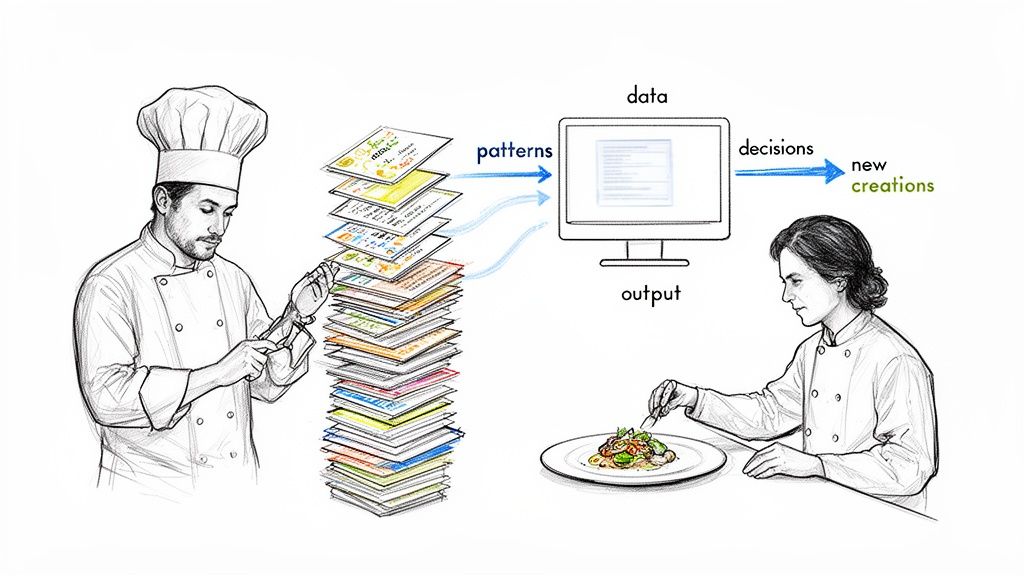
Let's cut through the noise for a second. When people throw around the term "AI," they're not talking about Hal 9000. A better analogy is a master chef who has memorized every cookbook ever written. This culinary genius can taste a dish and instantly name every ingredient, suggest a better spice, or even dream up an entirely new recipe by blending French techniques with Japanese flavors.
That’s basically what modern AI does. We feed a computer an insane amount of data—millions of images, mountains of text, entire libraries of code—and teach it to recognize the patterns within. Once it gets the hang of it, it can do some pretty amazing things, like perfectly crop a person out of a photo or finish your line of code for you.
The AI We Actually Use vs. The AI We See In Movies
It’s really important to draw a line in the sand between what’s real and what’s Hollywood. This helps ground the technology and show where its true power lies today.
- Artificial Narrow Intelligence (ANI): This is the AI you use every day, whether you realize it or not. It's built for one specific job. Your phone unlocking with your face? ANI. The spam filter guarding your inbox? ANI. An API that intelligently resizes images? You guessed it, ANI. It's a specialist, brilliant in its lane but clueless outside of it.
- Artificial General Intelligence (AGI): Now this is the sci-fi stuff. We're talking about a machine with human-like consciousness that can learn, reason, and solve any problem you throw at it. AGI is purely theoretical right now; it doesn't exist, and it’s still a far-off dream for researchers.
The bottom line is that today’s AI is a specialized tool, not a thinking being. By leaning into Narrow AI, teams can automate incredibly specific, mind-numbing tasks with surgical precision. This frees up brilliant human minds for the fun stuff: creativity and big-picture strategy.
Why It Matters Now More Than Ever
AI has officially left the lab and is now a foundational piece of the tech puzzle. The global AI market is expected to explode from USD 294.16 billion in 2025 to a staggering USD 2,480.05 billion by 2034. For product managers and engineers, this isn't just a trend—it's the new normal. If you want to get into the nitty-gritty of the systems that make this happen, understanding what an AI agent platform is is a great place to start.
The key takeaway is simple: AI isn't magic. It's a powerful and practical assistant that's ready to be put to work. Whether you're automating your image workflows with a tool like the PixelPanda API or building the next breakout app, getting a real handle on what AI can actually do is your first step to making it work for you.
Meet The Engines Behind The Magic
If AI is the brilliant head chef in the kitchen, then Machine Learning (ML) is the dedicated apprentice who learns by doing. This is where the real work happens.
Let’s say you need to teach this apprentice to spot every single cat in a library of millions of photos. You wouldn’t even try to write a rule for every possible cat pose, color, or breed. That’s just not going to happen.
Instead, you’d show the apprentice thousands of photos, pointing out, "Yep, that's a cat," and "Nope, not a cat." At first, it's a disaster. It might confuse a fuzzy blanket for a Persian or a dark shadow for a black cat. But with every single guess and correction, it slowly but surely refines its internal "cat-ness" detector.
This process of learning directly from examples is the soul of machine learning. The system isn't programmed with rigid rules; it figures out the patterns on its own by chewing through mountains of data. It’s the engine running everything from your email’s spam filter to the product recommendations you see on Amazon.
Supercharging The Brain With Deep Learning
Now, what if that apprentice could spontaneously grow its own multi-layered brain? That’s the monumental leap we take from machine learning to Deep Learning (DL).
Deep learning is a souped-up, more powerful subset of ML. It uses complex structures called artificial neural networks, which are loosely modeled after the connections in our own brains.
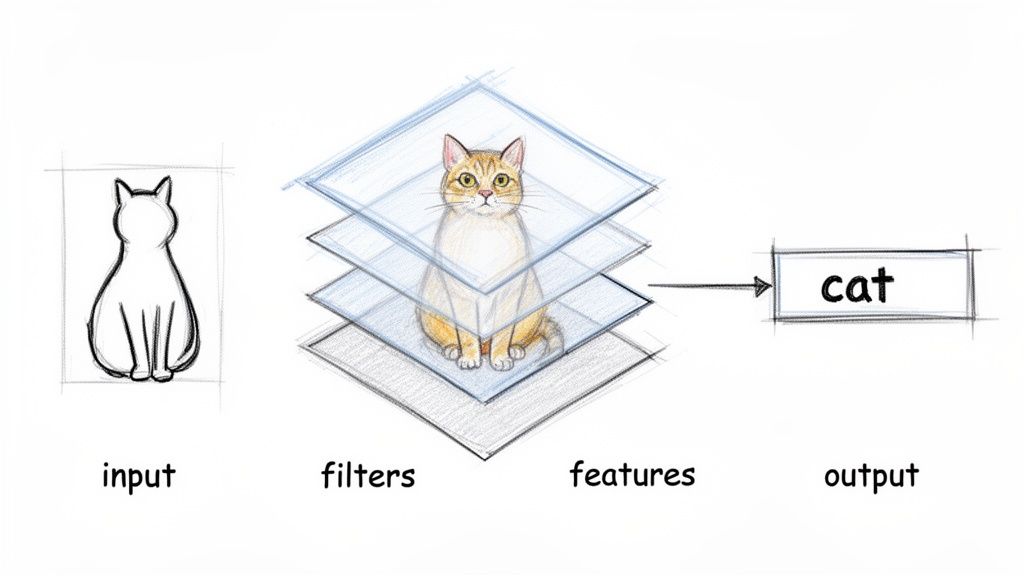
Think of it like building a visual recognition system with a stack of increasingly picky filters.
- The First Layer: This one is pretty simple. It just looks for basic stuff like edges, corners, and blobs of color. It can't see a "cat" yet, but it can spot a sharp line that might be an ear.
- The Middle Layers: These take the simple shapes from the first layer and start putting them together. They learn to recognize more complex features—eyes, whiskers, paws—by combining all those little edges and blobs.
- The Final Layer: This top layer takes all those assembled parts and makes the final call. When it sees the right combination of pointy ears, whiskers, a feline nose, and a furry texture, it confidently shouts, "That's a cat!"
This layered strategy allows deep learning models to grasp incredibly subtle and intricate patterns that are miles beyond what traditional machine learning can handle. It’s exactly why an AI can tell the difference between a real person's face and a high-res photograph, or perfectly cut the background out of an image while preserving every last wisp of hair.
Deep learning doesn’t just see pixels; it learns a hierarchical representation of concepts. This ability to understand context and abstraction is what enables the most impressive feats of modern AI.
So, How Does The Magic Really Work?
When we talk about "AI" these days, we're almost always talking about systems built on these learning principles. Machine learning provides the core method—training from data—while deep learning brings the powerful neural network architecture needed for heavy-duty tasks like image and speech recognition.
These models aren't "thinking" like we do. They are just executing incredibly sophisticated pattern-matching at a scale we can barely comprehend. This is the foundation that today's most powerful AI tools are built on.
To dive even deeper into how advanced models are put together, you can explore resources that break down things like GPT-5 for software developers. Getting a handle on these core concepts—ML as the apprentice and DL as the layered brain—strips away the mystery. AI stops being some abstract idea and becomes a tangible set of techniques that solve very real problems. This is the tech powering the tools changing how we all create and work.
Unleashing The Creative Power Of Generative AI
So far, we've treated AI as a brilliant analyst—a super-fast apprentice that can sort and label data better than any human. But what happens when that apprentice picks up a paintbrush and starts creating masterpieces? That's when you meet the rockstar of the AI family: Generative AI.
Think of it like a musician who has spent a lifetime internalizing every genre, every chord progression, every rhythm. Now, you ask them to compose a brand-new jazz piece in the style of Miles Davis, but with a subtle hip-hop beat. That's what generative AI does. It doesn't just analyze what's there; it creates something entirely new from scratch.
This is the branch of AI that’s completely upending creative workflows. Instead of just identifying what's in a picture, it can dream up a picture that has never existed before, all from a simple text command.
From Understanding To Creating
The leap from the AI we knew to generative AI is massive. A classic AI model (a discriminative one) might look at a photo and tell you, "Yep, that's a dog." A generative model, on the other hand, can take the prompt "a corgi wearing a tiny superhero cape, flying over a city at sunset" and conjure up a brand-new image.
And it’s not just cutting and pasting. The model has learned the very essence of "corgi-ness," what a "superhero cape" looks like, the physics of "flying," and the colors of a "sunset." It then weaves these concepts together, pixel by pixel, into a unique, coherent picture. This moves AI from being a simple tool to a true creative partner.
The real magic of generative AI is its knack for synthesis. It smashes learned concepts together in novel ways, turning abstract ideas into tangible visuals in seconds. This lets creative teams cycle through ideas at a speed that was pure science fiction just a few years ago.
Core Generative Techniques For Visuals
For anyone in marketing or creative, the real action is happening in the visual space. A few key techniques are behind all this magic, each solving a different piece of the visual production puzzle.
- Text-to-Image Generation: This is the one everyone's talking about. You type a description (a "prompt"), and the AI spits out a matching image. It’s the ultimate brainstorming engine for mood boards, custom illustrations, or an endless supply of unique social media assets.
- Style Transfer: Got a photo that’s a little… bland? Style transfer can slap the aesthetic of one image (like a Van Gogh painting) onto the content of another (like your product photo). It's a killer way to create branded content with a consistent, artistic vibe.
- Smart Inpainting and Outpainting: This stuff feels like a superpower for photo editors. Inpainting intelligently fills in a missing or removed part of an image. If you need to erase a pesky object, the AI doesn't just blur the spot; it rebuilds what should have been behind it. Outpainting, its equally cool cousin, expands an image beyond its original borders, creating a wider scene that looks completely natural.
Let's break down how these different generative flavors can fit into your day-to-day work.
Types of Generative AI for Visuals
| Technique | What It Does (The Simple Version) | Killer Use Case for Your Team |
|---|---|---|
| Text-to-Image | You type words, it makes a picture. | Instantly create custom blog headers, social media visuals, or ad creative without a designer. |
| Image-to-Image | It transforms an existing image based on a text prompt or another image. | Fine-tune an AI-generated image or give a bland stock photo a complete makeover. |
| Style Transfer | It "paints" one image with the style of another. | Apply a consistent artistic filter across all your campaign images for a cohesive brand look. |
| Inpainting | Magically erases unwanted objects or fills in missing parts of a photo. | Clean up product photos by removing props, reflections, or watermarks in seconds. |
| Outpainting | Expands the canvas, creating more image around the original. | Turn a vertical photo into a horizontal banner for your website without awkward cropping. |
| 3D Asset Generation | Creates 3D models from text or 2D images. | Generate 3D product models for AR try-on features or interactive e-commerce experiences. |
Each of these tools opens up new ways to create faster and more dynamically, turning once-tedious tasks into quick, creative exercises.
Putting Generative AI Into Practice
This isn't just about making funny pictures of astronauts riding horses. Generative AI is a serious workhorse that's automating tasks that once devoured hours of manual labor.
Picture an e-commerce brand launching a new sneaker line. The old way involved a massive, expensive photoshoot for every color, every angle, and every marketing campaign. With a generative AI API, their workflow looks completely different.
- They take one perfect, clean shot of the sneaker.
- An API call instantly removes the background.
- Using text prompts, they generate dozens of unique backgrounds: "a futuristic neon-lit street," "a serene beach at sunrise," or "a minimalist concrete studio."
- They then generate countless ad variations with different styles and text overlays to A/B test on social media.
A process that used to take a week is now done in an afternoon. You get a massive flood of new content, production costs plummet, and you can finally test what your customers actually want to see. This AI-powered workflow isn't some far-off dream; it's a practical strategy for anyone who wants to stay ahead.
Putting AI To Work In Your Visual Workflow
It's one thing to talk about what AI can do in theory, but it’s a whole different ballgame when you see it actually save you time and money. This is where the rubber meets the road. Let’s get past the cool demos and walk through how AI can overhaul a real-world visual production pipeline, one automated step at a time.
Picture a typical e-commerce photoshoot. You've got a new product—let's say it's a slick pair of sneakers. In the old days, getting that photo from the camera to the website was a long, manual slog for your design team. Now, with an API-first approach, that entire workflow gets a massive upgrade.
The magic starts the moment the photo is taken. Instead of a designer spending 20 minutes in Photoshop meticulously tracing every edge, a single API call is made. In just seconds, the AI perfectly removes the background, nailing tricky details like shoelaces and delivering a crisp, transparent PNG ready for anything.
Automating The Grunt Work
This is where AI truly shines—by taking on the repetitive, soul-crushing tasks that drain your team's creative energy. Every team has these chores, and they are begging to be automated.
- Automated Background Removal: Imagine flawless, studio-quality cutouts for thousands of product listings. This isn't just about speed; it's about enforcing brand consistency across your entire catalog, from your website to third-party marketplaces.
- Smart Inpainting and Cleanup: Did a stray prop or an annoying watermark sneak into the shot? An AI inpainting model can intelligently paint it out, rebuilding the background pixels so it looks like the object was never even there.
- AI Image Upscaling: We’ve all been there—stuck with a low-resolution image that looks like a pixelated mess on modern screens. AI upscaling can intelligently increase the resolution, adding realistic detail to rescue otherwise unusable assets. Go ahead and try an image upscaling demo to see how it reconstructs fine details firsthand.
This is a simple look at how the generative process works, turning a basic prompt into a finished piece of content.
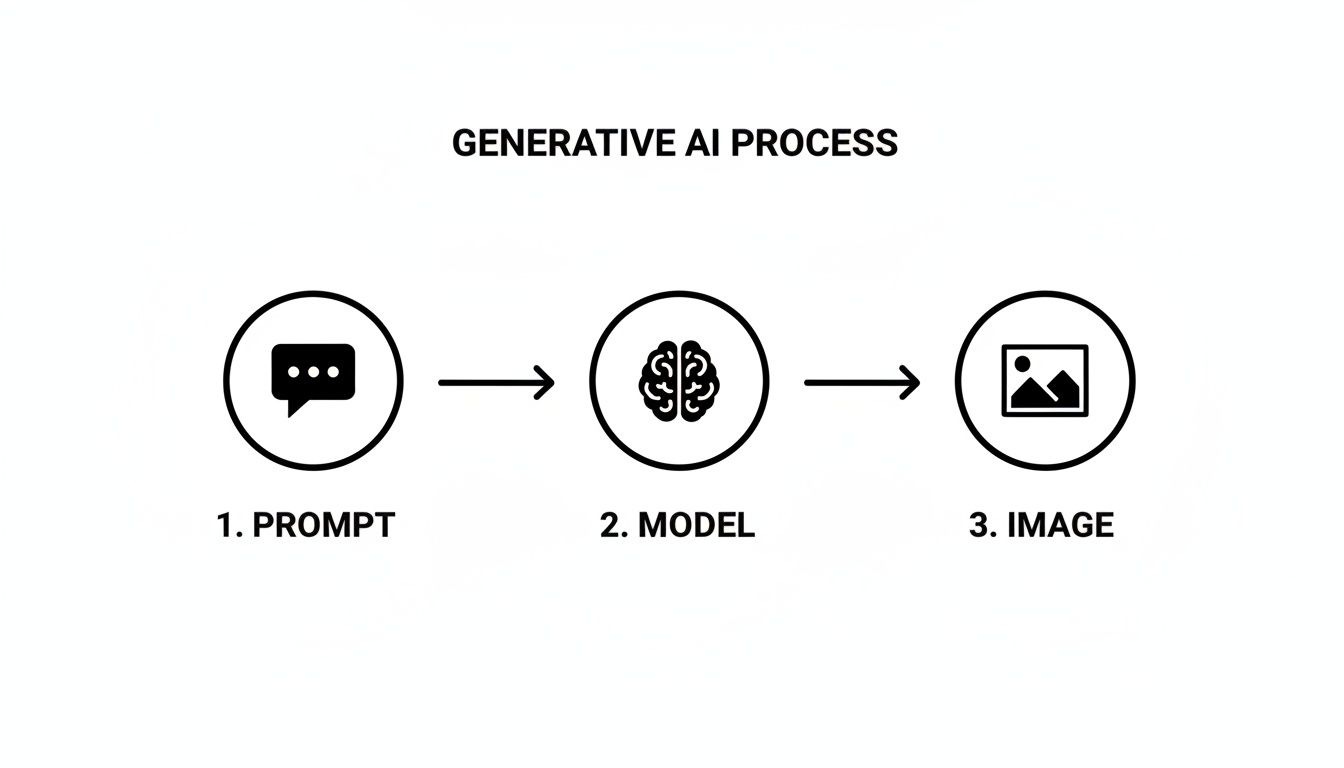
This flow shows how abstract ideas get translated by a model into something tangible, forming the basis for countless automated creative tasks.
Scaling Creativity On Demand
Once the initial image is cleaned up and ready, the real fun begins. Your marketing team now needs visuals for half a dozen different campaigns: a Facebook ad, an Instagram story, an email banner, and a website hero image.
Instead of a designer grinding out each one manually, they can use generative AI to spin up endless variations.
- Generate New Backgrounds: That clean product cutout can be programmatically dropped onto dozens of AI-generated backgrounds. A single prompt like "a futuristic cityscape with neon lights" or "a minimalist studio with soft morning light" whips up a unique scene in seconds.
- Create Ad Variations: The AI can then produce different compositions, crops, and even add text overlays for A/B testing. Suddenly, you have hundreds of ad creatives to find the one that connects with your audience.
- Ensure Brand Consistency: Using style transfer, the team can apply a consistent visual vibe across all generated images, making sure every asset feels on-brand, no matter where it appears.
The goal isn't just to make one image faster; it's to create an entire ecosystem of visual assets from a single source file. This is how teams unlock both massive efficiency and creative diversity at the same time.
The Power Of An API-First Approach
The key that unlocks all this automation is plugging these capabilities in through an API. For developers, this is huge. You don't need to build and train your own insanely complex AI models from scratch—a job that requires mountains of data, deep expertise, and a ton of computing power.
Instead, you just integrate a specialized service like PixelPanda. With a few lines of code, you can send an image and get a perfectly processed result back. This API-first mindset lets developers build powerful, automated visual workflows directly into their own applications, platforms, or internal tools.
This AI boom is only getting bigger, and image-focused AI is one of its fastest-growing corners. The market for AI-based image analysis is projected to grow from USD 13.07 billion in 2025 to USD 36.36 billion by 2030. At the same time, the AI image generator market is expected to rocket from USD 9.10 billion in 2024 to USD 63.29 billion by 2030. For teams on the ground, this means powerful features like background removal and text-to-image generation are quickly becoming standard, off-the-shelf tools you can easily integrate.
By putting AI to work in your visual pipeline, you shift your team's focus from tedious manual editing to high-value creative and strategic work. It’s not about replacing humans; it’s about giving them superpowers.
How To Weave AI Into Your Projects
Okay, we've had a nice tour of the AI landscape. Now it's time to get practical. This is for the developers, the product managers, and the founders who are ready to stop just talking about AI and actually put it to work solving real problems.
The big question isn't if you should use AI, but how. You’ve really got two paths you can go down: build your own sophisticated models from the ground up, or plug into a specialized API service that’s already done the hard work. For most teams, the choice is a no-brainer.
The Great Debate: Build vs. Buy
Building an AI model from scratch sounds heroic, but let's be real—it's a monster of a task. It means wrangling massive datasets, hiring Ph.D.-level talent, and burning through cash on heavy-duty computing power. This isn't a weekend project; it's a multi-year commitment.
The alternative? Using a pre-built AI through an API. Think of it like hiring a world-class specialist who's already trained and on call 24/7. Instead of building the entire power plant, you're just flipping a switch.
This approach gives you some serious advantages:
- Launch Yesterday (Almost): You can plug in a feature like background removal in an afternoon, not in a year.
- Keep Your Money: You get to sidestep the frankly astronomical costs of a dedicated ML team and the endless GPU server bills.
- Focus on Your Actual Product: Your team can stick to what they do best—building your app—instead of getting lost in the weeds of neural network architecture.
For 99% of teams, the answer is to use an API. It's faster, cheaper, and lets you stand on the shoulders of giants. Your goal is to ship a great product, not accidentally become an AI research lab.
Your First AI API Call: A Quick Guide
If you've ever worked with a REST API, you're already most of the way there. Integrating AI this way is surprisingly straightforward. It's the standard language of the web: you send a request with your data (like an image), and the server sends you back the result (like that same image, but with a perfectly clean, transparent background).
Here’s what that process usually looks like for a visual task:
- Grab Your API Key: First, you sign up for the service and get a unique key. This is your secret handshake—it proves who you are and gives you access.
- Actually Read the Docs: Any decent AI service will have crystal-clear documentation. This is your treasure map. It shows you exactly how to format your requests and what to expect in return. To see a great example, check out the PixelPanda developer documentation.
- Send the Request: Using your favorite programming language, you'll make an HTTP request to the API's endpoint. You’ll usually stick your API key in the headers and pop the image file in the request body.
- Handle the Response: A few seconds later, the API sends something back. For our background removal job, that's usually the image data for a new PNG file with a transparent background, ready to be saved or shown in your app. Easy.
Going From One to Ten Thousand
Making a single API call is cool, but what happens when you need to process an entire e-commerce catalog of 10,000 product photos? This is where you move from a fun experiment to a serious production pipeline.
You’ll want to write a simple script that loops through all your images, sends them off to the API one by one, and gracefully handles the occasional hiccup. This kind of automation is what turns AI from a neat party trick into a fundamental part of your workflow.
This same API-first model is making waves in some incredibly demanding fields. For example, the AI in medical imaging market is projected to hit around USD 2.01 trillion by 2025. While healthcare has its own maze of regulations, the core technology—things like image segmentation and object recognition—is exactly the same stuff that e-commerce and creative platforms rely on for high-quality automation. You can learn more about these market trends on Precedence Research. It's a powerful signal that these methods are robust, battle-tested, and ready for primetime.
Wielding AI Without Causing a Ruckus
Jumping into AI feels a bit like being handed the keys to a spaceship. It's incredibly powerful, and the possibilities are exhilarating, but you probably want to read the manual before you accidentally fly it into the sun. As we start weaving this tech into our daily work, thinking ahead can save us from some pretty common—and sometimes spectacular—face-plants.
The Perils of Perfectionism and Bad Data
One of the biggest traps I see teams fall into is the hunt for the mythical, flawless AI. They spend ages trying to build a perfect digital brain when all they really needed was a solid tool to automate 80% of the boring stuff. The real win isn't an infallible oracle; it's a dependable sidekick that frees up your brilliant human team to tackle the tricky 20% that actually requires their expertise.
Then there’s the classic "garbage in, garbage out" dilemma. An AI model is a reflection of the data it learns from, plain and simple. If you train it on a diet of biased, junky, or incomplete information, don't be shocked when it spits out bizarre and skewed results. For those of us working with visual AI, this is huge—you absolutely need a dataset of images that’s diverse and well-rounded, or you're just asking for trouble.
Why Being Honest About Your AI Builds Trust
Let's be real: as AI gets baked into more products, being transparent with your users isn't just a nice-to-have, it's essential. This isn't about open-sourcing your secret sauce, but about being straight with people on where and how AI is pulling the levers.
- Label the bots! When content is AI-generated, just say so. A simple label on an image or a note on a piece of text manages expectations and shows you respect your audience.
- Show your work. If an AI is personalizing a user's feed or making recommendations, offer a simple "because you liked X" explanation. It demystifies the process and gives users a sense of control.
Ultimately, responsible AI is just good business. It’s about treating your users with respect by being transparent, fair, and standing by the technology you create.
And finally, let's talk about the legal side of things. The world of generative AI is the Wild West right now, especially when it comes to copyright law. The rulebook is literally being written as we speak. Using AI-generated images for an internal mood board is one thing, but slapping one on a global ad campaign is a whole different ballgame. It's smart to tread carefully, understand the potential risks, and keep a close eye on how the laws are shaping up.
Got Questions? We’ve Got Answers.
Alright, let's cut through the noise. Even after getting the grand tour of AI, a few key questions tend to bubble up again and again. Here are the straight-up answers to what's probably on your mind.
Do I Need a PhD in Machine Learning to Use This Stuff?
Heck no. That’s the beauty of how modern AI is delivered. The whole point of APIs like ours is that someone else—a team of very smart, very caffeinated people—has already done the brutal work of building and training these massive, complex models.
They handle the mind-bending math and the server infrastructure that costs a fortune. Your job? Just make a simple API call. You send an image, and you get back a perfectly cut-out PNG or a beautifully upscaled photo. It's about making impossibly powerful tech accessible to any developer who can write a few lines of code.
Is AI Coming for My Creative Job?
Let's reframe that. Think of AI as the world’s most powerful, focused, and tireless intern. Is it going to handle the mind-numbing task of removing the background from 1,000 product photos? Absolutely. Will it generate a hundred different ad variations for you to A/B test before lunch? You bet.
But it's not going to come up with the core creative concept or the brand strategy. It’s an accelerant, not a replacement. It frees up designers, marketers, and photographers from the drudgery so they can spend their time on the work that actually requires a human brain: brainstorming, strategy, and that final, brilliant creative touch.
The real story here is collaboration, not competition. AI handles the grunt work, letting creative pros focus on the fun stuff—the big ideas and innovation.
Okay, But How Does It Handle Really Fiddly Details, Like Hair?
Ah, the classic tell. This is where you separate the truly great AI from the mediocre knock-offs. Early tools were notorious for this; they'd see a wisp of hair or a fuzzy sweater and just give up, leaving you with a chunky, blurry mess that screamed "a robot did this!"
Today’s top-tier models have been trained on millions upon millions of images, with a special focus on these nightmare scenarios. They’ve learned to see the difference between a subject and its background with incredible nuance. The result is a clean, precise mask that respects every individual strand of hair, giving you a cutout that looks completely natural and professional.
Ready to stop wrestling with the lasso tool and let AI handle the heavy lifting? PixelPanda gives you a full suite of pro-grade image tools through a dead-simple API. Start automating your visual workflow today.