
An AI watermark remover is more than just a fancy eraser. It's a tool loaded with generative AI that doesn't just smudge or blur out a watermark—it actually rebuilds the image underneath it. Forget the clumsy clone-stamping of the past. This is about intelligent reconstruction, making the final image look like the watermark was never there in the first place.
The Unseen Arms Race in Digital Media
Welcome to the digital cold war you probably didn't know was happening. On one side, you've got content creators and stock photo companies rolling out increasingly sophisticated watermarks to protect their work. On the other, you have powerful AI watermark removers designed to surgically erase them. This is a constant game of cat and mouse, and it’s a fascinating glimpse into how AI has gotten scarily good at predicting and filling in missing data.

This tech is becoming essential for developers whose apps manage user-generated content, marketers who need to prep licensed assets for a campaign, or even photographers trying to recover their own original work after losing the master file.
The real magic is in a process called "inpainting." The AI doesn't just guess; it analyzes the pixels around the watermark to generate brand-new pixels that match the texture, lighting, and color perfectly.
Why Is Everyone Talking About This Now?
Honestly, it’s because we're all drowning in digital media. This explosion has created a surprisingly fierce market. The global watermark removal software space was pegged at $500 million in 2025, and that number is climbing fast, all thanks to AI.
On the flip side, the market for applying AI watermarks was already hovering around $434–$464 million in 2024. That's a ton of money being thrown at both sides of the problem. If you want to dive deeper, you can read the full research about these market dynamics to see just how big this industry has become.
This constant back-and-forth has pushed developers away from manual, one-off edits and toward automated, API-driven solutions. The goal is simple: quality and speed, at scale.
Picture an e-commerce marketplace where thousands of sellers upload product photos. Many of those images come straight from suppliers, complete with logos and watermarks. An integrated watermark removal API can automatically scrub those images clean the moment they're uploaded, creating a polished and uniform look across the site without anyone lifting a finger.
Weighing Your Options: AI vs. The Old Ways
Most people land on an AI watermark remover after getting burned by the alternatives. Firing up Photoshop for every single image is a soul-crushing time-sink, and older automated tools often leave behind a blurry, artifact-ridden mess.
When you stack them up, it's clear why AI is winning. A direct comparison of workflows shows that AI-driven APIs are orders of magnitude faster for bulk processing.
Here’s a quick look at who's jumping on this tech:
- Developers and SaaS platforms: They need a fast, reliable API to process user-submitted images on the fly without bogging down their systems.
- Marketing Teams: They have to clean up licensed stock photos or user content for campaigns and don't have time to wait for a designer.
- E-commerce Businesses: Their primary goal is a clean, consistent storefront, and supplier images are often all over the place.
Of course, not all tools are created equal. Digging into reviews and real-world tests reveals huge differences in API speed, cost, and the final image quality. This guide will give you a clear comparison of the top alternatives out there, helping you navigate the technical trade-offs. Getting this right can completely change how you handle media.
Comparing AI Watermark Remover Alternatives
Shopping for an AI watermark remover API can feel like trying to buy a new car without a test drive. Every provider's website promises a flawless, high-performance machine, but the real test is what’s under the hood. Let me tell you, not all APIs are created equal. The differences in how they’re designed, how fast they run, and—most importantly—the quality of the final image can be night and day.
This is exactly why you can't just take marketing claims at face value. You need a real, honest-to-goodness comparison of the various alternatives based on trusted reviews and your own testing.
When you're looking at different options, your job is to slice through the marketing fluff. You're not just looking for any API; you’re hunting for the right one that perfectly balances power, cost, and developer sanity for your project.
The Core Evaluation Checklist
Before you even glance at a pricing page, you need a mental checklist. I think of these as the non-negotiables for any serious AI watermark remover API.
- Output Quality: Does the result look clean, or does it leave behind weird blurs, smudges, or ghostly outlines? The best models are artists; they reconstruct the image so perfectly you'd never guess a watermark was ever there.
- API Performance and Speed: How fast does it process an image? If you're building a platform for user-generated content, a delay of even a few seconds can be an absolute deal-breaker.
- Integration and Documentation: Is the API documentation actually useful, with copy-paste-ready code snippets? A clunky integration can torch developer hours you just don't have to spare.
- Scalability and Reliability: Can this thing handle your traffic on its busiest day without crumbling? Look for details on uptime, rate limits, and whether it supports batch processing.
The ultimate test is always a trial run. Don’t trust the marketing examples. Upload your own trickiest images—the ones with semi-transparent logos over complex backgrounds—and see how each service handles the pressure.
A Head-to-Head Look at the Contenders
Alright, let's put some of the top alternatives under the microscope. While there are dozens of tools out there, they generally fall into a few buckets, each with its own pros and cons. A straight-up comparison is the best way to see where a solution like PixelPanda really shines.
Some services, for example, are great at zapping simple, opaque logos but completely fall apart on complex, semi-transparent watermarks. Others might boast about their speed, but you quickly find out it comes at the cost of quality, leaving behind those ugly digital artifacts.
To help you sort through the noise, I’ve put together a quick comparison of the different types of tools you'll encounter.
AI Watermark Remover API Comparison
Here’s a feature and performance comparison of the leading types of AI watermark remover APIs, designed to help developers and marketers pick the right tool for the job.
| Tool/API | Best For | Key Features | Pricing Model | Integration Difficulty |
|---|---|---|---|---|
| PixelPanda | Developers needing high-quality, scalable automation | Robust REST API, SDKs, batch processing, superior inpainting | Usage-based | Low |
| Generic Service A | Simple, one-off tasks & non-critical images | Basic removal for opaque watermarks, simple UI | Per image / Free tier | Very Low |
| Enterprise Suite B | Large corporations with complex media workflows | Multiple media tools, advanced analytics, enterprise-level support | High-cost subscription | High |
| Open-Source Model C | Teams with deep AI expertise & custom needs | Full model control, highly customizable, no vendor lock-in | Free (compute costs) | Very High |
After looking at the options, the choice becomes pretty clear. If your goal is to build a reliable, automated workflow directly into your application, a developer-first API like PixelPanda is built specifically for that. Its clean API and intense focus on high-fidelity inpainting give it a major leg up over generic tools or bloated enterprise suites.
Beyond the Feature List: What Really Matters
Reading feature lists and user reviews only gets you so far. The true value of an AI watermark remover pops up when you look at the little things that can make or break your project's success.
One of the biggest tells is how the model handles edges. Does the AI understand the difference between a watermark and the fine detail of someone's hair or the texture on a piece of clothing? Cheaper alternatives often use a brute-force approach, essentially just blurring the area, which destroys crucial image data.
Another huge differentiator is how the API deals with different file types, especially transparency. A professional-grade service will handle PNGs with alpha channels without breaking a sweat, making sure the cleaned area stays transparent instead of getting filled with a flat color. It’s a small detail, but for anyone in graphic design or e-commerce, it’s a massive deal. These are the nuances that separate a decent tool from an indispensable one.
Let's Make Our First API Call with PixelPanda
Alright, enough talk. Let's fire up the terminal and see what this AI watermark remover can actually do. We're going from marketing speak and comparison charts to real, working code. I'll use PixelPanda for this walkthrough because their API is refreshingly straightforward—you can get a clean image back in just a few minutes.
The whole point here is to skip the fluff and get straight to a working result. I’ll show you how to grab your API key, structure the request, and handle the output with code you can copy and paste directly into your project.
First, Grab Your API Key
Before we write a single line of code, you need an API key. This little string of text is your secret handshake with the PixelPanda servers, authenticating your requests.
Getting one is a piece of cake:
- Sign up: Head over to PixelPanda and create a free account.
- Find the API section: Once you’re logged in, poke around your dashboard for the API settings.
- Generate your key: Click the button, and you'll get a new key. Copy it somewhere safe—and treat it like a password! Anyone with this key can use your account's credits.
With your key in hand, you're ready to rock. For those who want to dig deeper into every last parameter and endpoint, the official PixelPanda for developers page is your best friend.
Making the Call in Python
Python is a classic choice for this kind of work, especially with its killer requests library. If you don't have it installed for some reason, just run:
pip install requests
Now, here’s a quick script to upload a local image and save the de-watermarked version.
import requests
import os
Your secret API key goes here
API_KEY = "YOUR_PIXELPANDA_API_KEY"
The path to your test image
IMAGE_PATH = "path/to/your/watermarked_image.jpg"
def remove_watermark(api_key, image_path):
url = "https://api.pixelpanda.ai/v1/remove_watermark"
headers = {"Authorization": f"Bearer {api_key}"}
with open(image_path, "rb") as image_file:
    # The 'files' dictionary is how we send the image data
    files = {"image": (os.path.basename(image_path), image_file)}
    response = requests.post(url, headers=headers, files=files)

# A 200 status code means everything worked!
if response.status_code == 200:
    # Save the returned image data to a new file
    with open("result_image.png", "wb") as f:
        f.write(response.content)
    print("Success! Watermark removed and saved as result_image.png")
else:
    # If something went wrong, print the error
    print(f"Error: {response.status_code}")
    print(response.json())
Let's run it!
remove_watermark(API_KEY, IMAGE_PATH)
What’s happening here is simple: we’re sending a POST request to the /remove_watermark endpoint. The API key is passed in the Authorization header, and the image itself is sent as multipart/form-data. If you get a 200 response, the body of that response is your clean image, ready to be saved.
How to Do It in JavaScript (Node.js)
Building a web app or a serverless function? You're probably using Node.js. Here’s the same magic, but this time with axios and form-data.
First, get your packages installed:
npm install axios form-data
And here’s the script to make the API call.
const axios = require('axios');
const FormData = require('form-data');
const fs = require('fs');
const path = require('path');
const API_KEY = 'YOUR_PIXELPANDA_API_KEY';
const IMAGE_PATH = 'path/to/your/watermarked_image.jpg';
async function removeWatermark(apiKey, imagePath) {
const url = 'https://api.pixelpanda.ai/v1/remove_watermark';
const form = new FormData();
// We're streaming the file directly into the form data
form.append('image', fs.createReadStream(imagePath));
try {
const response = await axios.post(url, form, {
headers: {
…form.getHeaders(),
'Authorization': Bearer ${apiKey},
},
// This part is critical for handling binary image data
responseType: 'arraybuffer'
});
fs.writeFileSync('result_image.png', response.data);
console.log('Success! Watermark removed and saved as result_image.png');
} catch (error) {
console.error(Error: ${error.response.status});
console.error(error.response.data.toString());
}
}
// Kick it off
removeWatermark(API_KEY, IMAGE_PATH);
The logic is pretty much the same. We build a form, attach our image, and send it off with the right authentication. The key difference here is setting responseType: 'arraybuffer'. This tells axios to treat the response as raw binary data, not text, which is exactly what we need to save the new image correctly.
My Pro Tip: When you're first playing with an image API, always start with a super obvious, high-contrast watermark. This helps you confirm your code and authentication are working perfectly before you start throwing tricky semi-transparent or blended watermarks at it.
Going Beyond the Basics
These examples are just the starting point. Most modern image APIs offer a lot more under the hood. It’s always a good idea to explore general API capabilities to get a feel for what’s possible, like batch processing or object detection.
With PixelPanda, for instance, you can send extra parameters to fine-tune the removal process—maybe you want to adjust the model's sensitivity or tell it to look for a specific kind of object. This is the kind of control that separates a simple tool from a professional, developer-first platform. It gives you the power to nail those tricky edge cases and get the absolute best quality out of every image.
Building an Automated Removal Workflow
Making a single API call is a great start, but let's be honest, it's like using a bucket to empty a swimming pool. For any real-world application, processing images one by one just isn't going to cut it. To really tap into the power of an AI watermark remover, you have to think bigger. We're talking about building an automated, resilient workflow that can handle a flood of images without breaking a sweat.
This is where the real engineering fun begins. We're moving past simple scripts and into designing systems that can chew through thousands, or even millions, of images with almost no human babysitting. This is the playbook for building a media processing pipeline that can actually scale.
The API call itself is the core building block of this whole operation, and a simple flowchart can help visualize the moving parts.
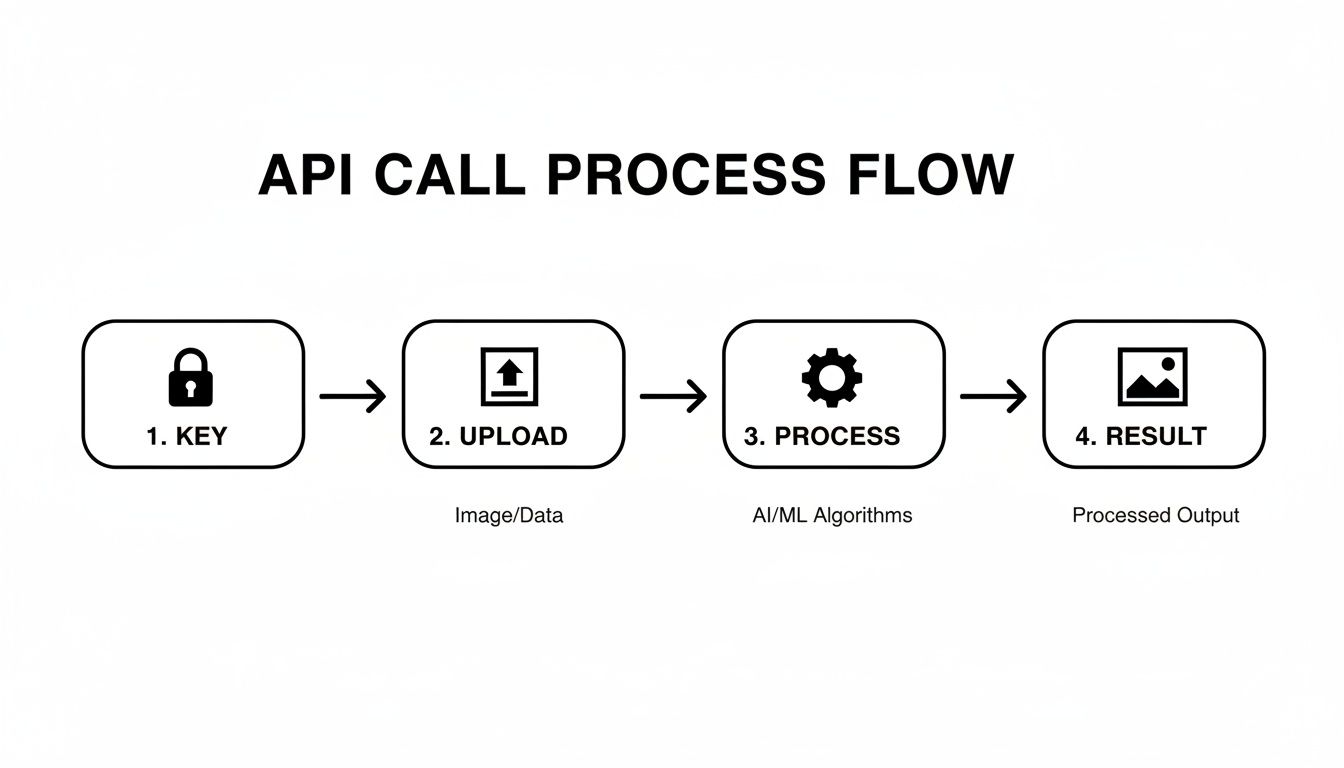
To build a truly hands-off system, every one of these steps—authentication, upload, processing, and getting the result—has to be automated and watched carefully.
Designing a Scalable Processing Pipeline
The secret to handling massive volume? Stop thinking about individual images and start thinking in batches. A classic, and highly effective, pattern is to set up a "watch folder" in a cloud storage service like Amazon S3 or Google Cloud Storage. New images get dropped into this bucket, which instantly triggers a serverless function to do the heavy lifting.
Here’s a common and battle-tested approach using AWS:
- The Trigger: A new image gets uploaded to a specific S3 bucket (think of it as an
/images-to-processfolder). - The Worker: This upload event automatically kicks off an AWS Lambda function, which is just a piece of code that runs on demand.
- The API Call: Inside that function, you’ll have your code that calls the PixelPanda API, sending the new image over.
- The Payoff: Once the API sends back the clean image, the function saves it to a different location (like
/processed-images) and maybe updates a database to mark the job as done.
This serverless architecture is a game-changer. It scales up or down automatically, you only pay for the exact compute time you use, and you don't have to manage a single server. It's brilliant.
Handling Errors and Edge Cases Like a Pro
In a perfect world, every API call would work flawlessly and every watermark would vanish without a trace. We, of course, do not live in a perfect world. Your automated workflow needs to be smart enough to handle the inevitable hiccups.
A truly robust system expects things to fail. This means building in retry logic for those random network errors or API timeouts. For instance, if an API call fails with a 503 Service Unavailable error, your code shouldn't just give up. It should wait a few seconds and try again. After a few failed attempts, then it can log the error and move the image to a "quarantine" folder for manual reviews.
Beyond simple network flakes, you'll run into some gnarly edge cases:
- Multiple Watermarks: Some images look like they're sponsored by a dozen different brands.
- Obstructive Placement: Watermarks plastered right over someone's face or a key product detail are much trickier to reconstruct cleanly.
- AI-Resistant Patterns: Some watermarks use subtle, complex designs specifically to trip up removal algorithms.
This is where doing a comparison of different alternatives during your initial testing really pays off. A high-quality API like PixelPanda is trained on these tough scenarios, but it's always wise to have a fallback. If you're curious about the tech that makes all this possible, digging into the foundational aspects of AI software development is a great place to start.
Quality control isn't something you tack on at the end; it has to be a core part of the workflow. For mission-critical images, you could even implement a "confidence score" system. If the API returns a low score for a removal, your system should automatically flag it for a human to give it a quick once-over.
From Simple Removal to Smart Processing
Once you have your basic automation humming along, you can start layering in more intelligence. Why stop at just removing watermarks? For example, after cleaning an image, you could chain another API call to upscale it to 4K, or even automatically generate social media banners from it. The possibilities are endless.
You can also get smarter on the front end. Add some logic to pre-filter images before you even bother the API. If an incoming image is too small or it's in a weird, unsupported format, you can reject it immediately. This saves you both processing time and money. You can get a feel for how different inputs behave by playing with our interactive text removal demo. This kind of multi-step thinking is what elevates a simple tool into a powerful, automated content engine.
The Legal and Ethical Tightrope Walk
Let's be honest: an AI watermark remover is an incredibly powerful tool. And with great power comes… well, you know the rest. Wielding this kind of tech means you have to navigate the often-murky waters between what’s legally allowed and what’s ethically right. This isn’t just about the magic of a button click; it's about understanding the rules of the road for digital content.
The whole conversation really boils down to a single, critical question: Do you actually have the right to use the original, un-watermarked image? If the answer is a confident "yes," you're probably on solid ground. If it's a "no," or even a "maybe," you're wandering into a legal minefield.
And the stakes are getting higher every day. The rapid growth of AI watermarking and removal tools is attracting massive investment and, you guessed it, government regulation. The U.S. AI watermarking market alone was pegged at around $141 million in 2025 and is projected to explode to $851 million by 2033, largely pushed by media and defense interests.
Globally, we're talking billions by the early 2030s, with some analysts forecasting a CAGR in the Asia-Pacific region as high as 27%. These numbers aren't just trivia; they show how seriously companies and regulators are taking content authenticity. If you're curious, you can discover more insights about these market trends to see why this is such a hot-button issue.
The Green Zone: When It’s Okay to Remove a Watermark
So, when can you fire up an AI watermark remover without looking over your shoulder? Thankfully, there are plenty of completely legitimate situations where these tools are a lifesaver. Think of it as simply exercising your rights over content you already own or have paid for.
Here are a few scenarios where you're in the clear:
- You're Recovering Your Own Work. A photographer I know lost a hard drive with years of original high-res files. Her only copies were the proofs she’d uploaded to a stock agency, plastered with their watermark. Using a tool to restore her own intellectual property? Totally fair game.
- You're Prepping Licensed Assets. Your marketing team buys a license for a stock photo. That license gives you the legal right to use the image, so removing the "preview" watermark is just a standard step in your creative workflow.
- You're Cleaning Up User-Generated Content. A social media platform might use an API to strip logos from images people upload. As long as their user agreement spells this out, it’s a valid way to maintain a consistent aesthetic on their site.
The golden rule here is ownership and permission. If you have a legitimate claim to the clean version of the image, the tool is just getting you back to where you should be. It’s about asset restoration, not counterfeit creation.
The Red Zone: Unethical and Illegal Uses
Now, let's talk about the dark side. Using an AI watermark remover to nab someone else's work is a one-way ticket to a nasty cease-and-desist letter, or worse. This is where the ethical lines are drawn in permanent marker, and crossing them is textbook copyright infringement.
Just don't do this:
- Stealing Stock Photos. Ripping a watermarked preview from a stock photo site to avoid paying the licensing fee is no different than shoplifting.
- Infringing on an Artist's Copyright. An illustrator posts their art online with a watermark to protect it from theft. Removing that mark and using the image without permission or credit isn't just rude; it's illegal.
- Misrepresenting Ownership. Using a cleaned-up image in a way that suggests you're the original creator is a major ethical breach and a violation of the artist's rights.
This stuff isn't a gray area. It’s absolutely crucial to respect the intellectual property of creators. Before you process any image, ask yourself that one simple question about permission. Always double-check that your use case complies with copyright law and the terms of service of the tool you're using. You can review our policies anytime to understand PixelPanda's terms of service.
Responsible use isn't just good practice—it's a legal necessity that protects you, us, and the entire creative community.
Got Questions? We've Got Answers.
Jumping into the world of AI watermark remover APIs can feel a bit like stepping into uncharted territory. You’ve seen the code and you get the general idea, but there are always a few questions that keep rattling around in your head. Let's get them out in the open and give you the straight-up answers you need.
So, How Good Are These Things on Tricky Images?
Honestly? They’ve gotten scary good. The latest AI models don't get tripped up by the semi-transparent logos, complex patterns, or watermarks slapped over busy backgrounds that used to be a nightmare. The inpainting tech is seriously impressive.
But let's be real—it's not magic. Highly sophisticated or "invisible" watermarking systems are built from the ground up to resist this exact kind of automated removal. That's where you'll see a massive difference in performance. The final result really comes down to the AI model's training, the watermark's nastiness, and what’s actually in the image itself.
Look, the best advice I can give you is this: test, test, test. Before you marry an API, grab a dozen of your worst-case-scenario images and see how different services handle them. That hands-on comparison is worth more than any slick marketing page or glowing review.
Can These AI Tools Handle Video Watermarks Too?
You bet. And it’s becoming a make-or-break feature for the serious players in this space. The whole process is way more involved, since the AI has to analyze and rebuild pixels consistently across thousands of frames. It's a real stress test for an AI's ability to maintain context.
The algorithm has to track the watermark, even if it moves around, and keep the restored background looking solid—no weird flickering or digital goo. It’s definitely more resource-intensive than zapping a logo off a static image, but the underlying tech is cousins. For anyone in professional media, video support is pretty much non-negotiable now.
How on Earth Do I Pick the Right API for My Project?
With all the alternatives out there, picking one can feel like a chore. The trick is to stop looking for the "best" one and start looking for the one that’s the best fit for you.
Here's a quick and dirty checklist I use to cut through the noise:
- Quality is King: Does it produce clean, artifact-free images that look natural? Some models are great with photos, others are tuned for digital graphics. Test with your own stuff.
- Need for Speed: How fast does it return a result? If you're building a real-time editor for users, every millisecond is precious.
- Will It Scale?: Can the service handle your traffic on a busy Tuesday without melting down? Check the rate limits and SLAs to make sure it can keep up as you grow.
- Dev-Friendly?: Is the documentation actually helpful? Are there SDKs in a language you actually use? A smooth integration will save you a world of headaches.
- Wallet-Friendly?: What’s the pricing model? Pay-as-you-go? Subscription? Tiers? Find a structure that won't give your finance team a heart attack.
Don't just focus on one of these. The fastest API is useless if the quality is trash, and a perfect-looking result is worthless if it takes ten minutes to process.
AI research is moving at a breakneck pace. For instance, reports in mid-2025 talked about an experimental model called 'UnMarker' that could supposedly strip watermarks from AI-generated images without knowing the marking algorithm. While you'll see lab tests claim success rates over 80% on simple logos, that number can plummet to below 20% against really tough invisible watermarks. The real world is messy. To get a better handle on this, you can learn more about AI watermarking research findings and see where the tech is heading.
At the end of the day, the right choice is the one that gives you consistently great results on your images, plugs into your workflow without a fight, and is ready to grow with you.
Ready to stop wrestling with manual edits and start automating your image workflows? With the PixelPanda API, you can integrate powerful, studio-quality watermark removal directly into your application in minutes. Try it for free and see the difference for yourself at https://pixelpanda.ai.