
At its core, a background removal API is a service that lets you programmatically strip the background from an image, isolating the main subject. You make a quick API call, send an image to the server, and get back a clean version with a transparent background—all in a matter of seconds.
Why a Background Removal API Is a Business Multiplier
In any business that handles a high volume of images, like e-commerce or marketing, manual photo editing quickly becomes a major bottleneck. Think about it: every new product or campaign means a designer has to spend hours meticulously tracing pixels and cutting out images. It’s slow, expensive, and just doesn’t scale. That kind of manual work directly stalls growth and pushes back your time-to-market.

This is where a background removal API completely changes the game. It turns that tedious chore into an automated, almost instant process. Instead of waiting days for a batch of photos, you can plug an API directly into your content management system (CMS) or digital asset manager (DAM). Suddenly, new product photos are processed on the fly, making sure every single image has a clean, consistent look that matches your brand guidelines.
The True Cost of Manual Editing
The first thing people look at is the direct cost. Sure, an API call has a price, but it’s a drop in the bucket compared to a skilled designer’s hourly rate. You can find flexible pricing models that fit just about any need, but the real savings aren't just in dollars and cents—they come from speed and opportunity.
By automating background removal, teams can redirect their focus from tedious, repetitive tasks to high-value creative work like designing compelling ads or improving user experience.
Imagine a huge sales event is coming up. With an API integrated into your workflow, you could generate thousands of marketplace-ready images for Amazon, eBay, or Shopify in minutes, not weeks. That kind of speed is a massive competitive advantage.
Evaluating API Alternatives and Making the Right Choice
The demand for these tools is exploding. The market for image background removers was valued at USD 1.38 billion and is on track to hit USD 2.38 billion within the decade, largely thanks to the nonstop growth of e-commerce and social media.
With this growth comes a flood of alternatives, each with its own pros and cons. When you dig into reviews, you'll find that the best APIs do more than just basic background removal. A thorough comparison shows they excel at handling tricky edges like hair and fur, support transparent objects, and deliver reliable performance even when you're processing thousands of images. This guide will walk you through the options to help you find the perfect fit for your workflow.
Choosing Your API: A Comparison of Top Alternatives
Before you lock yourself into any single background removal API, it's worth taking a look around. The market has plenty of options, but the right one for you really boils down to what your project actually needs. After you compare a few, you'll quickly see that they're not all the same, especially when you start looking at performance, how they charge you, and the overall developer experience.
Let's cut through the marketing fluff and get into what really matters. We’ll explore the key differences that should shape your decision, so you end up with a tool that grows with you instead of causing problems down the road.
Core Factors for API Comparison
When you're comparing different services, there are a few things you absolutely have to check. First up, the pricing. Are they pushing you into a rigid monthly subscription, or can you just pay for what you use? For a new project or a business with fluctuating demand, a pay-as-you-go model is almost always the smarter, more cost-effective choice.
Next, take a hard look at their documentation. An API can be incredibly powerful, but it’s worthless if your developers can't make sense of it. Good documentation is clear, filled with practical code snippets, and backed by SDKs for common languages like Python, Node.js, or PHP. This is what separates a weekend-long integration headache from a quick, 30-minute implementation.
A well-documented API with official SDKs is a huge green flag. It tells you the company actually cares about developers and has invested in making the integration process as smooth as possible.
And finally, you have to test the output yourself. Don't just take their word for it. Most good services offer a free trial or an interactive demo. This is your chance to throw your trickiest images at it—the ones with messy hair, sheer fabrics, or busy backgrounds. Go ahead and try a background removal demo and see the results with your own eyes before you even think about writing code.
A Deeper Dive into API Alternatives
Once you've covered the basics, you can start digging into the more specialized features that different alternatives bring to the table. Some APIs are built for very specific jobs and offer advanced controls that can dramatically improve your final images.
Here’s a quick list of what to look for when you're doing a side-by-side comparison:
- Edge Handling: How clean are the cutouts around fine details like hair, fur, or the fuzz on a sweater? Hunt down reviews that talk specifically about how well the API handles these complex edges.
- Transparency Support: Does it properly process see-through objects like a wine glass or maintain natural shadows? The best APIs preserve these subtle details, which makes the final image look far more professional.
- Batch Processing: If you're planning to process images by the thousands, you need to know the API can handle it. Look for clear rate limits and efficient batch processing endpoints. This is non-negotiable for any high-volume workflow.
- Bonus Features: Many tools offer more than just background removal. Keep an eye out for valuable extras like automatic shadow generation, smart cropping, or color replacement that can automate even more of your image editing pipeline.
Feature Comparison and Reviews of Leading Background Removal APIs
Choosing the right API often comes down to a direct comparison of what each provider offers. To help you sort through the options, we've put together a side-by-side analysis of some popular services, focusing on the features that matter most to developers: pricing, performance, and available tools. Reading reviews is helpful, but this kind of direct comparison of alternatives makes the differences clear.
| API Provider | Pricing Model | Key Features (e.g., Hair/Fur Detail, Transparency) | SDKs Available | Best For |
|---|---|---|---|---|
| PixelPanda | Pay-as-you-go, with volume discounts | Excellent hair/fur detail, handles transparency well, AI upscaling, shadow generation | Python, Node.js, PHP, Ruby | E-commerce, marketing agencies, and developers needing high-quality, reliable results. |
| Remove.bg | Subscription & Pay-as-you-go credits | Good general performance, decent edge detection, offers plugins for design tools | Python, Node.js, PHP, Java, .NET | Quick, one-off tasks and integrations with tools like Photoshop and Figma. |
| Clipping Magic | Subscription-based (tiered by image count) | Strong manual editor for corrections, good for complex product shots | No official SDKs provided | Users who need a mix of automated processing and manual touch-up capabilities. |
| Photoroom | Subscription-based, with a limited free tier | Template-based outputs, mobile-first design, good for social media content | API available | Social media marketers and small businesses creating content on the fly. |
This table gives you a snapshot, but the real test is trying them out with your own images. The "best" API is the one that consistently delivers the quality you need, fits your budget, and doesn't make your development team pull their hair out.
By weighing all these factors—pricing, docs, output quality, and special features—you can make a much more informed decision. Picking the right background removal API from the start is one of those foundational choices that will save you time, money, and headaches as your project scales.
Your First API Call: A Practical Walkthrough
Alright, you've done the research, compared a few alternatives, and read the reviews. Now it's time to roll up your sleeves and see what this thing can actually do. Making that first API call might seem a little daunting, but it’s designed to be a quick win, getting you from zero to a real result in just a few minutes. Let's break it down so you can build the confidence for more complex workflows later on.
First things first: authentication. Any solid background removal API will secure its endpoints, which means you'll need a unique API key. Think of this key as a password for your application—it identifies your requests and connects them back to your account. You can usually grab your key from the developer dashboard right after signing up.
Pro Tip: Treat your API key like you would any sensitive credential. Store it securely using environment variables or a secret management tool. Never hardcode it directly into your client-side application code where it could be exposed.
With your key in hand, the next move is a simple test call. Before you start writing a bunch of code, I always recommend using a tool like cURL from your command line. It's a fantastic way to quickly verify that your key is valid and that the API endpoint is reachable. This one small step can save you hours of debugging down the road by confirming the fundamentals are working.
It’s also a good idea to quickly scan the main API documentation to get familiar with the available parameters and endpoints before you start.
Structuring a Basic Request
So, what does a request actually look like? Most of the time, you'll be sending an HTTP POST request to a specific endpoint. This request needs two key things: your API key (usually in the headers for authentication) and the image you want to process (in the request body).
There are a few common ways to send the image data itself:
- File Upload (multipart/form-data): This is the go-to method. You just send the image file directly from your machine or server.
- Image URL: Super handy for images already hosted online. Some APIs let you pass a public URL, and their servers will grab the image for you.
- Base64 Encoded String: You can also convert your image into a Base64 string and include it in a JSON payload. This is a common pattern in a lot of modern web apps.
If everything goes right, you’ll get a response back—typically a JSON object containing a URL to your new, background-free image. Our team has put together a bunch of code samples and guides over at our developer hub to help you get started: https://pixelpanda.ai/developers.
Real-World Demand Driving the Tech
It's worth remembering why this is so important. The global market for this kind of software was valued at USD 1.2 billion and is projected to hit USD 4.7 billion by the end of the decade. That growth is fueled by the massive demand from e-commerce for clean, professional product photos.
In fact, AI and machine learning are now essential for improving the accuracy on the 80% of product images that absolutely must have a flawless background to drive sales.
Tackling Advanced Features and Tricky Edge Cases
Anyone can remove the background from a simple product shot on a plain white surface. But what really separates a professional-grade background removal API from the rest is how it handles the messy, real-world stuff. I’m talking about the tricky details that constantly trip up subpar tools: fine hair, fuzzy textures, and objects you can see through.
This is where you graduate from a basic POST request to really fine-tuning your results. The best APIs give you levers to pull, like parameters for edge feathering or foreground masking. These are your secret weapons for getting a clean, natural cutout instead of that harsh, "photoshopped" look.
If you really want to get good at this, it helps to peek under the hood a bit. Getting a basic feel for how AI image identification works will give you that "aha!" moment and explain why some images are so much harder for the machine to process.
Nailing the Fine Details: Hair and Fur
One of the most notorious challenges is preserving delicate, wispy details. Picture a model's hair flowing in the wind or a close-up of a fluffy wool sweater. A blunt removal process will just chop off those details, leaving the subject looking jagged and fake. Frankly, this is one of the most important things to check when doing a comparison of API alternatives.
When you’re testing different services, hunt for specific modes designed for high-detail subjects. Some APIs actually switch to a different AI model trained exclusively on portraits or animals. As you skim user reviews, keep an eye out for mentions of "hair" or "fur"—it's a massive pain point for many, so positive feedback here is a huge green flag.
The top-tier APIs I've worked with often use a two-step process. First, they create a rough mask to identify the main subject. Then, a second, more precise AI model goes back and refines just the complex edges, painstakingly capturing every last strand of hair.
Working with Transparency and Shadows
Another common headache is anything semi-transparent. Think about a wine glass, a car windshield, or a piece of sheer fabric. The goal isn't just to cut the object out, but to keep its transparency so the new background shows through correctly. A solid background removal API handles this by default, giving you a PNG with a proper alpha channel that retains different levels of opacity.
On top of that, the best alternatives don't just take things away—they can add them back. Look for features that let you generate realistic shadows based on the object's form. This one feature alone can make a composite image look a hundred times more believable.
- Alpha Channel Control: The API absolutely must provide a true alpha mask. This isn't just on/off; it's a pixel-by-pixel map of transparency levels.
- Shadow Generation: Being able to control the shadow's direction, softness, and darkness is a game-changer for creating professional product mockups.
- Color Spill Correction: You'll also want an option to clean up color casts from the old background that often "spill" onto the edges of the subject.
By really digging into these advanced parameters, you gain the power to handle almost any image you throw at the API. It stops being a simple removal tool and becomes a powerful, integrated part of your image workflow, delivering stellar results even on the toughest jobs.
Building a Scalable Production Workflow
Moving from a single API call to a full-blown production system is more than just looping through a list of images. It's about building a robust, automated pipeline that can handle serious volume, keep costs in check, and bounce back when things go wrong.
A really effective way to set this up is with an event-driven architecture using cloud storage. Imagine this: a new product photo gets uploaded to an Amazon S3 bucket. That upload event automatically triggers a serverless function, like AWS Lambda, which then calls the background removal API.
This "set it and forget it" approach is incredibly efficient. You only pay for compute time when an image is actually being processed, which beats having a server sitting idle, waiting for work. It’s the backbone of a modern, hands-off image processing pipeline.
This process flow shows how mastering key details like fine hair, transparent objects, and shadow control is central to achieving professional results.
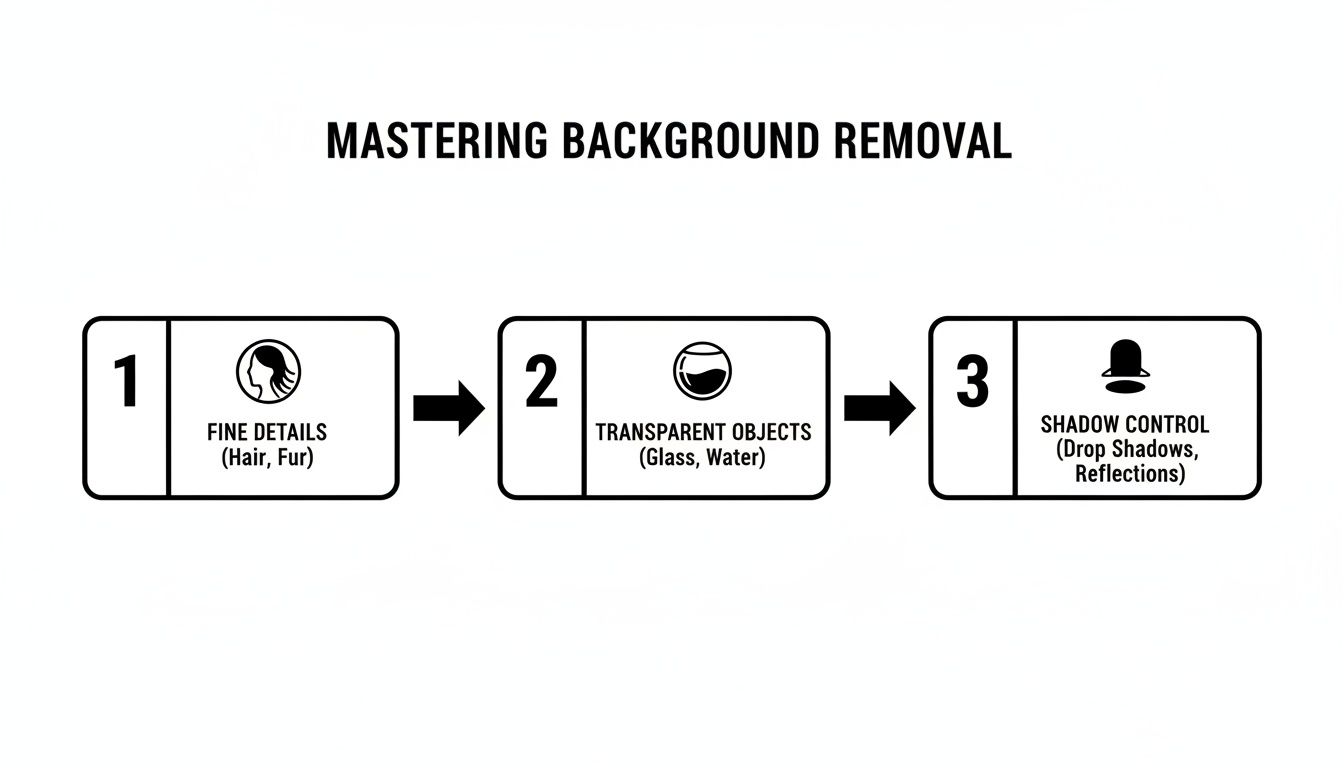
As you can see, a real-world production workflow has to be smart enough to handle these tricky edge cases without any human intervention.
Error Handling and Batch Processing
Let's be realistic: APIs fail. Networks drop. A production-grade system has to be built for this reality. That means implementing smart retry logic, usually with exponential backoff. If a request fails, you don't just hammer the API again. You wait a moment, then a bit longer on the next failure, giving the service (and your connection) time to recover.
When you're dealing with thousands of images, batching is a game-changer for efficiency and cost. Instead of making one API call for every single image, a smart workflow will queue up images and process them in larger groups. This dramatically cuts down on network overhead and can often unlock better pricing from the API provider.
A piece of advice from experience: log everything. Keep track of every API request ID, how long it took, and any error codes you get back. This data is pure gold when you're trying to hunt down a problem or figure out where your performance bottlenecks are.
Security and Performance Trade-Offs
Never, ever hardcode your API keys. It’s a disaster waiting to happen. Instead, use a proper secret management service like AWS Secrets Manager or HashiCorp Vault. These tools keep your credentials locked down, can rotate them automatically, and give you tight control over who or what can access them.
This level of security is crucial, especially as AI-powered tools have become the standard. In fact, they're the fastest-growing segment in this space—research on AI-driven image processing shows 60% of users now prefer automated tools that can cut down processing time by as much as 45%.
Finally, you’ll constantly be making a trade-off between speed and quality. Most APIs let you tune the output. You might use the highest-quality setting for a hero image on your homepage, even if it takes a few extra seconds. But for a hundred tiny product thumbnails? A faster, lower-quality setting is probably more than good enough. Making a direct comparison of different alternatives and checking their reviews will help you find the right balance for each part of your workflow, letting you perfectly blend cost, speed, and quality.
Answering Your Top Questions About Background Removal APIs
When you're looking to integrate a new tool like a background removal API, a few key questions always come up. Getting straight answers is the best way to pick the right service and avoid any surprises down the road. Let’s dive into some of the most common things developers and creative teams ask when they’re weighing their options.
How Good Is AI Compared to a Human Editor?
This is the big one, isn't it? The truth is, today’s best AI APIs are incredibly good. For well over 95% of standard images, especially the kind you see in e-commerce, the results are either on par with or even better than manual editing. The real power is in their consistency and speed—they can process thousands of images in the time it would take a person to meticulously edit just one.
That said, a human designer might still have the edge for the trickiest subjects. Think of things like fine, wispy hair, intricate jewelry with lots of tiny gaps, or semi-transparent objects. The very best APIs, however, have narrowed this quality gap significantly by training their models on millions of these exact kinds of challenging images. This is where a careful comparison and reading detailed user reviews can help you understand which alternatives perform best on complex subjects.
What Does This Actually Cost?
Budget is always a critical piece of the puzzle. When you start doing a comparison of different services, you'll generally find two pricing models: pay-as-you-go or monthly/annual subscriptions. The price per image can be anywhere from a few cents down to a tiny fraction of a cent, especially if you're processing a high volume of images on an enterprise plan.
A great tip is to look for a generous free trial or a monthly free credit tier. This is your chance to really put the API through its paces with your own images, check out the performance, and make sure the integration is straightforward—all without spending a dime.
Is It Just Background Removal, or Is There More?
Absolutely, there’s often more. The core job is to remove the background, of course, but many top-tier API alternatives bundle in a whole toolkit of other useful image editing features. This is a huge differentiator you’ll see pop up in product reviews.
You can often find capabilities like:
- Adding new backgrounds, whether it’s a simple solid color, a custom scene, or even a dynamic template.
- Generating realistic shadows that make your subject look like it's actually sitting in its new environment.
- Smart cropping and resizing to automatically fit platform requirements for marketplaces or social media.
- Color correction and enhancement to make your subject pop.
Before you commit, spend some time in the API documentation. You might find that a single tool can automate three or four steps of your workflow, which is a massive win for efficiency.
Ready to see how a powerful API can transform your image workflow? PixelPanda offers a developer-friendly background removal API with exceptional accuracy on tricky details like hair and fur. Start building for free and experience the difference.