When you need to remove a watermark from an image online, the absolute fastest way is to use an AI-powered tool. Forget the old days of tedious cloning and patching in Photoshop; modern browser-based tools can automatically find and erase watermarks in just a few seconds.
Your Quick Guide To Online Watermark Removers

We've all been there. You find the perfect image for a presentation or a social media post, but it's ruined by a distracting logo or text overlay right in the middle. It’s a common headache, and for years, the only solution was to painstakingly edit the image yourself. That often meant a lot of time spent for messy, unprofessional results.
Thankfully, that’s not the case anymore. AI-driven tools have completely changed the game. Now, you just upload your image, and smart algorithms do the heavy lifting, filling in the background with surprising accuracy. This move from manual work to automated precision is a big deal.
The Rise Of Intelligent Removal Tools
The market for this tech has exploded. The global watermark removal software market is projected to hit $500 million in 2025 and is expected to grow at a compound annual growth rate (CAGR) of 15% through 2033. This surge is directly tied to the nonstop demand for digital content for social media, marketing, and e-commerce.
This guide will give you a clear path forward, cutting through the noise to show you what works. We're going to focus on:
- Practical Walkthroughs: Actionable steps to get clean, high-quality images.
- In-depth Reviews: A close look at the top tools to see how they really perform.
- A Detailed Comparison: Breaking down the alternatives to help you find the best fit.
By the time you're done here, you won't just know how to remove a watermark. You'll understand which tool to pick for any situation, whether it's a quick one-off edit or a large-scale business workflow.
If you want to see this technology for yourself, I'd recommend checking out some interactive demos of AI-powered image editing. It’s the best way to get a feel for what’s possible. These tools are built to be intuitive, so anyone can get professional-looking results without a major learning curve. We’ll jump into specific reviews and comparisons a little later on.
A Detailed Comparison Of The Best Removal Tools

When you need to get rid of a watermark, the sheer number of online tools can feel overwhelming. The truth is, they're not all created equal. What works perfectly for a quick, one-off fix might fall completely flat when you need professional, high-quality results.
The key is finding the right tool for your specific job. So, instead of just listing options, we're going to dig into the top contenders. We'll look at their real-world strengths and weaknesses to help you decide whether you need a simple free tool for a quick social media post or a powerful, automated solution for your e-commerce catalog. This comparison of alternatives is based on our extensive reviews of the market.
Evaluating The Leading Alternatives
The real magic behind a good watermark remover is its technology. AI has completely changed the game here, with deep learning algorithms now powering tools that dominate 65% of the market segment—a niche worth over $1 billion annually. Some of these advanced models can hit over 90% accuracy even on tricky, complex watermarks, something that was a pipe dream with older, manual editing techniques. You can dive deeper into the numbers with this market analysis of watermark removal software.
Let’s break it down by a few common situations I see all the time:
-
Quick, Simple Removals: For straightforward jobs, tools like WatermarkRemover.io or Fotor are fantastic. They’re usually free, work right in your browser, and don't require you to sign up. Their AI does a decent job on simple text overlays against uncomplicated backgrounds. Perfect for casual users.
-
Complex Backgrounds: This is where most free tools struggle. If a watermark is slapped over something detailed—like hair, textured fabric, or a busy cityscape—you need a more sophisticated tool. Solutions like PixelPanda use advanced inpainting to intelligently reconstruct what's behind the watermark, preventing those blurry, smudged patches you get with basic removers.
-
Batch Processing: Got a folder with hundreds of images to clean up? Forget manually uploading them one by one. This is where an API-driven service becomes a lifesaver. It automates the entire workflow by integrating directly into your system, saving you a massive amount of time and effort.
Feature Comparison Of Top Online Watermark Removers
To give you a clearer picture, I've put together a side-by-side comparison of some leading online tools. This table breaks down what each tool does best, its standout features, and how it stacks up in terms of ease of use and cost.
| Tool Name | Best For | Key Features | Ease of Use Rating (1-5) | Pricing Model |
|---|---|---|---|---|
| PixelPanda API | Developers & High-Volume Users | Bulk processing, API access, high-quality AI inpainting, fast results. | 4 (Requires technical skill) | Pay-per-use / Tiered Subscription |
| WatermarkRemover.io | Quick & Casual One-Offs | Extremely simple interface, browser-based, free with limits, good for basic text. | 5 (Drag & drop) | Freemium |
| Fotor | All-in-One Photo Editing | Watermark removal plus a full suite of editing tools, AI-powered enhancements. | 4 (Easy to learn) | Freemium / Subscription |
| Inpaint | Precision Manual Control | Brush-based object removal, good for complex but small watermarks, desktop app. | 3 (Slight learning curve) | One-time Purchase |
| PhotoDirector | Mobile & Desktop Editors | Comprehensive editing features, AI object removal, strong mobile app experience. | 4 (User-friendly) | Subscription |
This comparison makes it pretty clear: while free tools are great in a pinch, they have their limits. For anyone needing consistent quality, speed, or the ability to process images at scale, investing in a specialized tool or an API is the way to go.
The big takeaway here is that the "best" tool is entirely relative. A marketer needing a quick edit for a social post has completely different needs than a developer building a workflow to process 10,000 product shots.
Ultimately, while the free alternatives certainly have their place, a specialized solution will always give you better results and efficiency when you need to remove watermarks from images online for any serious or recurring project.
Getting the Most Out of an AI Watermark Remover
Using an AI tool to get rid of a watermark isn't just about uploading a photo and hoping for the best. If you want a truly clean, professional-looking result, you need to approach it with a little bit of strategy. The best outcomes happen when you prep your image properly and know how to nudge the AI in the right direction, especially with tricky backgrounds.
Everything starts with the quality of your source image. For the AI to do its best work, it needs clean data. That means you should always, always start with the highest-resolution version of the image you have. Feeding it a low-quality, heavily compressed JPEG is a recipe for a blurry or smudged mess because the AI has a tough time making sense of the pixels around the watermark.
Prepping Your Image for a Clean Slate
Got your high-res image? Great. Now, take a second to really look at the watermark. Is it a faint bit of text over a simple, flat-colored background? Or are you dealing with a big, complicated logo that sprawls across a detailed texture like someone's hair or a patterned shirt?
Figuring this out upfront helps you know what to expect and whether you'll need to do some manual work.
- Simple Watermarks: These are usually a cakewalk. A good automated tool can often zap these on the first go, easily identifying the watermark and filling in the simple background.
- Complex Watermarks: For these, you’ll want a tool that gives you some control, like a manual selection brush. This lets you literally paint over the watermark, telling the AI exactly what needs to go.
The biggest mistake people make is trying to remove a massive, solid logo from a tiny, pixelated image. No AI can magically recreate detail that was never there to begin with. The quality of your starting file is directly linked to your success.
Using the Tool for a Precise Edit
Most modern AI removers have a pretty straightforward interface. You upload your image and are usually given a selection tool, like a brush or a lasso. This is your secret weapon for getting a perfect result. Instead of just letting the AI guess where the watermark is, zoom right in and carefully paint over only the watermark itself.
For instance, if you're getting rid of text, trace the letters as accurately as you can. If you get sloppy and select a huge chunk of the background along with the text, you're forcing the AI to rebuild more of the image than it needs to, which is how you get weird-looking artifacts. It’s a bit of a balancing act. From looking at countless user reviews, it's clear that tools offering adjustable brush sizes give you the fine-grained control needed for these jobs.
Once you've made your selection, let the AI do its thing. If the first attempt isn't quite perfect, don't throw in the towel. Many of the better alternatives have refinement tools that let you make small, targeted fixes. Sometimes, a quick second or third touch-up on a stubborn spot is all it takes to make the edit completely invisible.
You can see these principles in action by playing around with a text removal demo and observing how the precision of your selection affects the final image. Patience and a steady hand are what make the difference.
Automating Bulk Watermark Removal With An API
While online tools are fantastic for a quick fix on a single image, they just don't scale. If you're facing a folder with hundreds—or even thousands—of watermarked images, the idea of uploading them one by one is a non-starter. This is where an API (Application Programming Interface) completely changes the game.
Think of an API as a direct line of communication between your system and a watermark removal service. It lets you send images and get clean versions back automatically, no web browser needed. For anyone handling images at scale, like an e-commerce store processing supplier photos or a marketing team prepping a huge campaign, this kind of automation isn't a luxury; it's a necessity.
Why An API Is A Smarter Choice Than Manual Tools
Switching to an API is about moving from tedious manual labor to an efficient, automated workflow. Instead of someone spending hours clicking "upload," "remove," and "download," your application can process an entire batch of images in minutes. It's not just about speed, either. Automation delivers consistent, high-quality results every single time, eliminating the human error that can creep in during repetitive tasks.
After reviewing countless methods, the API approach is the clear winner for any kind of bulk processing. It’s easily one of the best alternatives to slogging through images manually or relying on clunky desktop software.
The basic process, whether you're clicking buttons on a website or calling an API, follows the same core logic.
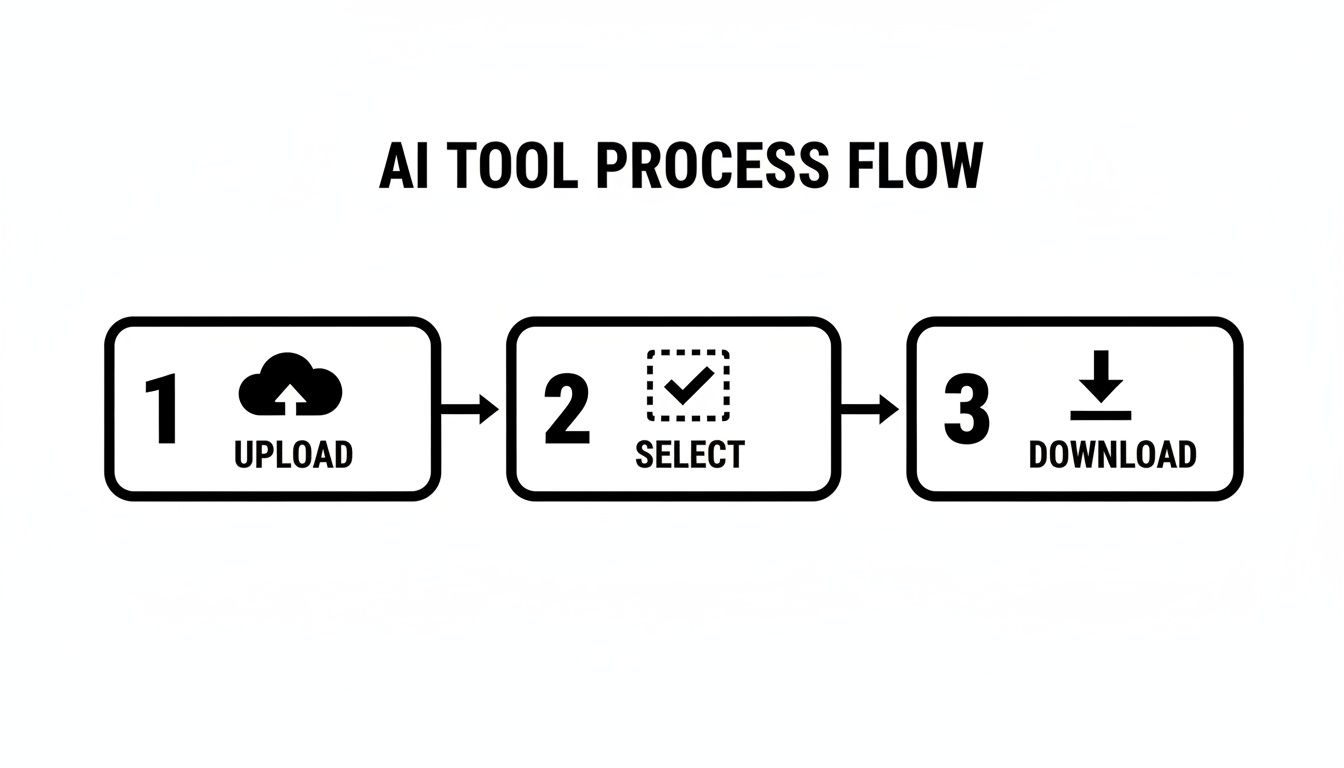
The real magic of an API is that it executes these steps—Upload, Select, and Download—in the background, often in just a few seconds per image.
A Practical Comparison Of API Alternatives
Of course, not all APIs are created equal. When you're making a comparison between different services, there are a few things I always look for.
- Documentation Quality: Is it actually helpful? Clear, easy-to-follow documentation is crucial for a painless integration. The resources available at https://pixelpanda.ai/developers are a great example of what you should be looking for.
- Performance and Speed: How fast can it churn through your images? A slow API will create a bottleneck in your own system, so test for quick turnaround times.
- Result Quality: This is the big one. The underlying AI model has to be smart enough to remove tricky watermarks without destroying the image behind them. Always run a few of your most challenging images through a trial.
The concept here isn't unique to image editing. Using an API to automate tasks is a common practice for developers. For instance, the logic behind automating Reddit posts with an API is very similar—you're using code to manage content at scale, saving time and creating a more efficient system.
For developers, this means you can build watermark removal right into your own apps. You could create a feature that automatically cleans user-uploaded photos or write a simple script to purify an entire product catalog overnight. It's an essential tool for any modern digital operation.
Understanding The Legal And Ethical Rules

The ability to remove watermarks from images online is incredibly useful, but it comes with some serious responsibility. Just because you can wipe away a watermark doesn't always mean you should. Stepping over legal and ethical boundaries here can land you in hot water, with consequences ranging from hefty fines to legal battles.
At the end of the day, a watermark is a copyright notice. It’s the creator’s way of marking their territory and saying, "I made this." Removing that mark from an image you don't have the rights to is a clear violation of intellectual property laws like the Digital Millennium Copyright Act (DMCA). There isn't much gray area here.
When Is It Okay To Remove A Watermark?
Of course, there are plenty of legitimate reasons to remove a watermark. The deciding factor always comes down to ownership or permission. It's perfectly fine in a few common situations:
- You're the Creator: Maybe you watermarked a draft for a client and now you're preparing the final, clean version for them after they've paid. That’s your right.
- You've Purchased a License: You bought a stock photo, and part of that purchase is getting the high-resolution file without the "proof" or "preview" watermark splashed across it.
- You Have Explicit Permission: The photographer or artist gave you the green light to use their image without the watermark for a specific project.
In these scenarios, you're in the clear because you have the legal right to use the image as intended. Any other situation is a risk.
The crucial takeaway is this: Never remove a watermark from an image you do not have the legal rights to use. The ease of an online tool doesn't give you a free pass to ignore copyright law.
The Problem With Using Unlicensed Images
Ignoring copyright isn't just unethical; it’s bad for business. If you grab someone's watermarked photo for your blog or company website, you're not just stealing—you're damaging your own reputation. Think about it: if a brand is willing to cut corners on something as basic as an image, what else are they skimping on? This is a point that often comes up in professional reviews of creative industry practices.
The comparison between ethical and unethical use is straightforward: one path respects the people who create the content we all rely on, and the other doesn't.
If you need great images, there are so many better alternatives than resorting to theft.
- Royalty-Free Stock Sites: Platforms like Unsplash, Pexels, and Pixabay are treasure troves of high-quality images that are completely free for commercial use.
- Paid Stock Services: For professional-grade content with rock-solid licensing, services like Adobe Stock or Getty Images are the industry standard.
- Create Your Own: The simplest way to guarantee you have full rights? Take your own photos or design your own graphics from scratch.
Ultimately, using these tools responsibly is about protecting yourself and respecting the artists whose work fuels the creative world. It lets you build your project on a solid, ethical foundation.
Got Questions About Removing Watermarks? You're Not Alone.
When you're looking to clean up an image, a handful of questions almost always come up. Getting straight answers is key to picking the right tool and, just as importantly, using it the right way. Let's dig into what people usually ask.
Can AI Really Remove a Watermark Perfectly?
This is the big one. While today's AI is seriously impressive, a "perfect" removal really hinges on the complexity of the image and the watermark itself.
Got a simple text logo on a plain, solid-colored background? Most modern tools will knock that out of the park without breaking a sweat.
But what about a detailed logo stretched across a tricky texture, like a person's hair or the pattern on a shirt? That's a much tougher job. Even the most advanced tools might leave behind a faint ghost or a slight blur. The best alternatives use generative AI to intelligently rebuild what was behind the watermark, and honestly, the results can be mind-blowing. Still, promising a 100% flawless edit every single time isn't realistic.
Quality, Legality, and Safety Concerns
Beyond just getting the watermark off, a few other critical points come into play.
Will this mess up my image quality?
Not if you use a good tool. High-quality removers don't just crudely blur out the watermark; they analyze the surrounding pixels and intelligently fill in the space with matching colors, textures, and patterns. Some of the basic free sites can leave you with a blurry mess, but the more advanced services are designed to maintain the original resolution, making the edit look completely natural. A quick scan of user reviews is a great way to see which tools consistently deliver clean results.
Is this even legal?
This is a crucial question, and the answer comes down to one thing: ownership. If you own the image, or you have a license to use it and modify it, you're generally in the clear. However, removing a watermark from a copyrighted photo that you don't have the rights to is a copyright infringement, which is illegal. Always, always make sure you have permission.
Are these online tools safe to use?
For the most part, yes, but you have to be smart about it. Stick to reputable services that have a professional website and a clear privacy policy. A quick comparison of a few different platforms will usually give you a good feel for who the legitimate players are. For specific questions about how certain tools handle your data, you can often find answers on their help pages, like Soreel's FAQ page.
Ultimately, a trustworthy tool respects your privacy by processing images securely and deleting them after a short period. Avoid any site that asks for unnecessary personal information or seems unprofessional.
Ready to automate your image editing workflows with consistent, high-quality results? The PixelPanda API offers powerful, developer-friendly tools for watermark removal, background removal, and much more. Start building for free today and see how easy it is to integrate studio-quality image processing into your applications.